

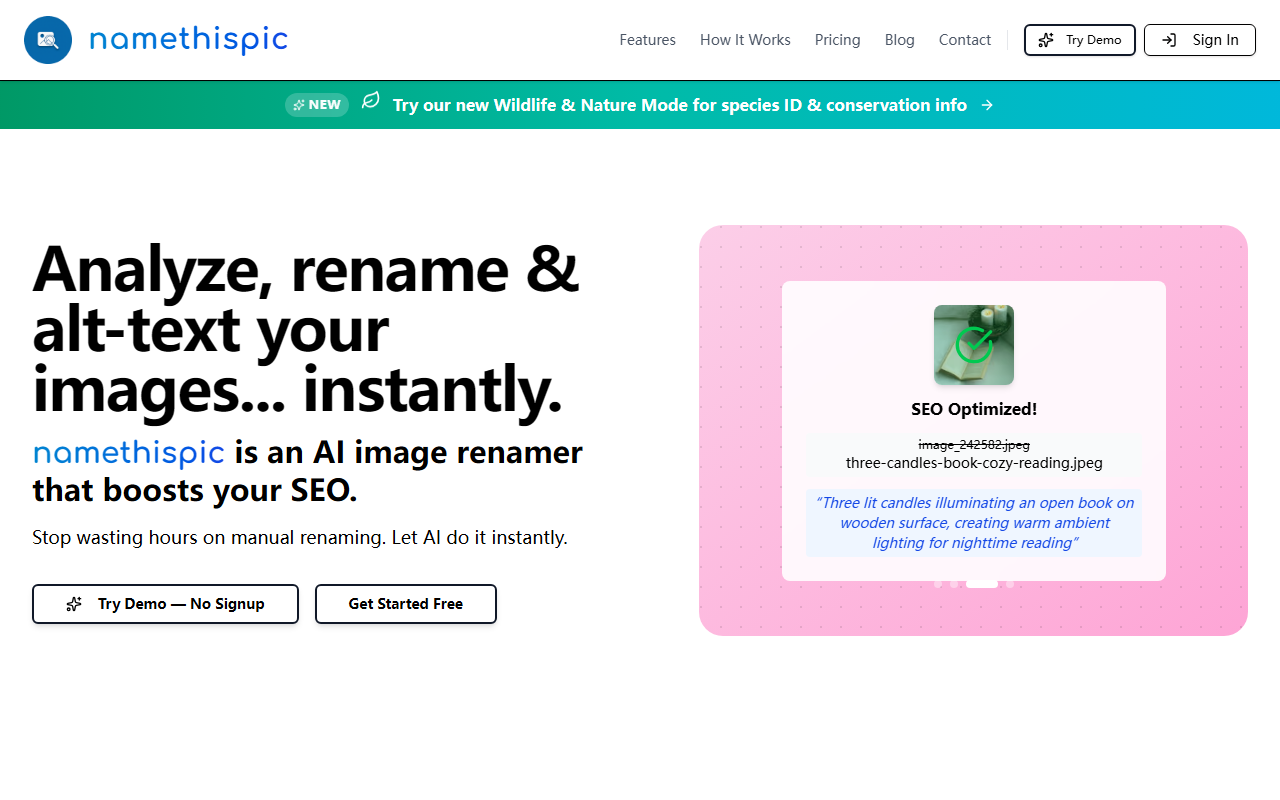
What Is namethispic and How Does It Work?
Upon visiting namethispic’s website, I immediately understood its core promise: automatically rename generic image files like “IMG_1234.jpg” into descriptive, keyword-rich filenames that boost image SEO. The tool uses computer vision AI to analyze the content of each photo—objects, scenes, colors, and context—then generates a dashed, lowercase filename (e.g., “three-candles-book-cozy-reading.jpeg”) and even suggests alt text. Beyond renaming, you can input target keywords (e.g., “Amsterdam barbershop men’s haircuts”) to steer the AI toward more relevant names. The workflow is straightforward: upload images, optionally add keywords, then download the batch as a ZIP or individual files. The site also touts a new Wildlife & Nature Mode for species identification and conservation info, though I focused on the core renaming feature during my test.
First-Hand Experience and Interface
I tested the free tier by dragging in three random photos. The interface is clean and minimal: a drop zone on the main page, a “Try Demo — No Signup” button, and a “Get Started Free” CTA. Uploading triggered a split-screen view showing old filenames on the left and new SEO names on the right, plus generated alt text. For example, a photo of a coffee cup was renamed from “image_043242.jpeg” to “cozy-coffee-shop-latte-art-wooden-table.jpeg”. The AI’s alt text was detailed and context-aware. Processing took about 3-5 seconds per image. The dashboard also includes a table summarizing each file’s status and the option to add custom keywords. The “EZ zip download” worked flawlessly, delivering all renamed files in a single archive. However, I noticed no bulk upload limit warning on the free tier, but the FAQ confirms a 25-file monthly cap. The responsive design worked on mobile, but the drop zone was slightly cramped on smaller screens.
Pricing and Value Comparison
namethispic offers four tiers, all publicly listed on the website. Starter: $0/month for 25 files—ideal for casual users. Pro: $9/month for 150 files. Plus: $29/month for 1,000 files. Enterprise: $79/month for 5,000 files. All paid plans include bulk upload, ZIP downloads, and priority processing. The free tier lacks batch processing above 25 files but still gives you a feel for the AI’s quality. Compared to manual renaming in bulk (which can take hours) or alternatives like Adobe Bridge (no AI alt text) or simpler tools like Bulk Rename Utility (no SEO awareness), namethispic stands out for integrating computer vision with SEO best practices. It’s not a full image editor or DAM, but for pure SEO optimization, it’s purpose-built.
Strengths and Limitations
The biggest strength is simplicity and speed. No signup required for the demo, and the AI generates accurate, keyword-rich names that follow SEO guidelines (lowercase, hyphens, under 60 chars). The generated alt text is a bonus for accessibility. I also appreciate the ability to inject custom keywords for niche relevancy. On the limitation side, the free tier’s 25-file monthly cap is tight for anyone with a large image library. Additionally, the AI sometimes missed contextual nuances—for instance, it labeled a photo of a modern office as “modern-office-workspace-laptop-coffee” even when I added a city-specific keyword. It also lacks integration with popular CMS platforms (WordPress, Shopify) or cloud storage, meaning you must manually upload and download files. For larger teams needing workflow automation, this could be a bottleneck. In summary, namethispic is best for freelancers, small site owners, and content creators who regularly publish images and want quick SEO wins without technical hassle. If you manage thousands of product images daily and need API-level control, look elsewhere. Visit namethispic at https://namethispic.com to explore it yourself.





Comments