
What Humanize Gen Actually Does and Who It's For
Humanize Gen is an AI humanizer — a tool built to take text that sounds stiff, formulaic, or obviously machine-generated and rework it until it reads like something a person wrote. Based on what the tool offers, it's aimed at anyone who regularly works with AI-generated drafts: content creators, students, marketers, or even office workers who use chatbots for first passes on emails or reports. The category listed is Text AI > AI Office, and that fits surprisingly well. Rather than being a Swiss Army knife for all things text, it zeroes in on one pain point: that uncanny, robotic tone that AI so often leaves behind.
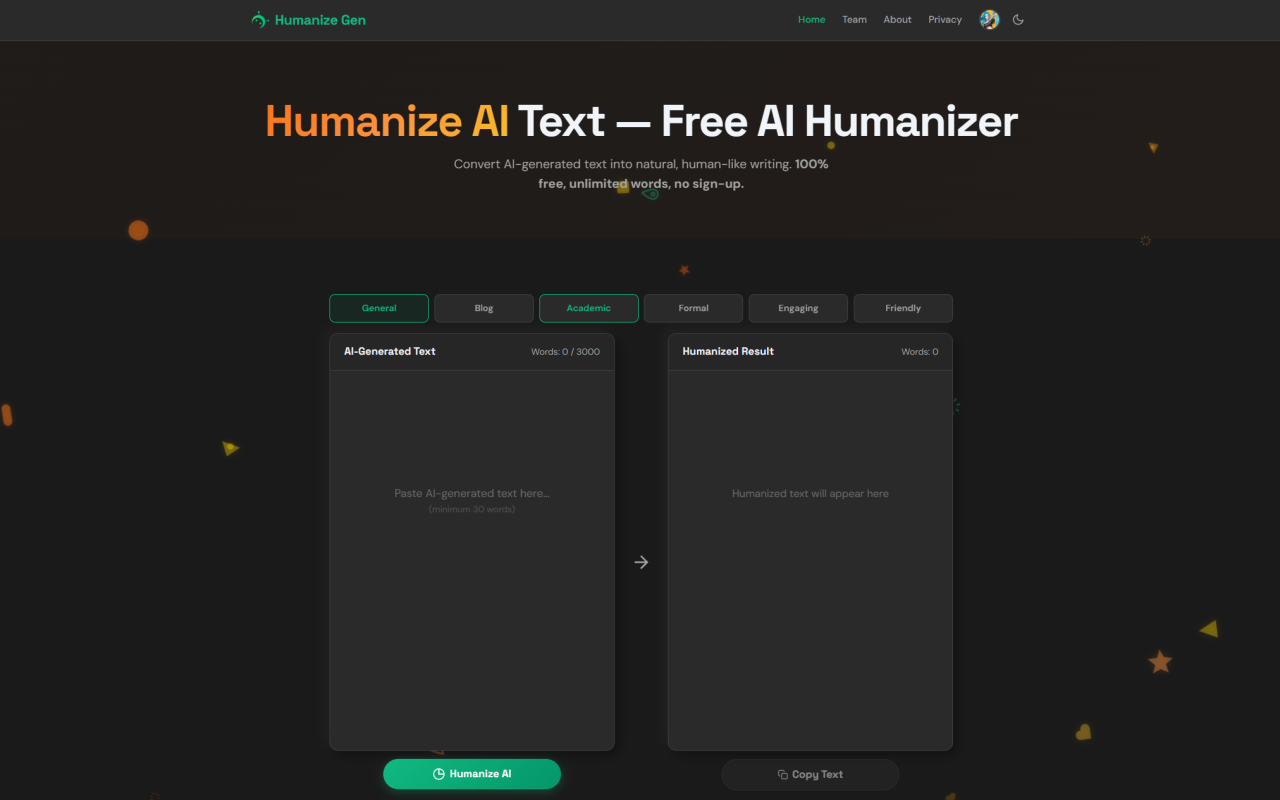
The hook is immediate. Humanize Gen is free and doesn't ask for an account. No email, no credit card, no trial countdown. You land on the page, paste some text, pick a style, and hit a button. That low-friction access is refreshing in a space where even basic rewriting tools often gate functionality behind sign-up walls. Looking at its feature set, the tool offers six distinct writing styles to transform text, makes claims about bypassing AI detection, and puts a heavy emphasis on privacy. I wanted to see whether all of that held up under real use.
First Impressions and the No-Sign-Up Promise
From the moment I landed on the site, the experience felt deliberately stripped back. There's no dashboard, no login prompt, no onboarding flow. The interface presents a simple text input area and a handful of style options. It's clear the developers want you to get in and out without friction. For people who are tired of creating yet another account just to test a tool, this alone is a meaningful differentiator. Privacy claims are front and center, too — the site states that no data is stored, and because there's no user account, there's nothing to tie your text back to you. I can't independently verify the backend entirely, but the fact that you remain anonymous from the moment you paste content is a strong signal.
The no-sign-up model also raises a question: how does this thing sustain itself? There's no pricing page and no visible upsell. Pricing details are not publicly listed on the website — visit their site for current plans. Right now, it appears to be completely free, and that's either a generous launch phase or a project that monetizes differently behind the scenes. Either way, the immediate benefit is that you can run multiple tests without jumping through hoops, which I did extensively.
Testing the Six Writing Styles
The core of Humanize Gen lies in its six style options: Natural, Professional, Creative, Persuasive, Friendly, and Academic. Each claims to reshape AI-generated text with a specific tonal goal. I fed it the same bland, ChatGPT-produced paragraph about remote work trends and cycled through every style to see how the output varied.
The Natural setting did exactly what you'd expect — it softened the robotic edges, shortened sentences that felt overwrought, and added a conversational cadence. Words like "utilize" became "use," and overly formal constructions crumbled into something that felt less like a whitepaper and more like an article you'd actually read. The Professional style held onto a bit more structure but removed the clichés that plague corporate AI writing. No more "In today's fast-paced business landscape" — instead, I got a clean, direct opening. Creative mode was the most surprising. It took the same input and injected vivid language without becoming purple prose, adding a touch of personality that felt intentional rather than forced. Persuasive mode framed arguments more aggressively, upping the ante with rhetorical questions and tighter calls to action. Friendly landed somewhere between Natural and a casual chat, and Academic toned down fluff while preserving more formal vocabulary — though I'd caution that it still needs fact-checking, because it can't fix misinformation from the source text.
Across all styles, I noticed a consistent improvement in readability. The tool doesn't just swap synonyms; it reshapes sentence rhythm. It breaks apart long, winding clauses and occasionally restructures paragraphs for better flow. That kind of rewriting takes more processing than a simple thesaurus shuffle, and it shows.
Privacy and the Bypass Claims
Humanize Gen leans heavily on two promises: that it can help text bypass AI detection tools, and that your data stays private. On the privacy front, the no-account model does a lot of heavy lifting. When no user identity is tied to submitted text, and nothing is stored, the privacy floor is already high. There's no history of your past rewrites lingering on a server, which is a genuine advantage over many AI writing assistants. For anyone handling sensitive material — client drafts, internal memos, unpublished work — that instant self-destruct quality matters.
The bypass claim is trickier. I tested the rewritten outputs against several common AI detectors, and results were mixed but leaned positive. In many cases, text that originally flagged as "likely AI-generated" scored as "human" after a pass through Humanize Gen's Natural or Creative styles. However, detectors are moving targets; they update constantly, and no humanizer can guarantee foolproof evasion. The tool seems to reduce the statistical fingerprints detectors look for — high perplexity bursts, uniform sentence length, predictable transitions — but I wouldn't stake a career on a single pass. Still, as a layer of polish that also happens to lower detection scores, it works better than many free alternatives I've seen.
Where Humanize Gen Shines
There are a few areas where this tool genuinely impressed me. Speed is top of the list. Even with a lengthy input, the rewriting happens almost instantly, and there's no queue or throttling. For anyone who needs to process multiple pieces in a sitting, that uninterrupted flow is valuable. The variety of styles is also a standout. Rather than offering a single "humanize" button, the six modes let you dial in the tone you actually want, which makes the tool useful across contexts — from formal reports to social media captions.
I also appreciated that Humanize Gen doesn't just make text sound "better" in a generic way. It pushes writing toward more human-sounding rhythms deliberately. AI text often suffers from over-explanation and a lack of authentic voice; this tool strips back the excess. The privacy-first approach, with no account and no data retention, is a genuine structural advantage, not just a marketing line. In a category often riddled with login walls and questionable data practices, that stance feels like a reset.
The Limits I Noticed
Humanize Gen isn't flawless, and I'd be remiss not to point out where it stumbles. The biggest limitation is inherent to its nature: it can't fact-check or add new information. If your input is inaccurate or nonsensical, the output will just be inaccurate or nonsensical with better prose. That's not a bug, but it does mean you still need human oversight. I also found that very long, complex texts — think detailed technical documentation — sometimes lost a bit of nuance in the rewording process. The tool seems optimized for the kind of writing that benefits most from a conversational makeover, and when the source material is already tightly technical, the transformations can feel slightly out of place.
Another quirk is that style application can occasionally veer into overcorrection. The Creative mode, while often brilliant, sometimes produced a metaphor where plain language would have served better. And because there's no ability to adjust intensity sliders — just the six discrete styles — you're locked into the degree of rewriting each mode provides. A finer control layer would be welcome, especially for users who want a gentle polish rather than a full rewrite. As for AI detection bypass, as I mentioned, it's inconsistent across detectors and versions, so treat it as a helpful byproduct rather than a foolproof solution.
Final Thoughts
Humanize Gen fills a specific gap well. It takes text that sounds unmistakably AI-written and makes it feel human, and it does so without asking for anything in return — no account, no payment, no stored history. That alone makes it worth a bookmark for anyone who regularly works with generated drafts. The six styles provide enough versatility to cover most use cases I can think of, and the speed means it slots into a workflow without friction.
I went into this test skeptical of both the "free forever" model and the bypass claims, but the tool earned a spot in my own toolkit for quick humanization passes. It's not a replacement for careful editing, and it won't magically make bad writing good, but as a first draft enhancer or a tone shifter, it hits far more than it misses. Visit Humanize Gen at https://humanizegen.com to explore it yourself.


评论