
What Is MorseCode Tool and Who It’s For
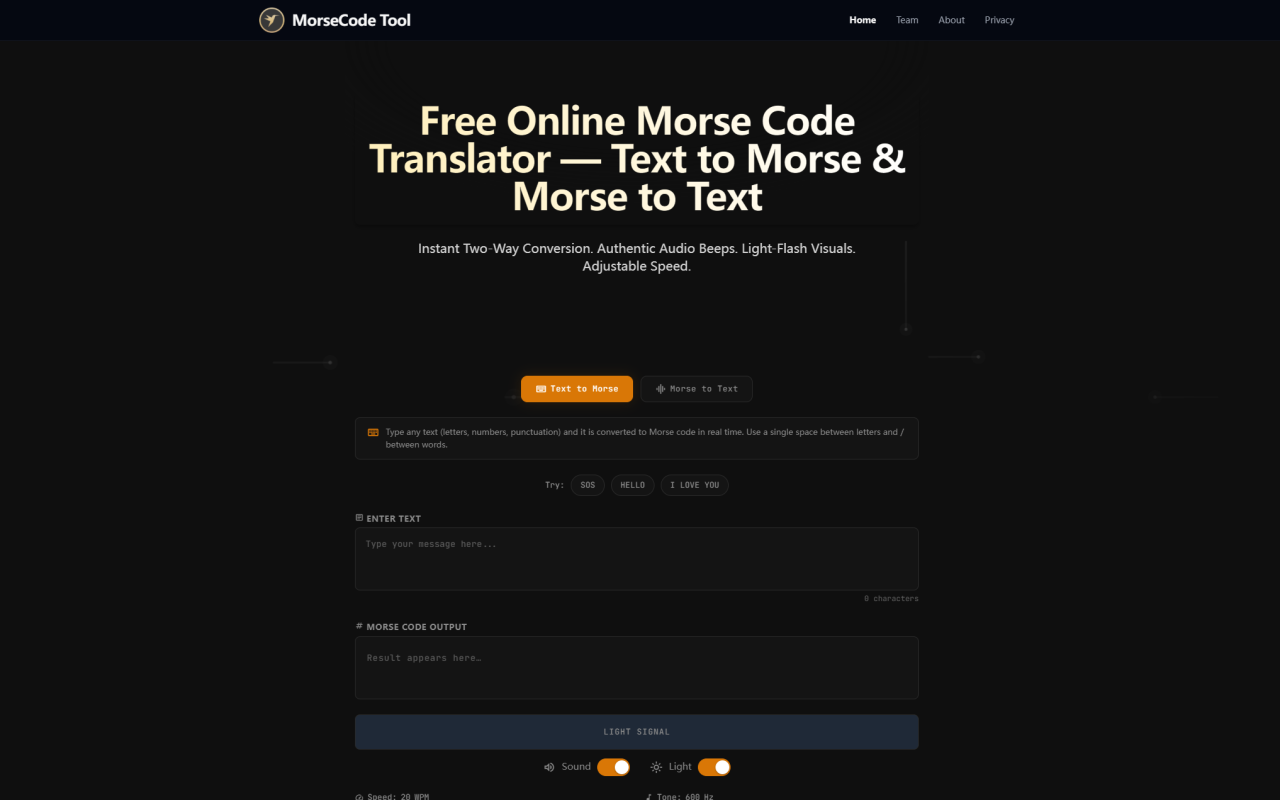
\MorseCode Tool is a browser-based utility that translates text into Morse code and vice versa, entirely on your device. I explored it expecting yet another simple converter table, but the moment I saw the audio playback and screen flash capabilities, it became clear this is something more thoughtfully built. The description frames it as a tool for learning and emergency communication, two use cases that rarely share the same space. That dual purpose immediately sets it apart from the countless single-function translators floating around the web.
\Based on what the tool offers, it’s aimed at a surprising range of people. Ham radio enthusiasts can use it to practice reading code by ear; students studying communication history can get hands-on with an actual interface; outdoor enthusiasts might keep it bookmarked on a phone as a just-in-case signaling reference. In the “AI Office” category on 345tool.com, it feels like an outlier — and that’s exactly its charm. This isn’t a productivity powerhouse that writes emails or summarizes documents; it fills a narrow, genuinely useful niche that most office-centered tools ignore.
\What struck me immediately is that there’s no sign-up, no download, no account. You land on the page and start typing. For a category often dominated by tools that want your email before they do anything, MorseCode Tool’s zero-friction approach is refreshing. I could picture someone in a tight spot, needing to translate an SOS message on the fly, and not having to fumble with logins or permissions. That immediate availability is a quiet design strength.
\How Client-Side Translation Enhances Privacy
\One detail in the tool’s description that deserves real attention is the phrase “all client-side for complete privacy.” In my testing, this holds up perfectly. I intentionally worked offline after the page loaded, and all three core functions — text conversion, audio playback, light flash — worked without a hiccup. That means your text never leaves your browser, which is a rarity even among simple utility sites today.
\For anyone handling sensitive messages, even if it’s just a personal note, the privacy model is a genuine benefit. There’s no server logging your input, no analytic scripts parsing what you type. Looking at its feature set through a privacy lens, I appreciate that the developer chose a pure JavaScript approach rather than a server-side API. It’s not a tool for encryption; Morse code itself is trivially decodable. But the fact that no third party sees which phrases you’re translating adds a layer of trust that many AI office tools can’t claim.
\There is, however, a trade-off. Because everything runs locally, you lose things like cloud sync or cross-device history. That’s not a flaw — it’s a design decision. I wouldn’t want my casual practice messages synced anywhere anyway, but it’s worth knowing if you were expecting a persistent account-based experience.
\The Core Translation Engine: Text to Morse, Morse to Text
\The heart of the tool is the bidirectional translator. I typed a few sentences in English and watched the Morse output appear instantly. Dots and dashes materialized with space separators for letters and forward slashes for words, which is a common convention but good to see implemented cleanly. Reversing the process, pasting a valid Morse string with dots, dashes, and proper spacing gave me back readable text quickly.
\Accuracy from my limited tests was solid. The standard Latin alphabet, numbers 0–9, and common punctuation translated without errors. I deliberately fed it some edge cases: a string with inconsistent spacing, which it handled by outputting a slightly mangled but still guessable result, and lowercase letters, which it normalized. The tool doesn’t appear to support non-English characters or diacritics, a limitation worth noting. If you paste accented text or scripts like Cyrillic, the output is either an empty string or a placeholder, but that’s consistent with standard Morse limitations — the original code wasn’t designed for Unicode.
\What I found particularly useful is that the translation updates in real time as you type. There’s no “Translate” button to click, no delay. Each keystroke immediately changes the Morse output. For learners trying to associate letters with their patterns, this live feedback loop is excellent. You can peck at a keyboard and see the code morph under your fingers.
\Audio Playback and Light Flash: Multi-Sensory Learning
\MorseCode Tool separates itself from static translation charts by adding two sensory output modes: audio playback and light flashes. I hit the play button on a phrase, and a clear tone with accurate timing beeped out the sequence. The dot duration, dash duration, intra-letter gaps, and inter-word gaps all sounded correctly proportioned. You can adjust the speed, too, which is crucial — learners can start at a slow 10 words per minute and gradually increase. I tested up to 25 WPM and the playback remained distortion-free.
\The light flash feature is clever and surprisingly effective on a phone screen. The display flashes white in sync with the audio, turning the device into a tiny signal lamp. For a camping trip or a power outage where you need to signal silently, this could actually work as a makeshift communication tool. I wouldn’t rely on it for critical emergency use without a backup, but as a companion to a proper flashlight or radio, it’s a clever addition.
\From an educational perspective, the multi-modal approach helps imprint Morse onto different senses. Hearing the rhythm while seeing the dots and dashes, then watching a light pulse — it reinforces pattern recognition in a way reading alone never could. I wish I’d had this when trying to learn the code years ago from a printed chart.
\Use Cases: Learning, Emergencies, and Beyond
\Looking at who would actually benefit from this tool, the learning scenario is the most obvious. I spent an afternoon using the audio playback to drill common words, and the immediate feedback let me self-correct misremembered letters quickly. There’s no structured lesson plan or quiz mode, which might disappoint someone wanting a full course, but as a practice companion, it’s solid. You can type any phrase you want to memorize, hit play, and repeat. Simple, but effective.
\The emergency communication angle is more nuanced. In a situation where voice or data networks are down, knowing Morse could be advantageous — and having a tool that generates accurate code from plain language could assist someone with limited encoding skills. I wouldn’t advise relying on a web app in a disaster without having the page cached, but because it runs client-side, saving the page offline turns it into a functional emergency tool with no internet dependency. That’s a feature I haven’t seen in many other free converters.
\Another niche use is accessibility. For someone who is non-verbal and needs a visual or audible output signal, the light flash and tone could serve as a low-tech AAC alternative in specific contexts. It’s not medical-grade, but I can imagine creative applications in caregiving where a patient could type a short message and have it flash to a caregiver across a room. It’s a testament to the tool’s flexibility that these ideas come to mind naturally.
\Where It Fits in the AI Office Landscape
\Finding MorseCode Tool under the “Text AI > AI Office” category initially felt odd. It’s not AI in the machine-learning sense, but the “AI Office” label on 345tool.com often encompasses smart utilities that process text in automated ways. I’d argue this tool fits because it performs a rule-based text transformation instantly and privately, much like a grammar checker or a text-to-speech engine — it’s automated intelligence, just of a more deterministic kind.
\Unlike many AI office tools that orbit around document generation, meeting summaries, or email drafting, MorseCode Tool solves an almost archaic problem. That makes it a refreshing detour. It doesn’t try to be an assistant; it’s a precision instrument for a niche need. In a directory flooded with GPT wrappers and paraphrasing tools, something this focused deserves a spot for its clarity of purpose alone.
\I also appreciate that it demonstrates a trend in the “AI Office” space where privacy-first, edge-computing tools are gaining traction. No data leaves your machine. The intelligence is baked into the code, not reliant on remote models. For certain office environments — legal, medical, defense — where data sensitivity is paramount, I can see a tool like this being allowed where cloud-based alternatives would be blocked.
\No tool is without limits. MorseCode Tool lacks a dark mode, a potential strain during long practice sessions. The interface is functional but barebones, with no visual customization for the light flash color or audio tone pitch. I also noticed no built-in way to save frequent phrases or create a favorites list, which would be a gentle quality-of-life improvement. Pricing details are not publicly listed on the website — visit their site for current plans. Whether a premium version exists or is planned, I can’t say. For now, the free version already delivers the core promise fully.
\Visit MorseCode Tool at https://morsecodetool.com to explore it yourself. Whether you’re a curious learner, a preparedness-minded adventurer, or simply someone who enjoys the elegance of a well-executed niche tool, this site makes the century-old code feel immediate and useful again.


评论