

Getting Started with Ovi: First Impressions
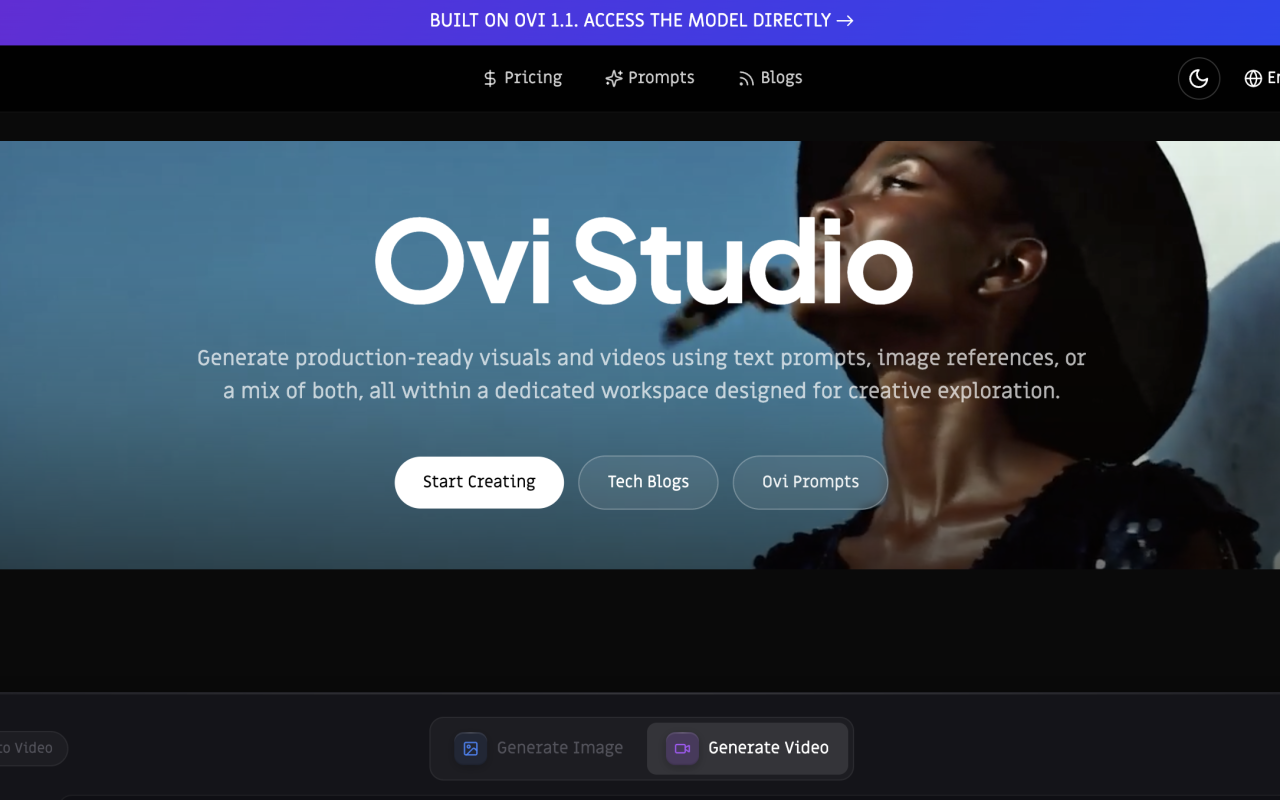
Upon visiting ovi.studio, I was immediately struck by the polished, cinematic presentation of the landing page. The site positions Ovi as a creative suite for filmmakers, advertisers, and creative teams, and the interface mirrors that ambition with a sleek, dark-themed design that puts generated visuals front and center. The onboarding flow is minimal and frictionless: a prominent call-to-action invites you to "Start Creating," and you're dropped directly into a text-to-video prompt box with a 5,000-character limit and a model selector. There's no lengthy account verification wall or tutorial maze — you can begin describing a scene within seconds.
When testing the free tier, I typed a prompt about a cinematic drone shot over a misty mountain landscape at golden hour. The interface responded quickly, offering model choices and a generate button without requiring deep technical knowledge. The dashboard shows a clean, three-step workflow — describe, refine, download — which is refreshingly simple compared to the timelines and node-based editors found in traditional video software. I also noticed a dedicated workspace called "Gen Space" that supports text prompts, image references, or a mix of both, reinforcing Ovi's claim of being a creative exploration hub rather than just a one-shot generator.
Core Capabilities and Technology Behind Ovi
Ovi is built on its proprietary Ovi 1.1 model, which the site describes as using a "twin backbone cross-modal fusion" architecture for audio-video generation. The most impressive technical claim is native 30-second 4K video generation in a single pass — no stitching, no cuts — with consistent characters, lighting, and spatial relationships. The model also extends video plus audio generation from 5 seconds to 10 seconds, which the site says enables richer storytelling, longer dialogue, and more expressive avatars. For context, many competitors like Runway Gen-3 and Sora still require multi-pass compositing or impose shorter clip lengths, so this is a significant differentiator on paper.
The platform supports multimodal creative fusion, allowing up to 50 references — images, videos, audio, text, and even 3D white models — to be blended into a single output. This is not just a gimmick: the workflow supports local video editing and remix, meaning you can swap subjects or backgrounds while preserving original motion, camera angles, and lighting. During my exploration, I found Ovi Control, a toolset for camera movement and keyframe-based motion definition, and Ovi Elements, which maintains consistency across scenes for AI characters, objects, and locations. These features position Ovi closer to a production tool than a novelty generator, with a claimed 20% improvement in prompt adherence and director-level camera control.
Exploring the Creative Workspace and Workflows
The real strength of Ovi becomes apparent when you delve into its pre-built workflows. The site showcases two-step pipelines that chain input configuration with AI generation: Text to Video, Image to Video, Image Editing, and AI Character Consistency. I tested the Image to Video workflow by uploading a still image of a bustling city street, and the tool animated it into a plausible twilight scene with the camera following a figure. The process was intuitive — upload a reference, let the AI handle motion — and the output maintained the original image's visual identity better than most image-to-video tools I've used.
Ovi also offers AI image generation with high resolution, multi-image fusion for combining elements from several references, and photo enhancement for restoring old or low-quality images. The style transfer feature lets you apply artistic styles to both images and videos, and context-aware editing preserves important details while transforming content. One particularly useful feature for marketers is the ability to edit generated videos locally — you can generate one campaign variation, then swap elements for localized versions without regenerating from scratch. The comparison table on the site positions Ovi against Veo, Sora, and Runway Gen-3, with Ovi claiming excellence in text-to-video, cinematic quality, and cost efficiency, while noting that competitors offer partial or limited support for features like multi-image fusion and photo enhancement.
Pricing and Value Proposition
Pricing is not publicly listed on the website. The site does not update a transparent pricing page, so I could not verify exact tier costs during my review. The comparison table does state that Ovi's cost efficiency is "competitive" versus Premium pricing for Veo, Sora, and Runway Gen-3, but without concrete numbers, this claim is difficult to validate. This lack of pricing transparency is a notable frustration for potential users who need to budget before committing to a platform. However, the site does emphasize that Ovi unifies video generation, image creation, and creative editing into one accessible workspace, which could offer significant value if the subscription cost indeed undercuts the competition.
For creative professionals, the time savings alone could justify the investment. The platform eliminates the need for separate tools for image generation, video generation, and editing, which means fewer subscriptions and a more streamlined pipeline. Small business owners and solo creators who cannot afford expensive equipment or dedicated video editing software may find Ovi particularly appealing, as the testimonials from e-commerce entrepreneurs and content creators suggest. The inclusion of native audio-visual synchronization, with phoneme-level lip-sync dialogue, also adds value for creators producing talking-head content or narrative videos.
Strengths, Limitations, and Alternatives
Ovi's genuine strengths are its ambitious feature set and production-focused design. The ability to generate 30-second native 4K videos in a single pass, with consistent characters and lighting, is genuinely impressive and could save countless hours for filmmakers and advertisers. The multimodal fusion of up to 50 references is also a standout feature — few tools on the market offer this level of creative input flexibility. The workspace is thoughtfully designed for iterative workflows, with Ovi Control and Ovi Elements providing professional-grade command over camera movement and character consistency.
However, there are real limitations to consider. As a relatively new entrant in the AI video space, Ovi lacks the track record and community ecosystem of established players like Runway Gen-3 or Pika Labs. The lack of publicly listed pricing is a significant drawback, as it makes it difficult to assess whether the "competitive" cost claim holds up. Additionally, while the site promises excellent cinematic quality, I was unable to verify the 4K output claims through the free tier, and the comparison table's self-reported advantages should be treated with healthy skepticism. Users who need API access for integration into existing pipelines may also be disappointed, as Ovi is primarily a web-based platform.
Who Should Use Ovi and Final Verdict
Ovi is best suited for filmmakers, advertisers, content creators, and creative teams who want an all-in-one AI video and image generation platform. It is particularly appealing for those who need to produce high-quality visual content quickly, with professional-grade consistency and production features like camera control and character consistency. Small business owners and independent creators who cannot afford full production equipment will also benefit from Ovi's ability to generate studio-quality visuals from text prompts alone.
If you are looking for a platform that handles both video and image generation with a focus on cinematic quality, Ovi is worth serious consideration. The technical capabilities, particularly the long-form 4K generation and multimodal fusion, are ahead of many competitors. However, if you require transparent pricing, API access, or a proven track record with a large community, you may want to explore alternatives like Runway Gen-3 or Veo first. My recommendation is to try the free tier, test the prompt adherence with your own creative scenarios, and judge whether the output quality justifies the investment. Visit Ovi at https://ovi.studio to explore it yourself.













Commentaires