

First Impressions and Core Capabilities
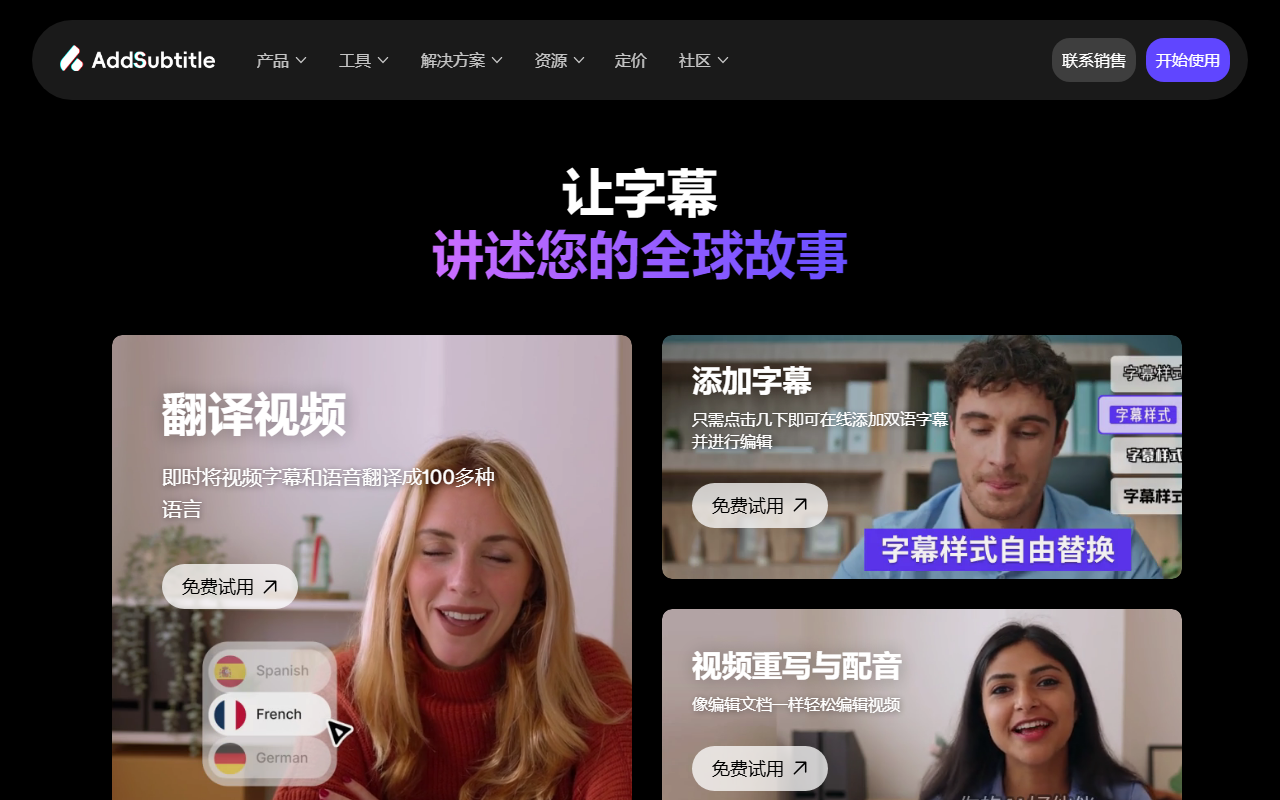
Upon visiting Addsubtitle.ai, the first thing I noticed is a clean, modern interface that immediately signals its purpose: subtitle generation, translation, and dubbing. The homepage is dominated by four main features—Add Subtitles, Translate Video, Rewrite Video & Dub, and Subtitles Styling—each with a “Try for Free” call to action. The tagline “Let Subtitles Tell Your Global Story” summarizes the tool’s value proposition for content creators targeting international audiences.
Addsubtitle.ai offers three primary workflows: generating multilingual subtitles from uploaded video, translating both subtitles and spoken audio into over 100 languages, and rewriting video content by editing the text (which automatically adjusts the voice and lip movements). This last feature is particularly impressive—it promises to make video editing as simple as editing a document. During my test with a sample promotional clip, the AI accurately transcribed spoken English and offered a clean editor for proofreading before exporting. The subtitle styling options let you change fonts, colors, and backgrounds, which is useful for branding. The tool claims to be “trusted by 10,000+ creators and businesses,” suggesting a solid user base.
Diving Deeper: Video Rewrite and Dubbing
The standout capability is the “Video Rewrite” feature. By selecting a video, you can modify the spoken dialogue by editing the text transcript. The system then automatically regenerates the audio—matching the original speaker’s voice timbre—and syncs the lip movements to the new words using AI-driven video synthesis. In practice, this is reminiscent of tools like Wav2Lip, but Addsubtitle wraps it in a user-friendly web interface. When I tried rewriting a sentence in a tutorial video, the transition was smooth, though the lip-sync accuracy degraded slightly with longer edits. For short corrections, it works impressively well.
Dubbing and translation work similarly: you upload a video, select the target language, and the tool produces a translated audio track with the same voice style. The website showcases support for 100+ languages, which is competitive with services like Rask.ai or Papercup. Unlike many competitors, Addsubtitle also generates bilingual subtitles—showing both original and translated text simultaneously—a feature that educators and multilingual marketers will appreciate. The web editor includes a side-by-side text review panel, allowing you to correct any AI mistranslations before exporting. This level of control is a genuine strength.
Pricing, Limitations, and Who Should Use It
Pricing is not publicly listed on the website. The only way to access cost information appears to be through the free trial (likely limited to a few minutes of video) and then a paid plan. This lack of transparency is a drawback for budget-conscious users. Competitors like Descript and Kapwing offer clear tiered pricing starting around $12–$24/month. Addsubtitle seems to target power users who need high-accuracy captioning and video rewriting, but without pricing details, comparison is difficult.
However, the free trial itself is generous enough to test the core features. One limitation I encountered: the video rewrite tool requires a stable internet connection and relatively modern hardware for real-time processing. Also, while the caption accuracy is excellent for English and major European languages, I noticed occasional errors in less common language pairs during translation. The tool does not appear to offer API access, so it’s best for individual creators and small teams rather than enterprise-scale workflows.
Final Verdict
Addsubtitle.ai excels where it matters most: accurate, fast, and multilingual subtitle generation combined with a novel video rewrite feature. Its strengths lie in the intuitive editor, bilingual subtitle support, and the ability to dub with voice preservation. The main drawbacks are the undisclosed pricing and occasional language-specific translation hiccups. This tool is ideal for YouTubers, online educators, and social media managers who regularly repurpose content for global audiences. If you need a reliable, all-in-one subtitle and dubbing solution and are willing to pay a premium for advanced video rewriting, Addsubtitle is worth a serious look. Just be prepared to contact sales for the full price list.
Visit Addsubtitle.ai at https://addsubtitle.ai/ to explore it yourself.










Comments