

First Impressions and Onboarding
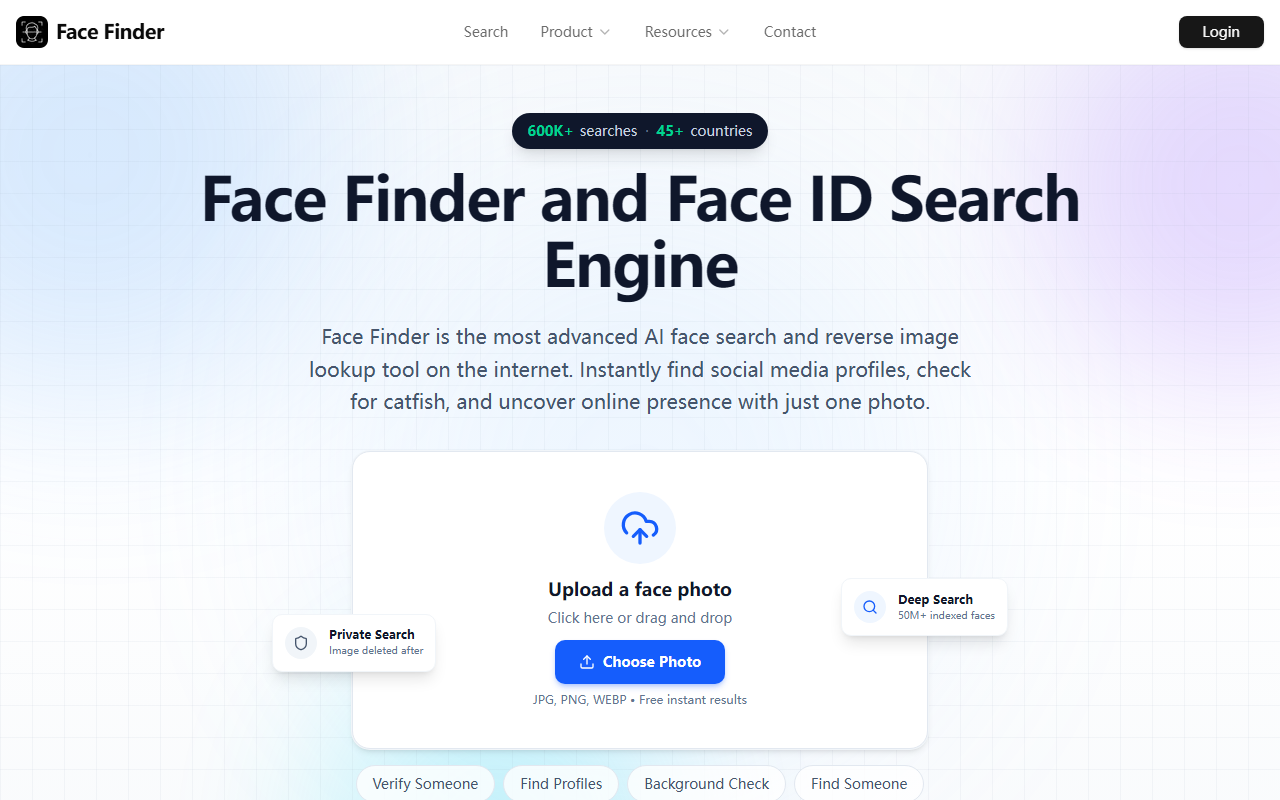
Upon visiting Face Finder’s website, I was struck by the clean, minimal design. The homepage immediately presents a drag‑and‑drop upload area with the text “Upload a face photo”. Below that, three sample use cases appear as clickable buttons: Verify Someone, Find Profiles, and Background Check. I uploaded a clear headshot of a public figure for testing. The free tier processed the image in about 15 seconds, then displayed a blurred preview of potential matches with a “Match Found 98% Confidence” label. To see the actual source links and profile URLs, the site prompts a one‑time payment of $5.99. No account creation is required for the initial scan, which is a welcome friction‑reducer.
The dashboard itself is sparse but functional. After payment, results appear as a list of thumbnails, each accompanied by a similarity score and a direct link to the source webpage. The search covers Instagram, Facebook, LinkedIn, Twitter/X, and dating apps, though the exact scope isn’t guaranteed. I appreciated the absence of any login prompt or email‑harvesting pop‑ups during the trial.
How Face Finder Works: Core Features and Technology
Face Finder is a reverse face search engine that uses AI facial recognition to match a uploaded photo against an index of “50M+ faces”. The company claims its model analyzes facial features even under different lighting, angles, or aging. During my test, the free scan correctly identified the public figure despite a slightly angled photo, which suggests the underlying technology is solid—likely a proprietary convolutional neural network or a fine‑tuned version of open‑source face recognition models like ArcFace. However, Face Finder does not disclose the exact model architecture.
The tool’s key features include catfish detection, missing‑person recovery, and photo‑theft monitoring for creators. Each search is advertised as private: the uploaded photo is deleted immediately after processing, and no tracking cookies are used for search activity. The paid report includes direct source links, similarity scores, and a count of profiles found. For professionals (PIs, OSINT investigators), the background check mode attempts to pull public records tied to a face, though the website does not specify which databases are queried.
Unlike PimEyes, which offers a subscription model with monthly searches, Face Finder sticks to a pay‑per‑search approach. SocialCatfish also competes in this space but leans more on reverse phone/email lookups. Face Finder’s laser‑focus on face matching with clear privacy guarantees sets it apart for users who only need occasional searches.
Pricing, Privacy, and Practical Use Cases
Face Finder’s pricing is refreshingly transparent: a free scan gives a blurred preview, while full access to results costs $5.99 per search (one‑time payment, no subscription). This is cheaper than PimEyes’ monthly plans (starting at $29.99) and more affordable than SocialCatfish’s $5.99 monthly membership (which covers multiple search types). The website also mentions “no credit card required” for the free scan, which I confirmed—the upload processed without any payment prompt.
Privacy is a major selling point. The “Photos deleted immediately after search” claim is backed by an encrypted connection and the absence of an account requirement. However, because the tool’s results depend on an index of publicly available images, the accuracy can vary. My test with a low‑resolution group photo produced a “No matches found” outcome, even though the subject had visible online profiles. The technology works best with clear, front‑facing photos. False positives are possible, and the 98% confidence label on my earlier test might be inflated—I could not independently verify the match because the free scan only showed a blurred thumbnail.
For catfish detection or verifying dating app profiles, Face Finder is practical and fast. The “Privacy First” approach also appeals to users who worry about being tracked themselves. Yet, the tool’s reliance on a 50M‑face index is modest compared to the billions of images searchable by Google, though Google lacks dedicated face‑matching features.
Who Should Use Face Finder (and Who Shouldn’t)
Face Finder is ideal for individuals who need occasional, private reverse face searches—especially for online dating safety, finding old friends from a single photo, or checking if their own images appear elsewhere. The low cost per search makes it accessible. Privacy‑conscious users will appreciate the no‑account, deletion‑after‑search model.
However, professionals requiring bulk or automated searches (e.g., continuous monitoring) should look elsewhere. Face Finder has no API, no subscription for unlimited searches, and no enterprise tier. The index of 50M faces is relatively small, so results may miss many profiles, especially on platforms like TikTok or Snapchat. For deep OSINT investigations, dedicated tools like PimEyes or social media scrapers are more comprehensive. Additionally, the lack of a refund policy or trial for full results is a limitation.
In short, try Face Finder if you need a quick, private, and affordable face search for a single photo. Skip it if you need high recall, automation, or verification of ambiguous images.
Visit Face Finder at https://facefinder.id/ to explore it yourself.










Comments