

First Impressions and Onboarding with 345Gradient
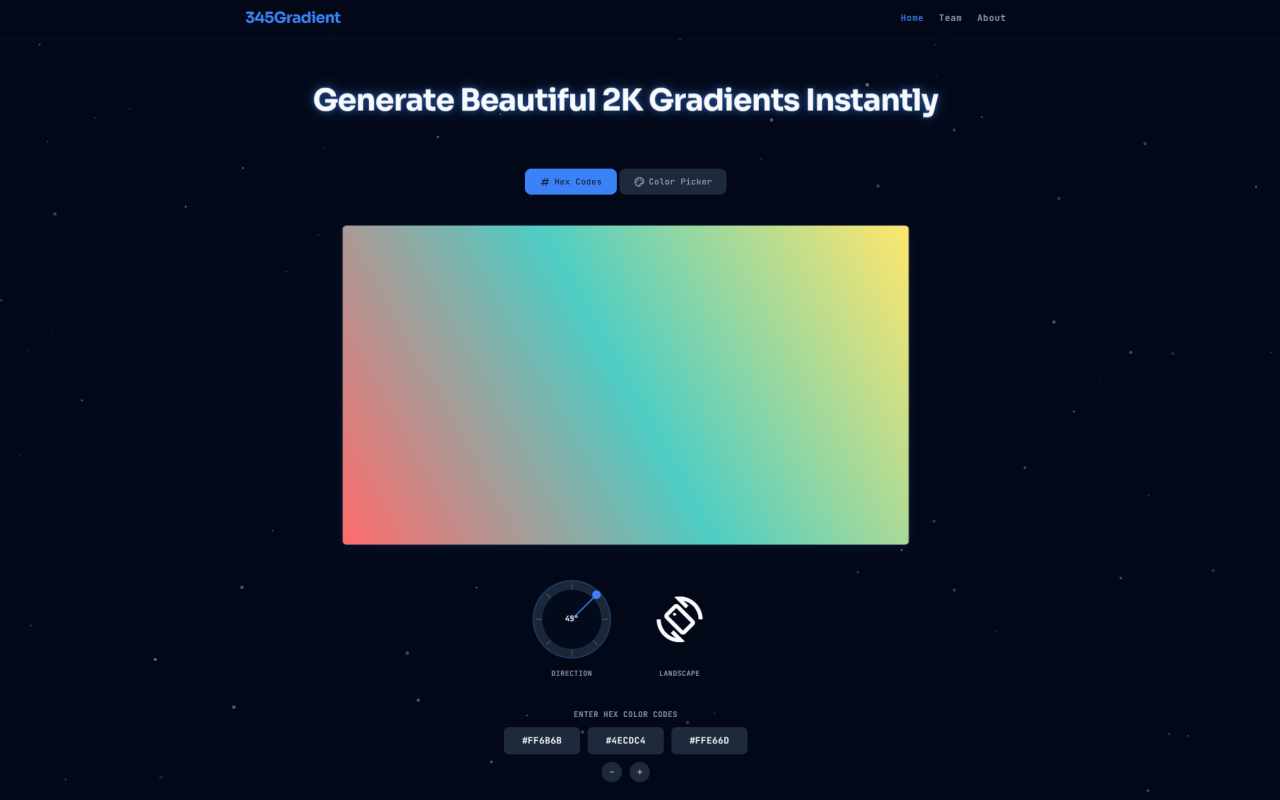
Upon visiting 345Gradient at gradientget.com, I was immediately struck by its minimalist interface. The page loads almost instantly—no splash screens, no cookie banners, no sign-up prompts. The tool is presented as a single-page utility with a clean dashboard: a color selection panel on the left, a live gradient preview in the center, and export controls on the right. There is no onboarding tutorial or tooltip overload; you simply see a default two-color gradient with a 45° angle and a "Download PNG" button. This zero-friction launch aligns perfectly with 345Gradient's stated philosophy of being a "launch-and-use" tool. As someone who has tested dozens of online design utilities, I appreciated not having to wade through feature walls or trackers before generating my first gradient.
Core Features and Workflow: Hex Input, Color Picker, and Precise Angle Control
345Gradient offers two distinct modes for selecting colors: Hex Code Mode and Color Picker Mode. The default mode focuses on hex input—you type in up to four hexadecimal color codes (e.g., #FF6B6B), and the preview updates in real time. I tested this by entering a dark blue (#1a2a6c) and a light cyan (#b21f1f) to create a striking nighttime gradient. The browser rendered the transition smoothly with no noticeable banding. For visual experimentation, switching to Color Picker Mode reveals circular hue selectors for each color stop. Dragging the sliders felt responsive; the gradient changed as I moved the picker. The tool supports 2 to 4 colors, and you can add or remove stops using the plus/minus buttons. The real standout, however, is the direction knob—a physical-inspired circular control that rotates from 0° to 360°. I dragged the arrow to 135° and watched the gradient tilt diagonally. The knob displays the current angle in degrees, and the tool defaulted to 45°, which is sensible for a natural diagonal flow. While testing, I also toggled between landscape (2560×1440) and portrait (1440×2560) orientations. The preview pane resized instantly to match the aspect ratio, giving me a good sense of how the gradient would look on different screens.
Performance and Privacy: Client-Side Processing with Zero Latency
345Gradient runs entirely in the browser using vanilla JavaScript. There are no server calls during color selection or export—the PNG generation happens client-side via the Canvas API. This design eliminates latency and, more importantly, ensures complete privacy. The website explicitly states that no user data is harvested or transmitted. I verified this by checking the browser network tab while generating gradients: no external requests were made. The export process for a 2K PNG took less than a second on my machine. This is a significant advantage over many online tools that upload images to a server for processing, which can introduce delays and security concerns. For designers working with sensitive brand colors or internal project assets, the client-side approach is a strong selling point. The tool is also notably lightweight—no ads, no trackers, no bloat. It fits the ethos of the broader 345tool project, which aims to replace bloated internet platforms with single-purpose utilities.
Use Cases and Output Quality: High-Resolution PNGs for Commercial and Personal Projects
The exported PNGs are delivered at true 2K resolution: 2560×1440 pixels (landscape) or 1440×2560 pixels (portrait). I downloaded a gradient with four color stops and opened it in Photoshop to check for banding. At 2K, the transition was smooth, with no visible color stepping. The file is uncompressed, which preserves quality but means file sizes are larger—my test gradient was about 11 MB. For most web and UI uses, this size is manageable, but for repeated batch exports, you might want to compress further. 345Gradient grants full commercial usage rights: no attribution required, no royalties. Whether you're creating a gradient for a client website, an Instagram story, or a product mockup, the asset is yours to deploy freely. The FAQ confirms this explicitly, which gives peace of mind for professional projects. I can see this tool being especially useful for UI/UX designers prototyping in Figma or Sketch needing quick, brand-matched gradient backgrounds. The hex input mode makes it easy to replicate exact brand colors from a design system.
Comparison and Target Audience: How 345Gradient Stacks Up Against Alternatives
Most online gradient generators either limit resolution (e.g., CSS gradient generators that only output code) or introduce ads and data tracking. 345Gradient's 2K PNG export is relatively unique among free tools. Competitors like uiGradients or Gradient Hunt focus on community-curated palettes but don't offer angle control or high-res downloads. Figma and Photoshop plugins can do similar things but require software installation and a learning curve. 345Gradient sits in a sweet spot: it's frictionless, private, and outputs production-ready files. However, it has limitations. It does not generate CSS code for gradients—you only get a PNG image. If you need inline CSS gradients for a website, you'll need to extract the hex codes manually. Also, there is no undo/redo or history of generated gradients; each session starts fresh. The tool is best suited for designers and content creators who need high-resolution gradient images quickly, without signing up or worrying about privacy. Developers looking for CSS gradient code should look elsewhere, but for image assets, 345Gradient excels.
Final Verdict and Recommendation
345Gradient delivers exactly what it promises: a fast, private, client-side gradient generator with high-resolution 2K output. Its strengths are its simplicity, zero-latency performance, and respect for user privacy. The angle knob and color picker modes are intuitive and responsive. Where it falls short is in missing features like CSS output and history, but those are outside the tool's stated scope. I would recommend 345Gradient to UI/UX designers, web developers needing background images, social media managers, and anyone who values a clean, no-nonsense utility. If you need a gradient image in seconds and don't want to deal with sign-ups or ads, give this tool a try. Visit 345Gradient at gradientget.com to explore it yourself.





Comments