
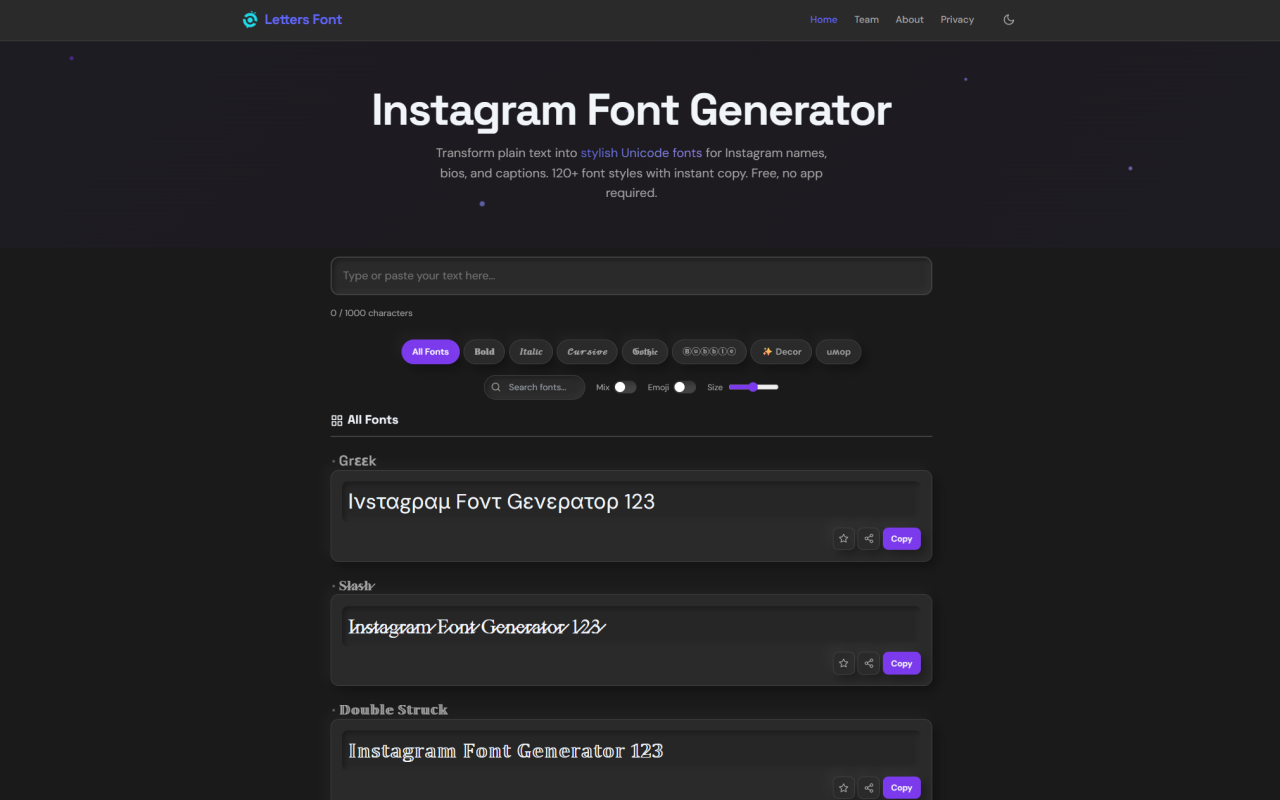
Landing on the Site and Core Mechanics
Upon visiting lettersfont.com, the first thing you notice is how aggressively single-purpose the page is. There is no hero carousel, no pricing table, no signup wall. A large text input box sits at the top labeled "0 / 1000 characters," and directly beneath it sprawls a live-updating grid of font previews. Type a single letter and the entire grid instantly populates with that character rendered across every available style. It is fast — almost jarringly so — because the JavaScript engine mapping characters to Unicode equivalents runs entirely in your browser.
The interface is flat and utilitarian. A row of category chips sits above the grid: All Fonts, Bold, Italic, Cursive, Gothic, Bubble, Decor, and Upside Down. There is also an Emoji tab, a Mix toggle, and a Size slider. A character counter tracks input length, which matters when you are crafting an Instagram name capped at 30 characters. Every font card in the grid has its own Copy button. Clicking one copies the styled text and flashes a brief "URL Copied" confirmation — an odd label choice that momentarily confused me, though the copy function itself works reliably. There are no tooltips, no onboarding wizard, and no tutorial. You either understand what this tool does immediately or you do not.
Exploring the Font Categories
The 135+ font styles are organized into eight main categories, and clicking any category chip filters the grid instantly. Bold fonts use Mathematical Alphanumeric Symbols — think 𝐁𝐨𝐥𝐝 and 𝗦𝗮𝗻𝘀 𝗕𝗼𝗹𝗱 — and they are the most universally compatible option. During testing, bold variants rendered flawlessly across Instagram, WhatsApp, and Discord on both an iPhone 14 and a Pixel 7.
The Cursive and Script section houses roughly 15 variants, from flowing 𝒞𝓊𝓇𝓈𝒾𝓋ℯ script to bolder calligraphic forms. These are where the tool shines for lifestyle and aesthetic accounts. Gothic and Fraktur styles deliver dramatic blackletter characters like 𝔊𝔬𝔱𝔥𝔦𝔠 and 𝕸𝖊𝖉𝖎𝖊𝖛𝖆𝖑, which carry a distinct gaming-community and dark-aesthetic appeal. Bubble and Circle fonts — Ⓑⓤⓑⓑⓛⓔ, 🅒🅘🅡🅒🅛🅔🅓 — lean heavily into the cute-aesthetic niche popular with teen and creative accounts.
The Number Fonts category surprised me. Digits get five treatment options: circled (①②③), superscript (¹²³), subscript (₁₂₃), double-struck (𝟙𝟚𝟛), and monospace (𝟶𝟷𝟸). It is a small detail but genuinely useful for dates, follower counts, and numeric handles. The Upside Down category — producing text like "uʍop ǝpısdn" — is more of a novelty, though I could see it working as a clever comment tactic. One limitation worth noting: not every style in the decorative category (hearts, stars, flowers) renders cleanly on all platforms. Some combining characters appeared broken on an older Android device I tested.
The Mix Toggle and Emoji Features
The Mix toggle is Letters Font's most distinctive feature. When enabled, it assigns a random style from the full library to each character in your text. Type "Hello" and you might get 𝐇𝒆𝔩𝔩𝔬 — bold H, italic e, gothic l, gothic l, bold o. The randomization uses a Fisher-Yates shuffle seeded per session, meaning you get consistent output within a single visit. Toggle Mix off and everything snaps back to uniform styling.
In practice, Mix creates a chaotic, eye-catching effect that genuinely stands out in crowded Instagram comment sections. It is not something you would use for a profile name — readability suffers too much — but as a one-off attention grabber in a caption or comment, it works. The Emoji toggle is simpler: it inserts emojis like 😊, 💕, or ⭐ between characters. The Emoji tab itself provides six categories (Cute, Love, Happy, Cool, Stars, Nature) and clicking any emoji from this panel adds it to your text. It feels bolted on rather than deeply integrated, but for quick emoji access without leaving the page, it serves its purpose.
How Unicode Mapping Powers Real-World Compatibility
What separates Letters Font from tools that generate styled text via HTML or CSS is its reliance on raw Unicode code points. When you select a bold font, the letter "A" becomes "𝐀" (U+1D400, Mathematical Bold Capital A), not "A" wrapped in a span tag. The output is plain text — you can paste it into Instagram bios, TikTok captions, WhatsApp messages, Discord channels, YouTube comments, and even file names on Windows and macOS.
This approach has real trade-offs. The upside is genuine cross-platform compatibility without font installation, file downloads, or special formatting. The downside is that you are limited to the characters the Unicode Consortium has already encoded. You cannot adjust weight, slant, tracking, or any other typographic property because you are not dealing with a font file — you are selecting from a fixed inventory of pre-encoded glyphs. Letters Font also employs cross-script mapping, where Latin letters get replaced with visually similar characters from Cyrillic, Greek, Runic, Cherokee, and other scripts. The result looks exotic but can confuse screen readers and search indexing, which is worth keeping in mind if accessibility matters to you.
Privacy Architecture and Offline Reliability
One of Letters Font's genuine differentiators is its client-side architecture. All text processing happens in JavaScript within your browser. No server receives your typed text. There are no user accounts, no passwords, no database storage. The website explicitly states this, and you can verify it yourself: disconnect your internet after the page loads and every feature — font conversion, copy and paste, favorites management, theme switching, the Mix and Emoji toggles — continues working without interruption.
Favorites are stored via the browser's localStorage API, meaning they persist across sessions on the same device but never leave it. The only external network calls are for Google Fonts (loading the site's UI typeface) and Google Analytics (anonymized page-view counting — the GA4 implementation does not receive typed text). For users who draft sensitive content, experiment with brand name ideas before registering a domain, or simply value knowing their text stays local, this privacy model is a meaningful advantage over server-based font generators.
Where Letters Font Shows Its Limits
Letters Font does one thing and does not pretend to do more. This focus is also its ceiling. There is no kerning control, no line-height adjustment, no way to combine multiple styles into a single formatted block beyond the Mix toggle's randomness. You cannot save font combinations as templates. There is no export functionality beyond copy and paste. The 1,000-character input limit makes it unsuitable for styling longer passages like TikTok video descriptions or blog excerpts.
Some decorative styles using Supplementary Multilingual Plane characters (U+1D400 and above) fail to render on older devices and certain specialized apps. The site does not surface which styles may cause compatibility issues — you discover this through trial and error. The "URL Copied" confirmation message when clicking Copy is misleading, though functionally harmless. And while the site provides detailed Instagram bio and name optimization tips in its FAQ, these are buried in an expandable section that most users will scroll past.
Pricing details are not publicly listed on the website because there are none — the tool is completely free, with no premium tiers, no ads cluttering the interface, and no hidden upsells. The monetization model, if any exists, is not visible to the end user. For a free, privacy-respecting utility that delivers exactly what it promises, Letters Font earns its place in any social media toolkit. Visit Letters Font at https://lettersfont.com to explore it yourself.


Commentaires