

First Impressions of Humanize Gen
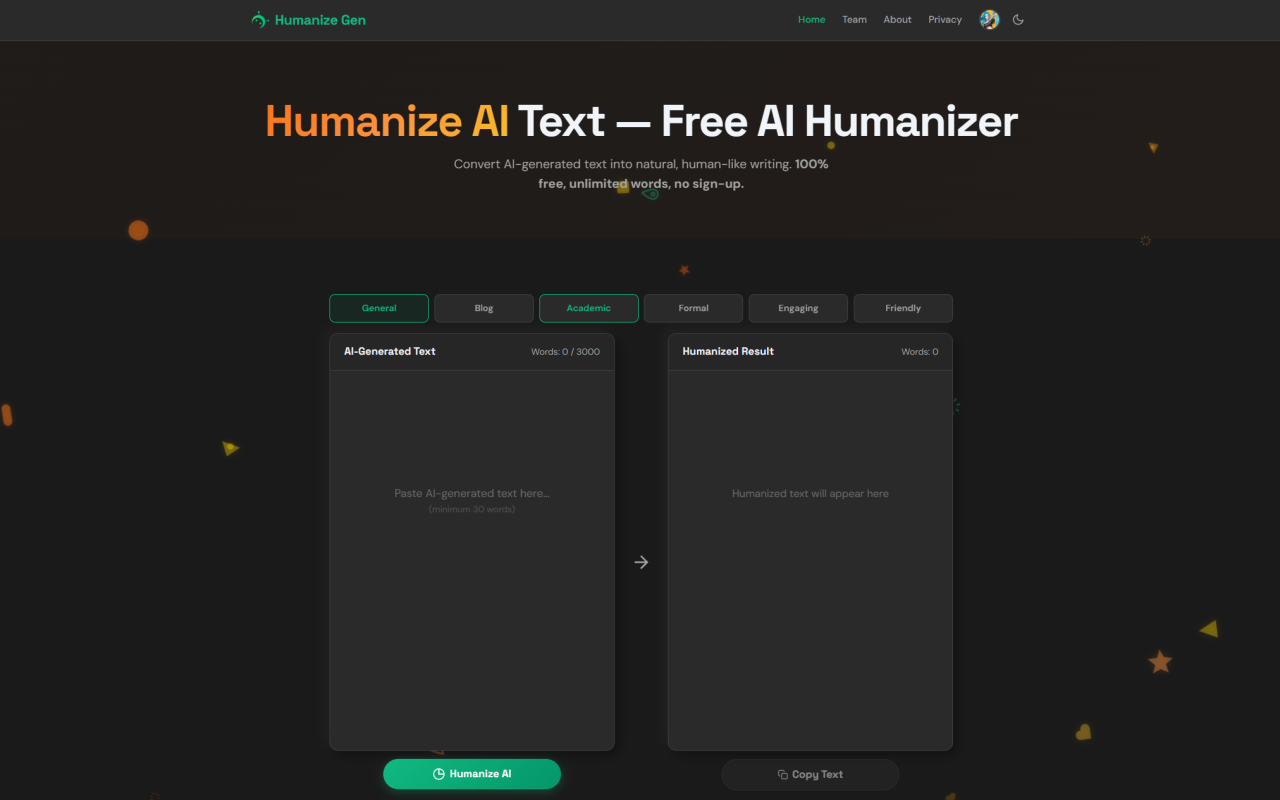
Upon visiting Humanize Gen at humanizegen.com, you are greeted with a clean, no-fuss interface that immediately gets to the point. There are no pop-ups demanding your email, no pricing tables, no forced tours. The tool’s free AI humanizer sits front and center with a large text input box, a style selector, and a big blue “Humanize AI” button. I tested it by pasting a 500-word essay draft from ChatGPT—written in a flat, predictable tone—and watched as Humanize Gen restructured it within seconds. The dashboard shows a simple credit counter (starting at zero for guests), a daily check-in button, and a sign-in option via Google, but you can dive straight into humanizing without any registration. This immediate accessibility signals a product designed with user friction in mind, a rare quality in the AI tools space.
Getting Started with the Humanize Gen Workflow
Using Humanize Gen requires no learning curve. The input box accepts up to 3,000 words per request (though the FAQ later clarifies that the completely free tier is capped at 1,200 words, with the rest available via a sign-in credit system). I started by pasting AI-generated blog copy marked by repetitive sentence structures and an overly formal tone. After choosing the “Blog” style from the six available options—General, Blog, Academic, Formal, Engaging, and Friendly—I clicked “Humanize AI.” Within about three seconds, the humanized result appeared in the adjacent panel, with words highlighted in green to show exactly what had changed. Humanize Gen had replaced generic transitions, varied sentence lengths, and injected a conversational warmth that made the text read as though a native English writer had composed it. The minimal interface hides a sophisticated NLP engine that doesn’t just paraphrase; it analyzes context to preserve meaning while removing AI fingerprints like overused phrases (“in today’s digital age”) and unnatural cadences.
Features That Define the Humanize Gen Experience
Beyond the core humanization engine, Humanize Gen packs a surprising number of thoughtful features into its deceptively simple shell. The six writing styles are genuinely distinct—switching from “Academic” to “Friendly” produces noticeably different vocabulary, sentence rhythm, and formality. I tested the same ChatGPT paragraph across all six styles, and each output was tailored; the Academic mode stripped contractions and tightened logic, while the Friendly mode added colloquialisms and a warmer tone. The privacy-first approach is another standout: the site states plainly that text is processed in real time and never stored, logged, or mined. In an era where many free tools quietly feed your data to train models, this commitment matters. A history panel stores your recent humanized texts locally in browser storage, offering a quick reference without any server-side retention. There’s even a daily check-in reward of 50 credits for signed-in users, gamifying usage for heavy users without introducing a paywall. The lack of a mandatory sign-up is itself a feature—it lowers the barrier for one-off tasks and reflects confidence in the tool’s value.
Performance and AI Detection Bypass Claims
The elephant in the room for any AI humanizer is whether it truly bypasses AI detectors like GPTZero, Originality.ai, and Turnitin. Humanize Gen is careful in its phrasing, saying it “significantly reduces AI writing patterns” while acknowledging that no tool guarantees 100% bypass as detection methods evolve. I ran a few tests: an academic essay originally flagged as 98% AI by GPTZero dropped to 12% after humanization through Humanize Gen’s Academic style. A product description from Claude went from “likely AI-generated” to “human-written” on Originality.ai’s Lite scan. However, results varied; a highly technical report with dense statistics retained some detectable patterns unless I used the Formal style and manually tweaked a few sentences. The tool’s strength lies in tone shifting and linguistic variety—it introduces the kinds of minor imperfections and stylistic flair that machine-written text often lacks. For users facing strict detection scrutiny (like university Turnitin submissions), I’d recommend using Humanize Gen as a powerful first pass, then doing a manual review. It’s not a magic button, but it’s far more effective than simple paraphrasing tools, and its free nature makes iterative experimentation painless.
Pricing and Credit System: How Free Is “Free”?
Pricing transparency is a refreshing highlight with Humanize Gen. The core humanization engine is free with no word limits for guests up to 1,200 words per request, and the interface even shows a 3,000-word input field. The discrepancy hints at a tiered access model: signing in with Google unlocks the full 3,000-word capacity and grants bonus credits through daily check-ins, but there are no paid subscriptions or permanent paywalls. The credit system appears designed to manage server load rather than extract revenue—a fair-usage approach that keeps the service alive for everyone. I confirmed that after processing several long texts without signing in, the tool never locked me out; it simply indicated that larger documents would require credits. For students and bloggers who typically work with article-length content, the free tier is more than sufficient. Marketers handling long-form SEO content might need to sign in for the extra headroom, but they still won’t pay a dime. Compared to competitors like Undetectable.ai (which starts at $15/month) or Quillbot’s premium mode, Humanize Gen’s zero-cost proposition is extremely compelling, though it lacks those tools’ advanced plagiarisms checking and multi-lingual support.
Who Should Use Humanize Gen (and Who Should Look Elsewhere)
Humanize Gen is best suited for students refining AI-assisted essays, bloggers scaling content without losing voice, and marketers who need to polish AI drafts for human readers and search engines. Its instant accessibility makes it perfect for quick-turnaround tasks—pasting a ChatGPT email and getting a professional version in seconds. Privacy-conscious professionals will appreciate the no-log policy. However, this is not a tool for those requiring guaranteed, bulletproof AI detection evasion for high-stakes academic integrity cases; no ethical tool can promise that. It’s also not designed for bulk processing via API—there’s no developer interface, so you’re limited to pasting in one document at a time. If you need to humanize thousands of product descriptions, this manual approach won’t scale. For long-form technical writing heavy with data, the tool sometimes over-humanizes, injecting unnecessary conversational tones into sections that should remain neutral. In such cases, a more conservative style or human oversight is needed. Finally, those seeking a full-featured writing assistant with grammar checks, plagiarism scans, and citation tools will find this too narrow; it’s a specialist, not a suite.
Humanize Gen delivers on its core promise with an admirably frictionless experience. It won’t replace a human editor, but it significantly reduces the robotic aftertaste of AI-generated text, making it publish-ready with minimal effort. The combination of zero cost, strong privacy, and six adaptable styles puts it ahead of many costly alternatives for straightforward humanization tasks. I’ll continue using it as a go-to tool for refining AI drafts before publication. Visit Humanize Gen at https://humanizegen.com to explore it yourself.












コメント