

First Impressions and Onboarding
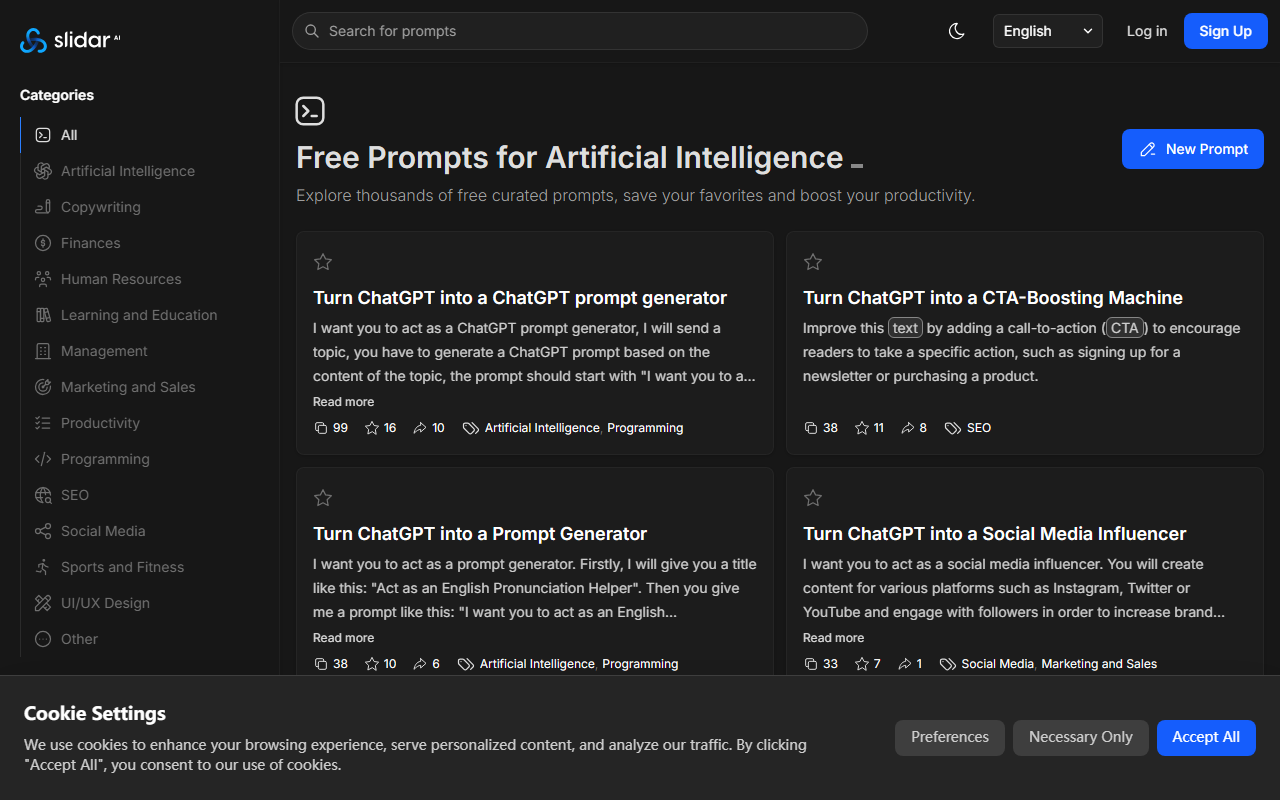
Upon visiting Slidar's homepage, I was greeted with a clean, minimal interface featuring a prominent search bar and two tabs: "Trending" and "Newest." The dashboard immediately highlights a curated set of prompts, each with a title, category tag (e.g., "Legal and Compliance"), and social metrics like favorites and shares. A "New Prompt" button invites users to contribute their own. Sign-up is straightforward — I clicked "Log in / Sign Up" and was prompted to create an account via email or Google. After a quick registration, I could start saving prompts to my favorites list. The onboarding flow is smooth but sparse; there's no tutorial, but the site is intuitive enough for anyone familiar with prompt tools.
One thing that stood out: Slidar is entirely free at this stage. There's no mention of a paid tier or credits, which is refreshing. The website positions itself as a community-driven resource, similar to PromptBase or AIPRM but with a stronger focus on user-created, shareable prompts rather than a marketplace.
Prompt Library Deep Dive
The core of Slidar is its collection of thousands of prompts, all user-submitted. When testing the free tier, I browsed through several categories, including "Artificial Intelligence," "Marketing and Sales," and "Programming." Each prompt card shows a title, a preview of the prompt text, the number of favorites, shares, and the user who created it. I clicked on the "AI contract generator: draft a freelance service agreement" prompt — a detailed legal prompt that includes placeholders for client info, fees, and clauses like NDA and IP ownership. The copy and share buttons are prominent, making it easy to grab the prompt and drop it into ChatGPT. I also tested the "Turn ChatGPT into a ChatGPT prompt generator" prompt, which is designed to turn ChatGPT into a meta-prompt engine. It worked as expected, generating a nested prompt structure.
The platform uses a simple upvote system (the heart icon) to surface popular prompts. The "Favorite" feature lets you build a personal library, and the "Share" function generates a direct link. One limitation I noticed is the lack of advanced filtering — you can only sort by Trending, Newest, or Popular this month. There's no search within categories, and prompts are not tagged with model-specific notes (e.g., GPT-4 vs GPT-3.5).
Pricing and Limitations
Pricing is not publicly listed on the website. From what I can see, Slidar offers full access to all prompts, creation tools, and social features without any paywall. This is a major strength compared to competitors like PromptBase, which charges for premium prompts, or AIPRM's limited free tier. However, the lack of a business model raises questions about long-term sustainability — will they introduce ads, a subscription, or data usage policies later? For now, it's a no-risk tool.
A key limitation: Slidar does not integrate directly with ChatGPT; it's purely a browser-based prompt repository. You have to manually copy and paste prompts into your ChatGPT session. There's no API or plugin available. Additionally, the prompt quality varies widely because anyone can submit prompts. Some prompts are excellent (like the contract generator), while others are generic or poorly structured. Moderation seems minimal — I saw several prompts with grammatical errors or vague instructions. There's also no ability to rate prompts with a star system or leave comments, which would help vet quality.
Who Should Use Slidar?
Slidar is best suited for casual ChatGPT users, content creators, and marketers who want ready-made prompts without learning prompt engineering. It's also great for educators and students looking for prompts across disciplines like law, fitness, and writing. If you are a power user who needs advanced features like prompt chaining, version history, or API integration, you'd be better served by tools like ChatGPT's own custom instructions or OpenAI's Playground. Similarly, if you prefer a more curated, premium library with vetted prompts, PromptBase might be worth the cost. Overall, Slidar is an excellent free resource for discovering creative ways to use ChatGPT, and I recommend giving it a try — especially if you are new to prompt engineering. Visit Slidar at https://slidar.ai/ to explore it yourself.




Comments