
What Is JCP Tool and Who Is It For?
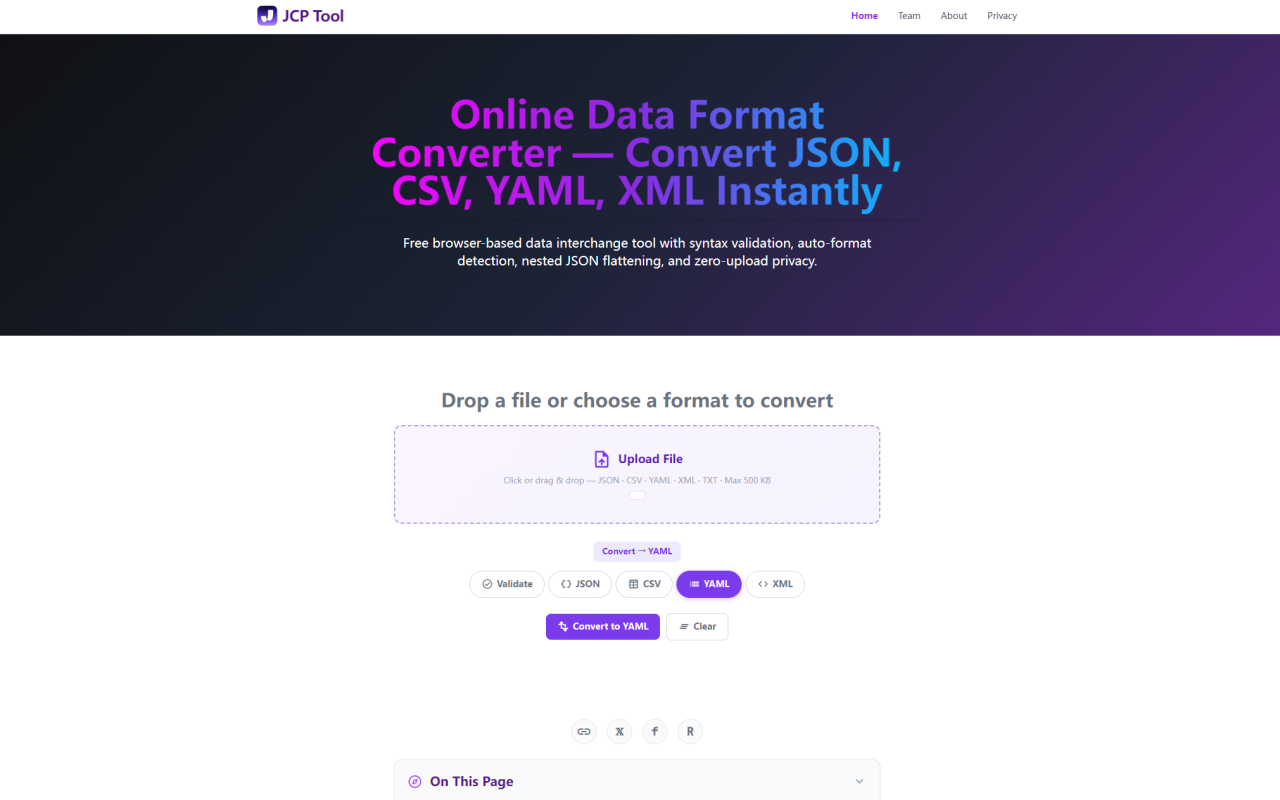
JCP Tool is a browser-based data format converter that handles JSON, CSV, YAML, and XML entirely on your local machine. Upon visiting the site at jcptool.com, I was greeted by a clean single-page interface with a large upload area and five format pills — Validate, JSON, CSV, YAML, XML. There is no signup gate, no pricing page (I checked; it returns a 404), and no nag screens. The tool is completely free and runs on a zero-server architecture, meaning every conversion happens inside your browser's JavaScript runtime. No data is uploaded anywhere. This makes it immediately useful for developers handling sensitive configuration files, data analysts working with API exports, and anyone who needs quick format conversions without installing bulky desktop tools. The about page reveals it was built by the 345tool engineering collective over five days in June 2026, and the entire converter engine (~956 lines of JavaScript) is publicly inspectable.
First Impressions: Interface and Onboarding
The interface follows a logical two-step flow. On the left side, you have a file upload bar that accepts drag-and-drop or click-to-browse (max 500KB), plus a large textarea for pasting raw data. The format pills sit above the textarea with Validate selected by default. Select a target format — say JSON if you're pasting CSV — and a single Convert button triggers the operation. The right panel displays a 1:1.414 A4-proportioned preview canvas with syntax-highlighted output. Success states show a green header, errors show red with line-level diagnostics, and validation-only runs show blue. A Download button appears only after a successful conversion. Everything is responsive and collapses gracefully at 640px for mobile use. I tested pasting a messy YAML file from a Docker Compose project, and the auto-detection correctly identified it before I even clicked convert. The whole process took about two seconds.
Core Features: Auto-Detection, 12-Path Conversion, and Flattening
JCP Tool's standout feature is its auto-detection engine. It tests input against JSON first (using native JSON.parse()), then XML (via DOMParser with a < pre-filter), then YAML (via the js-yaml v4.1.0 library), and finally CSV (via a custom RFC 4180 parser). The first successful parse wins, minimizing false positives. This means you can paste raw data without specifying what format it is — the tool figures it out. Once detected, you can convert across any of the 12 paths (4 sources × 3 targets, excluding self-conversion). Each path handles structural differences intelligently: JSON to CSV normalizes arrays of objects into header-prefixed tables; CSV to JSON treats the first row as field names; XML to JSON preserves attributes under @attributes keys; YAML to JSON resolves anchors and aliases. For deeply nested JSON, a checkbox labeled "Flatten nested JSON (dot-path keys)" transforms structures like { "user": { "profile": { "name": "Alice" } } } into { "user.profile.name": "Alice" } — essential when exporting API responses to flat spreadsheet tools. The unflatten reverse operation is also supported internally.
Privacy Architecture: What Zero-Upload Actually Means
JCP Tool makes a strong privacy claim: every byte stays in your browser. I verified this by opening Chrome's DevTools Network panel, pasting sensitive test data, and running a JSON-to-CSV conversion. Zero outbound requests appeared. The tool loads only three external resources: Google Fonts for typography, Material Symbols for icons, and js-yaml v4.1.0 from CDN for YAML support. There is a GA4 analytics tag (G-2NK5059S76) for aggregated page-view metrics, but it cannot access your input data or conversion results. No cookies are set for tracking. No user accounts, no session storage, no database backend exist. The source code at /js/converter.js contains zero fetch() or XMLHttpRequest calls. If you disconnect from the internet after the initial page load, all JSON, CSV, and XML conversions continue working offline indefinitely — YAML requires the CDN library, so that path gracefully degrades with a clear error message if the library fails to load. For data compliance officers or developers handling PII-confidential configs, this architecture eliminates an entire class of data-exposure risk.
Limitations and Edge Cases to Consider
No tool is perfect, and JCP Tool has honest constraints. The 500KB file upload cap means large production datasets won't work here — the FAQ explicitly notes this is intentional to keep the interface snappy. For files above that threshold, alternatives like jq, yq, or xmlstarlet are recommended. YAML support depends on a CDN-hosted library, so if you're behind a strict corporate firewall that blocks cdn.jsdelivr.net, YAML parsing and conversion will fail (though JSON, CSV, and XML paths remain fully operational). The CSV parser, while RFC 4180-compliant, may struggle with truly malformed spreadsheets; I threw a few Excel oddities at it — cells with embedded line breaks and inconsistent column counts — and while it handled them better than most free tools, the preview output showed empty strings for missing columns rather than warning about structural inconsistency. Finally, there is no batch conversion or bulk file processing: each upload is a one-at-a-time affair. These limitations are reasonable for a free, client-side utility, but worth knowing before you rely on it for heavy lifting.
Pricing: Truly Free and No Hidden Costs
Pricing details are not publicly listed on the website because the tool costs nothing. I visited the standard pricing URL and received a 404. The development journal confirms the platform was built under a "zero-server-footprint mandate" without any backend, API endpoints, or subscription infrastructure. There are no premium tiers, no pro features locked behind a paywall, and no usage limits beyond the 500KB file size cap. The only potential cost is your time reading the excellent FAQ section (which expands into 10 technical Q&A items covering every conversion path). JCP Tool is maintained by the 345tool team as a free utility — you can use it indefinitely without creating an account.
Bottom Line: A Solid Swiss Army Knife for Format Conversion
JCP Tool fills a genuine gap in the developer tool landscape: a fast, private, no-install data format converter that works offline for the most common text-based formats. The auto-detection is reliable, the flatten/unflatten feature genuinely helps when wrestling with deeply nested API responses, and the client-side privacy model is transparent and verifiable. It won't replace dedicated CLI tools for heavy workloads, but for everyday conversions — turning a YAML config into JSON, flattening a NoSQL export to CSV, validating XML before a production deploy — it's hard to beat a zero-friction, zero-cost solution. Visit JCP Tool at https://jcptool.com to explore it yourself.


Comments