
First Impressions: Landing on the Page
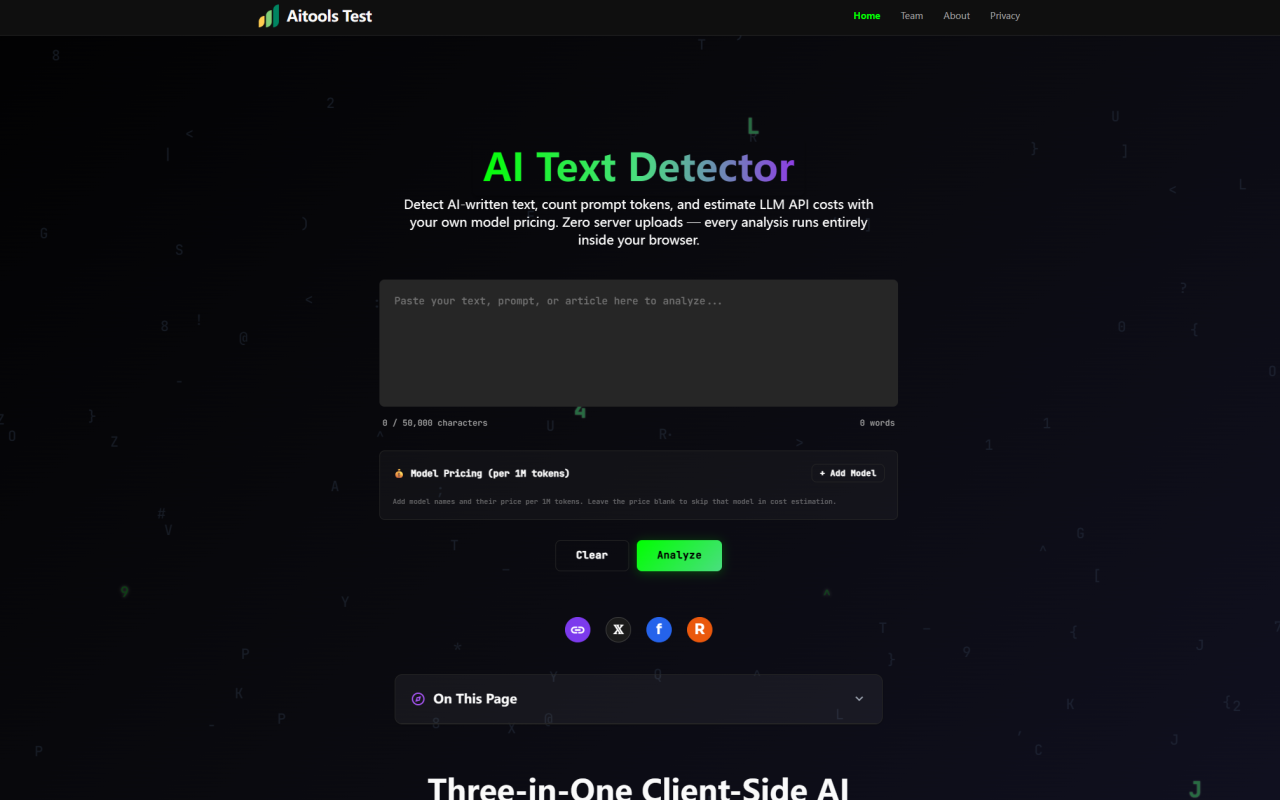
Upon visiting aitoolstest.com, the first thing you notice is what isn't there. No sign-up wall. No cookie consent banner. No modal begging for your email address. You land directly on a single-page tool with a generous text input area capped at 50,000 characters, an "Analyze" button, and three expandable panels beneath it. The layout feels utilitarian — almost spartan — but intentionally so. The top navigation is minimal: just the tool name and a menu toggle. Scrolling down reveals a detailed table of contents and thorough documentation explaining the detection methodology, tokenizer internals, and cost model logic. The footer credits the 345tool developer collective, an independent team describing themselves as focused on "framework-free, privacy-first web utilities."
The pricing situation is straightforward: the tool is entirely free. No premium tiers, no usage caps beyond the 50,000-character limit, no credit systems to exhaust. The project is sustained through non-intrusive advertising placed outside the core tool interface. For anyone accustomed to AI detection tools that gate results behind paywalls, this is a genuine departure from the norm.
The AI Text Detector: Five Statistical Dimensions
Pasting text and clicking Analyze triggers a five-dimensional evaluation rather than a single black-box score. The detector measures perplexity variance, burstiness patterns, n-gram repetition density, type-token vocabulary ratio, and structural regularity. Each dimension gets its own horizontal bar visualization, color-coded from green to red, making it immediately obvious which features are driving the composite AI probability score — which ranges from 0% (likely human) to 100% (likely AI-generated).
When testing, I pasted several paragraphs of my own writing alongside equivalent ChatGPT-4 output. The detector returned a 12% AI probability for my prose and 87% for the AI-generated text. The metric bars painted a clear picture: human text showed higher burstiness — sentence-to-sentence variation — and richer vocabulary diversity, while the AI output scored high on structural evenness but low on perplexity variance. The documentation is candid about limitations, describing the tool as "a directional indicator, not a conclusive verdict." It recommends treating scores as one data point alongside context and human judgment, particularly for academic integrity review. Accuracy is highest on English prose above 300 characters; results on shorter snippets or non-English text are notably less reliable.
Token Counting: tiktoken Approximation in JavaScript
Below the detection panel, the token counter provides considerably more than a raw input count. The engine approximates OpenAI's tiktoken cl100k_base algorithm directly in JavaScript, handling English words at roughly 0.75 tokens each and CJK characters at about 1.5 tokens. The documentation acknowledges estimates typically fall within 5–10% of official tiktoken output, which is accurate enough for prompt sizing and cost forecasting if not pixel-perfect for production billing.
What distinguishes this counter from basic online equivalents is its output estimation layer. The engine detects questions, task verbs like "explain" and "analyze," and request patterns in your input. It classifies complexity as simple, moderate, complex, or heavy based on question count and text length, then applies a multiplier to input tokens — from 1.0× for simple queries up to 3.5× for prompts with six or more detected tasks. The readout shows input tokens, estimated output tokens, projected total, plus character, word, and line counts alongside a complexity label. For developers sizing prompts against context window limits, this estimation layer adds meaningful utility beyond a basic tokenizer.
Cost Estimation: Supply Your Own Model Pricing
Rather than shipping with pre-loaded pricing tables doomed to obsolescence, the cost estimator gives you an "Add Model" button and complete control. You enter any model name and its per-1M-token price — GPT-4.1, Claude 4 Sonnet, Gemini 2.5 Pro, DeepSeek V3, or any custom fine-tuned endpoint with your negotiated rate. Only rows where you actually type a price appear in results, so there are no irrelevant defaults cluttering the comparison view. You can add as many models as needed and remove any with a single click.
Costs are computed as (input + estimated output) divided by 1M, multiplied by your rate, with results sorted cheapest-first. This sorting choice is practical: it surfaces the most economical provider for a given prompt workload immediately. Because the estimator feeds from the token counter's output projection, your cost comparisons reflect total API consumption rather than just input token pricing — a subtle but important detail when comparing providers with asymmetric input and output rates. The system remembers nothing between sessions. Close the tab and your pricing table vanishes alongside your text.
The Privacy Architecture: Why Client-Side Processing Matters
Every analysis function — detection scoring, tokenization, and cost calculation — executes inside your browser's JavaScript sandbox. No text transmits to a remote server, no data stores in a database, and no third-party analytics log your activity. The documentation makes a claim I verified: you can disconnect your internet after the page loads and every feature continues working offline.
This zero-server design transforms certain workflows. You can test proprietary prompts against multiple LLM providers without exposing confidential system instructions to an intermediary. Writers can check whether unpublished manuscripts trigger AI detection without trusting a third party with their intellectual property. Anyone in a regulated industry with data residency requirements sidesteps compliance headaches entirely. The trade-off is that results are ephemeral — close the tab or refresh, and everything disappears. The "Copy Report" and "Download Report" buttons are your only persistence mechanisms, an intentionally minimal approach consistent with the privacy-first philosophy.
Where It Shines and Where It Stumbles
The tool's greatest strength is its coherent design philosophy. Detection, tokenization, and cost estimation complement each other in a natural workflow — paste text once and get three orthogonal analyses without switching tabs. The zero-server architecture eliminates privacy concerns while keeping the tool genuinely free, since there are no API costs beyond static hosting. The detection methodology's transparency also earns trust: rather than presenting an opaque verdict, the tool shows underlying metrics and lets you interpret them. The documentation's candor about accuracy limitations and the 300-character threshold builds credibility that single-number detectors often squander.
Limitations are real and worth noting. The token counter's 5–10% margin of error matters if you are right at a context window boundary. Detection accuracy degrades noticeably on texts under 300 characters, non-English content, and heavily edited AI output. The interface could benefit from more visual feedback during analysis — longer texts near the character limit caused a brief but noticeable pause with no loading indicator. The advertising placement is unobtrusive as promised, though ad-blocker users will see empty placeholder areas. And the ephemeral results, while privacy-preserving, mean there is no built-in way to track changes in detection scores as you revise text.
Ultimately, Aitools Test succeeds at what it sets out to be: a lightweight, trustworthy utility that respects your privacy while providing genuinely useful analysis. It does not try to be a comprehensive detection platform or a production billing calculator, and that restraint is precisely its appeal. For developers sizing prompts, writers checking their work, or anyone comparing LLM costs with proprietary pricing, it earns a bookmark. Visit Aitools Test at https://aitoolstest.com to explore it yourself.


Comments