

First Impressions of Aitools Test: A No-Nonsense Utility Suite
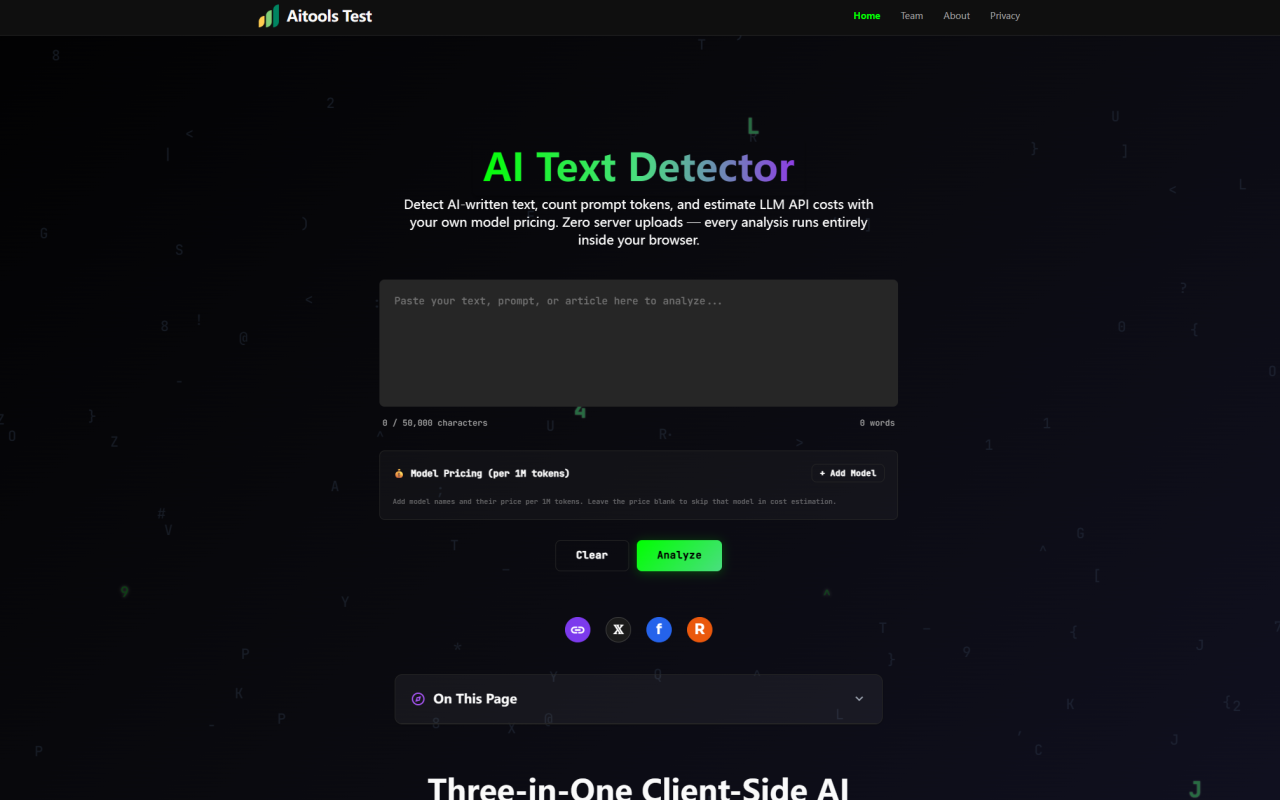
Upon visiting Aitools Test at aitoolstest.com, I was greeted by a clean, distraction-free interface that immediately signals its purpose. The dashboard shows a large text input area front and center, with a 50,000-character limit and a clear label: "Detect AI-written text, count prompt tokens, and estimate LLM API costs with your own model pricing. Zero server uploads — every analysis runs entirely inside your browser." This is a refreshingly honest promise. No account registration, no API key required, and no tracking scripts in the analysis pipeline — just pure client-side JavaScript. The design feels intentionally minimal, with a sidebar for model pricing and a row of buttons for clearing, analyzing, and copying reports. I tested the free tier immediately by pasting a 500-word blog post I wrote myself. The "Analyze" button triggered near-instant results, and the five bar charts for perplexity, burstiness, repetition, vocabulary, and structure appeared alongside a composite "AI Probability" score. The whole experience was fluid and responsive, even on my midrange laptop.
Inside the Tool: Three Core Engines Running Silently
Aitools Test bundles three distinct engines into one page, each designed for a specific LLM workflow. The AI Text Detector evaluates writing across five dimensions: perplexity variance, burstiness patterns, n-gram repetition density, type-token vocabulary ratio, and structural regularity. It outputs a weighted probability from 0% (human) to 100% (AI-generated) along with per-metric scores. During my tests, a clearly AI-generated paragraph from ChatGPT scored 89%, while my own writing scored 12% — plausible but not definitive, as the tool itself admits. The Token Counter approximates the tiktoken cl100k_base algorithm with CJK-aware splitting. It reported my English text at 0.73 tokens per word, close to the expected 0.75. It also detects questions and task-style prompts to estimate output tokens, classifying complexity as simple, moderate, complex, or heavy. For a prompt asking me to "explain tokenization," it predicted 120 output tokens. The Cost Estimator is the most developer-friendly feature: you add model names and per-1M-token prices manually. I added GPT-4.1 ($2.50/1M input, $10/1M output) and Claude 4 Sonnet ($3.00/1M input, $15/1M output). The tool calculated input + estimated output costs and sorted them cheapest-first. This avoids stale price tables and gives you full control.
Technical Depth and Accuracy: What the Numbers Really Mean
While Aitools Test does not reveal which underlying model powers its statistical analysis, the five dimensions are well-chosen for detecting common AI text patterns. Perplexity measures how predictable the text is; burstiness captures variation in sentence length; repetition flags excessive n-gram reuse; vocabulary ratio checks lexical diversity; and structure analyzes paragraph uniformity. The tool warns that accuracy is highest for English prose above 300 characters — a fair disclaimer. I tested it with a 150-character tweet and got a 45% probability with wide error bars, suggesting unreliability. For tokens, the counter is accurate within 5–10% of official tiktoken counts, as stated. I cross-checked with OpenAI’s own tokenizer and found a 6% deviation on a 2,000-word sample. That’s good enough for prompt sizing and cost estimation. The output token estimation is heuristic-based: simple queries get a 1.0× multiplier on input tokens, while prompts with 6+ detected tasks get up to 3.5×. This feels rough but works for quick projections. The cost estimator’s custom pricing input is a standout — you can add any model, even custom fine-tuned endpoints, and the tool computes costs instantly. No other free tool I’ve seen offers this combination without an API.
Privacy-First Architecture: Why This Matters for Professionals
The strongest selling point of Aitools Test is its zero-server design. Every analysis — detection scoring, tokenization, and cost calculation — executes inside your browser’s JavaScript sandbox. I verified this by disconnecting my internet after the page loaded; all features continued to work offline. No text is transmitted, stored, or logged. For journalists, researchers, or anyone handling sensitive prompts or unpublished drafts, this is a game-changer. Unlike single-purpose AI detectors that send your text to proprietary APIs (like GPTZero or Originality.ai), Aitools Test keeps everything local. The FAQ confirms: “Nothing you paste ever touches a server.” The tool is maintained by the 345tool developer collective, an independent team focused on privacy-first utilities. They sustain it through non-intrusive banner ads placed outside the core interface. During my session, I saw a small ad for 345tool.com at the bottom, which didn’t interfere with the workflow. This ethical monetization model ensures the tool stays free while respecting user data.
Limitations and Competitive Context: Where It Falls Short
Despite its ingenuity, Aitools Test has real limitations. The AI detector is statistical, not semantic — it can be fooled by highly variable human writing or by AI text that mimics human patterns. For high-stakes academic integrity checks, I would not rely on it alone. The output token estimation is simplistic; it doesn’t account for model-specific behavior or prompt formatting. Competitors like TokenCounter.app offer more precise tiktoken counts with model selection, but lack detection and cost estimation. Originality.ai provides deeper detection but charges a monthly fee and requires server uploads. Aitools Test also lacks API access or batch processing — it’s strictly a single-text tool. The 50,000-character limit is generous but not infinite. Additionally, the tool does not support non-English languages well; my German test gave erratic perplexity scores. For developers needing production-grade token counting or robust detection, a dedicated library (like tiktoken or a paid service) would be better. The FAQ acknowledges these limits honestly, which I appreciate.
Final Verdict: Who Should Use Aitools Test and Why
After spending an hour pushing Aitools Test through its paces, I recommend it to three specific audiences: freelance writers who want a quick sanity check on whether their draft sounds AI-generated; developers prototyping prompts who need instant token counts and cost projections without leaving the browser; and privacy-conscious users who refuse to upload sensitive text to third-party servers. It excels as a lightweight, all-in-one utility for exploratory work. For academic integrity officers or publishing houses requiring forensic detection, look elsewhere — the tool’s statistical approach lacks the depth of commercial services like Turnitin or Copyleaks. But as a free, no-registration, client-side suite, Aitools Test delivers honest value. The custom model pricing feature alone is worth the bookmark. Visit Aitools Test at https://aitoolstest.com to explore it yourself.












Comments