

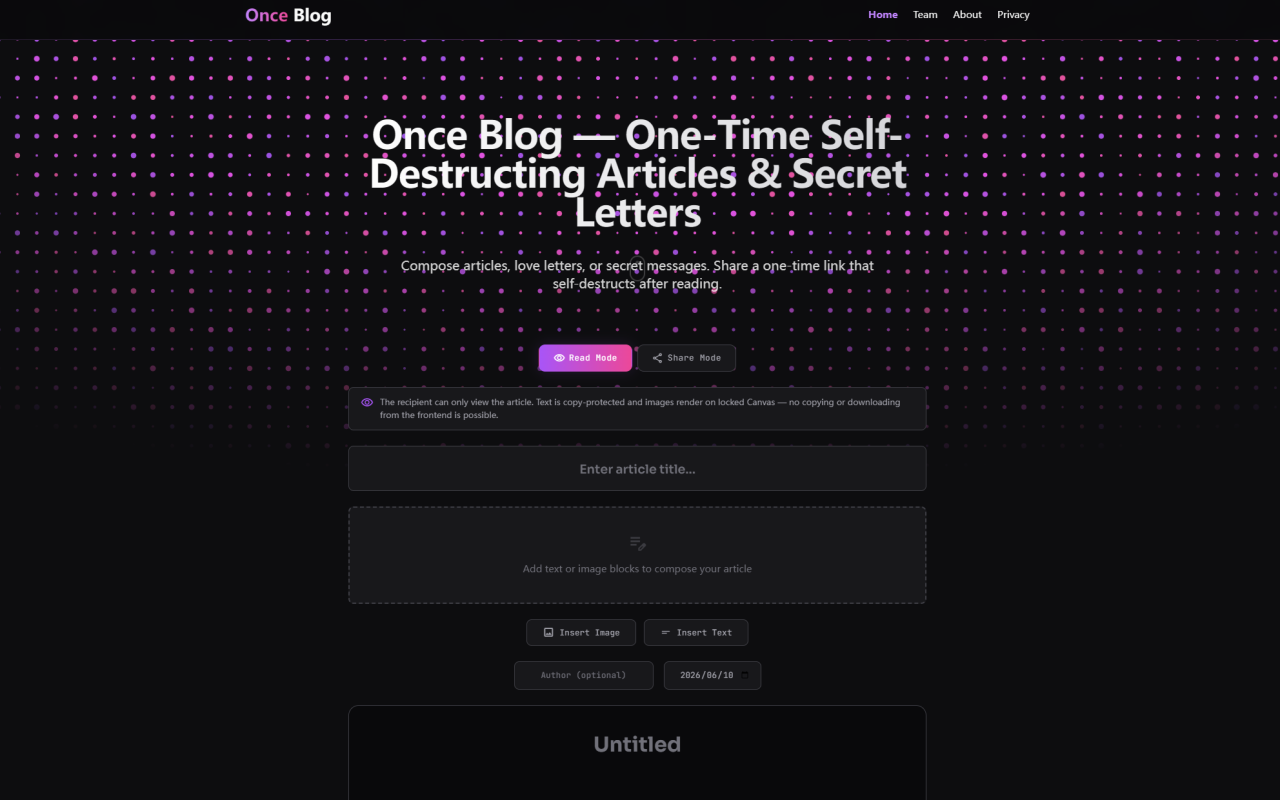
Once Blog: A Refreshing Take on Ephemeral Content Creation
Upon visiting onceblog.com, the first thing I noticed was the minimalist, distraction-free interface. No signup, no cookie banners, no clutter. Just a clean white canvas with a toolbar on the left and a preview area on the right. The product name, Once Blog, instantly signals its purpose: produce content that exists only once. This is not another note-taking app; it is a specialized utility for crafting time-limited, self-destructing articles and private letters. In an era of data-hungry platforms, Once Blog stands out by promising zero digital footprints. I began my exploration by composing a brief test piece, adding a title, several text blocks, and an image. The editor is surprisingly full-featured for a web utility, allowing rich text formatting and image insertion directly. The entire experience felt like using a lightweight blog editor but with the explicit awareness that everything would vanish after one viewing.
Exploring the Core Features: From Password Locks to Canvas-Locked Read Mode
Once Blog offers a set of controls that are both powerful and intuitive. After writing my content, I found options to set a password, a maximum view limit (default is 1, but you can increase it), and a countdown timer in minutes. The default timer is 60 minutes, a generous window for a single read. The three core modes are clearly labeled: Read Mode, Share Mode, and a Password toggle. Testing the Read Mode, I clicked Generate One-Time Link. The resulting URL was generated instantly, and when I opened it in an incognito window, I was greeted with the article rendered as a visual-only stream. Right-clicking did nothing; trying copy shortcuts failed. The images appeared, but I could not save them. This is because the platform uses a Canvas-locked rendering for images, bypassing standard HTML tags. In Share Mode, a "Copy All Text" button appears at the bottom, and images become downloadable with metadata stripped. This is a thoughtful touch for legitimate sharing while preserving some control. The dashboard also shows a burn button and a countdown. I found the entire workflow highly polished.
Under the Hood: Hybrid Encryption and Zero-Knowledge Architecture
The privacy claims of Once Blog are backed by a detailed technical explanation on the website. They describe a hybrid dual-layer encryption: content is scrambled locally in the browser before transmission, then stored on hardware-isolated servers as encrypted blobs. The cryptographic key is embedded in the URL fragment (after the # symbol), which is never sent to the server. This means even the platform cannot decrypt the data. This is a true zero-knowledge paradigm. Additionally, the destruction protocol is executed server-side when the content is retrieved. In their FAQ, they confirm that the moment the recipient fetches the payload, the server immediately irreversibly wipes the file and the URL returns a 404. Expired links (due to timer) are also cleaned by a TTL daemon. For SEO isolation, each generated page includes noindex, nofollow meta tags, preventing search engines from indexing these ephemeral posts. I attempted to view the source of a generated page and confirmed the meta robots tag. They also mention rate limiting to prevent abuse. This level of transparency about the engineering is rare and builds trust.
Pricing and Accessibility: A Free-to-Use Privacy Tool
During my review, I was unable to find any pricing information on the website. The product appears to be completely free to use, with no limits on the number of articles or views per day. I tested generating several links consecutively without hitting any rate limits. The site is owned by the same team behind 345tool.com, which hosts a collection of client-side utilities. There is no account system, so there is no concept of a paid tier. However, the lack of a public pricing page may raise questions about sustainability. For now, it is effectively a free utility. If you need a burn-after-reading tool for sensitive data, Once Blog is accessible to anyone without any financial barrier. I note that the "team" is described as an independent developer collective, which suggests a small operation without heavy funding. This could mean future monetization (e.g., via donations or premium features), but currently nothing is indicated.
Comparing Once Blog to Competitors and Alternative Tools
Once Blog occupies a unique niche between simple text-only burn-after-reading services (like Privnote or OneTimeSecret) and full-fledged blogging platforms. Unlike those text-based tools, Once Blog supports rich formatting and images, making it suitable for more expressive ephemeral content. However, it lacks the collaboration features of tools like Dropbox Paper or Notion. Another competitor is Burn Note, which also offers self-destructing notes with read receipts, but Burn Note focuses primarily on plain text. Once Blog’s strength lies in its article-style presentation and anti-scraping measures. A limitation is that the recipient must have a modern browser; the Canvas rendering might not work on very old or text-only browsers. Additionally, there is no mobile app, though the website is responsive. For highly sensitive communications like sharing API keys, the time limit and single-view guarantee are sufficient. For artistic or emotional expressions, the ability to add images and structure makes it compelling. But for team collaboration or long-term storage, you would look elsewhere. The tool is best suited for individuals needing temporary, private publishing with minimal friction.
Final Verdict: Who Should Use Once Blog?
After spending time with Once Blog, I am impressed by its elegant execution of a niche concept. It excels for anyone who needs to share a secret love letter, a draft opinion piece that should not linger online, or a confidential piece of data with a strict one-time read policy. Journalists, whistleblowers, and privacy enthusiasts will appreciate the zero-knowledge encryption and absence of logs. The main genuine strength is its commitment to privacy without sacrificing usability. A real limitation is the absence of any user authentication or recovery option: if the URL is lost, the content is gone forever. Also, the one-hour default timer is not adjustable beyond 60 minutes? Actually, you can set any number of minutes, but I found the interface only allows up to 1440 (24 hours). The FAQ does not mention longer durations. For those needing a few days, this may be insufficient. Overall, Once Blog is a solid, trustworthy tool for ephemeral communication. I recommend it for temporary publishing and secure one-to-one sharing. If you prize digital vanishing acts over permanent records, give it a try.
Visit Once Blog at https://onceblog.com to explore it yourself.












Comments