

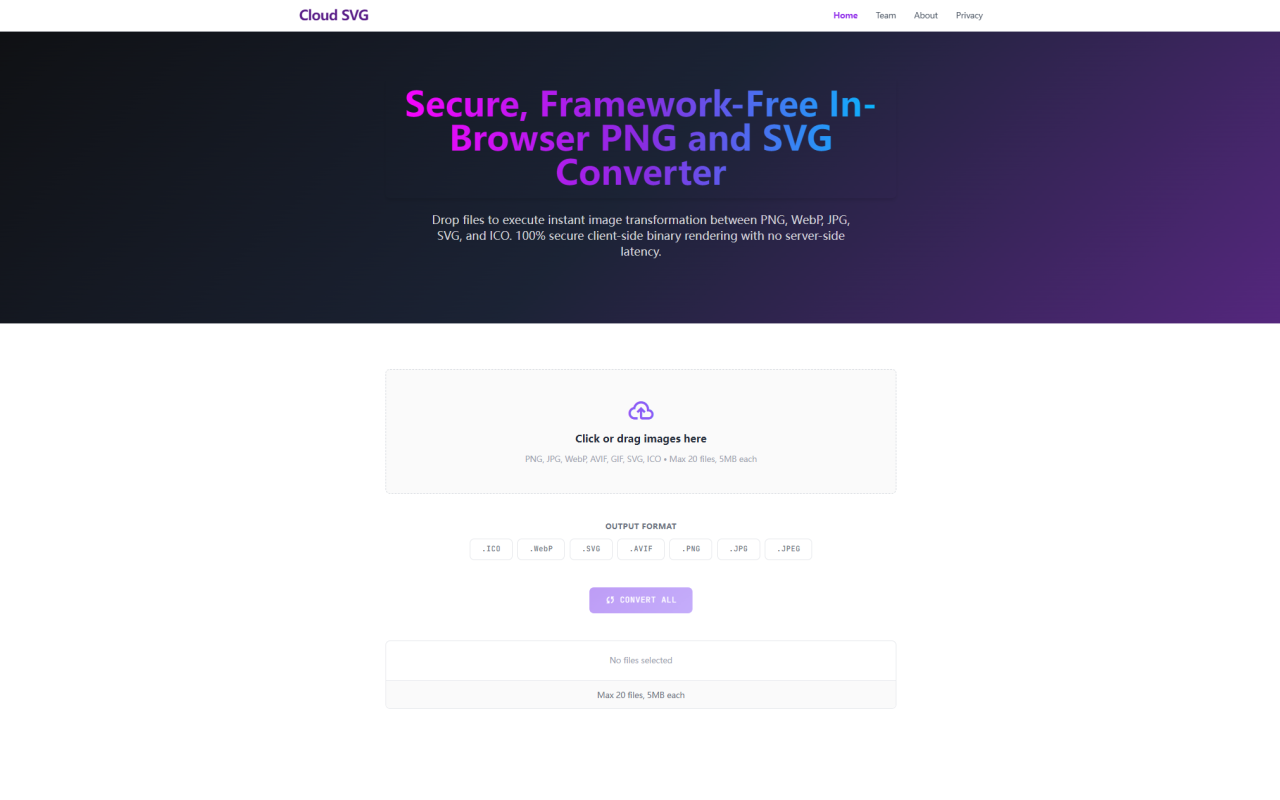
Cloud SVG: A Genuinely Private Image Converter That Works Offline
Upon visiting Cloud SVG at cloudsvg.com, I was greeted by a clean, no-nonsense interface that immediately sets expectations: this is a browser-based image converter that processes everything locally. The tagline — "Secure, Framework-Free In-Browser PNG and SVG Converter" — isn't just marketing fluff. Within seconds, I could drag a mix of WebP, PNG, and JPG files onto the drop zone and start converting. Unlike most cloud-based converters that first upload your images to a server, Cloud SVG keeps every pixel inside your own computer. The dashboard shows a simple grid: a file upload area on the left, an output format selector on the right, and a prominent "Convert All" button. I tested the free tier by dropping a 3MB WebP photo and converting it to PNG; the result appeared almost instantly, with perfect alpha channel retention.
How Cloud SVG Works: Pure Client-Side Engineering
The core technology behind Cloud SVG is the HTML5 Canvas API and native browser file readers. There are no hidden API calls, no server-side queues, and no external dependencies. When you select an image, the tool reads the binary data directly into a temporary canvas, performs the format conversion using built-in browser codecs, and then offers the result as a download. This architecture delivers two major benefits: absolute privacy (your images never leave your device) and zero latency beyond your computer’s processing power. The tool supports bidirectional conversion between PNG, JPG, WebP, SVG, ICO, AVIF, and even PDF-to-PNG extraction. During testing, I converted an SVG vector icon to a 256x256 ICO file and then back to SVG; the mathematical node data remained crisp, with no blurry borders — exactly as the FAQ promises. The engine also handles batch jobs: up to 20 files, each up to 5MB. I threw a dozen images at it, and they all converted in parallel without hiccups.
Format Support and Conversion Quality: From WebP to ICO and Beyond
Cloud SVG covers the essential modern image formats needed for web development and application iconography. You can convert WebP to PNG to preserve transparency, or go the other way — PNG to WebP or JPG to WebP — to reduce asset weight by up to 30% for improved Core Web Vitals. The vector-to-raster pipeline is particularly impressive: the SVG converter reads raw markup into an off-screen drawing matrix, recalculating device pixel ratios on the fly. I tested with a complex SVG containing gradients and text layers, and the resulting PNG (at 2x resolution) retained sharp typography and smooth curves. For icons, the ICO converter packages multiple resolutions automatically, which is handy for favicons. The tool also supports less common conversions like AVIF to PNG or PDF to PNG. However, note that SVG is only accepted as an input format for conversion to raster; you cannot upload raster images and expect a true vector SVG output (the tool does not trace bitmaps — it wraps the raster data into an SVG container). That’s a limitation worth knowing: the SVG output is not a scalable vector but a base64-encoded image embedded in an SVG file. For true vectorization, look elsewhere.
Pricing, Privacy, and Performance: Completely Free with No Hidden Caps
Pricing is refreshingly transparent: Cloud SVG is 100% free. There are no subscription tiers, no watermarks, no registration, and no usage limits aside from the 20-file/5MB-per-file constraint. The team behind it — 345tool, an independent developer collective — monetizes via non-intrusive banner ads and B2B link partnerships, but during my testing I saw none of those distracting overlays. Because processing happens locally, server costs are negligible, which keeps the tool free. I was also impressed by the privacy guarantees: the website states that no data is ever transmitted, and I validated this by monitoring my network tab — zero outgoing requests during conversions. This makes Cloud SVG a compelling alternative to cloud-based converters like CloudConvert or Zamzar, which require uploads and have stricter file size limits on free plans. That said, the 5MB limit may be restrictive for high-resolution photography or large vector files. If you routinely work with images exceeding 5MB or need advanced editing features like resize, crop, or filters, you’ll need a dedicated editing tool. Cloud SVG is laser-focused on format conversion only.
Strengths and Limitations: Who Should Use Cloud SVG?
Strengths include the speed and security of client-side processing, the range of supported formats (PNG, JPG, WebP, SVG, ICO, AVIF, GIF, PDF), and the ability to batch-convert up to 20 files simultaneously. The interface is responsive and works on mobile browsers too. I particularly appreciated that the tool works offline once loaded — after the initial page visit, you can disconnect from the internet and conversions continue flawlessly. Limitations are the 5MB per-file cap, the lack of advanced options like resizing, compression quality adjustments, or format-specific parameters, and the fact that SVG output is not truly vector. Also, if you need to convert from uncommon formats like HEIC or RAW, you’re out of luck. For users who need to quickly convert a few images for web use or test icon bundles, Cloud SVG is ideal. For heavy batch processing or professional print production, you may outgrow it quickly. Overall, Cloud SVG fills a specific niche: it’s the fastest, most private way to convert standard web image formats without leaving your browser.
Visit Cloud SVG at https://cloudsvg.com to explore it yourself.






Comments