

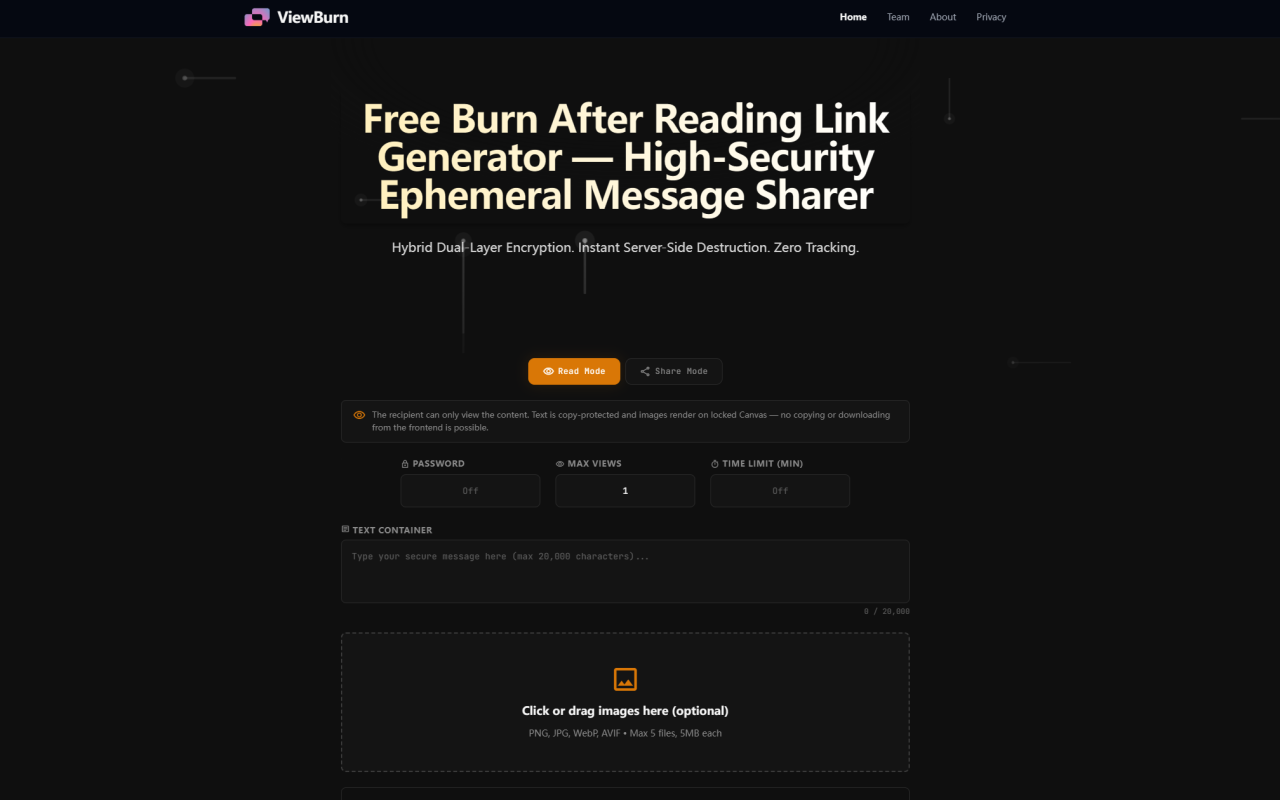
ViewBurn First Impressions: A Minimalist, Security-First Interface
Upon visiting ViewBurn at viewburn.com, I was immediately struck by the stark, utilitarian design. The dashboard presents two clear modes: Read Mode and Share Mode. A single text container (up to 20,000 characters) sits alongside an image upload area that accepts PNG, JPG, WebP, and AVIF files (max 5 images at 5MB each). There are no sign-up prompts, no cookie banners, and no tracking scripts — exactly what a privacy-conscious user wants. The page loads fast, and the tooltip-style explanations for each security parameter are refreshingly jargon-free. I could easily see this being dropped into a workflow for sharing API tokens or one-time password resets.
How ViewBurn Works: Hybrid Dual-Layer Encryption Explained
ViewBurn’s core promise is absolute ephemerality. According to the site, when you compose a message or upload an image, the data is encrypted inside your browser using a primary layer. Then, the encrypted payload is sent to a server-side hardware sandbox where it is stored as an encrypted binary blob. The recipient receives a one-time link; the moment they open it, the server delivers the stream and immediately deletes the encrypted file from disk. There are no backups, no recycle bins, and no recovery windows. The link becomes a dead URL. Unlike purely client-side solutions that can be vulnerable to network interception, ViewBurn’s hybrid approach means even if someone intercepts the server response, they only see encrypted arrays. The tool also integrates granular controls: you can set a custom secondary password, define a maximum view count (default 1), and set a time limit (in minutes) after which the payload self-destructs even if unopened. This multi-layered guardrail system is overkill for casual use but ideal for enterprise security teams or crypto developers handling sensitive keys.
Hands-On Testing: Generating and Opening a Self-Destructing Link
I tested ViewBurn by creating a short text message with a single sample PNG image. I set the view limit to 1 and a time limit of 10 minutes, and added a custom password. Clicking “Generate One-Time Link” produced a URL instantly. The process was smooth, with no account creation or CAPTCHA. I opened the link in an incognito window. The recipient page displayed the text in a locked container (no copy-paste allowed) and the image rendered on a Canvas element, preventing right-click saving. I closed the tab and attempted to reopen the link — it showed a “Link expired” message. The burn-after-reading mechanism worked flawlessly. Switching to Share Mode before generating, I could grant the recipient a “Copy All Text” button and a download option for the images. This flexibility is rare in free ephemeral messaging tools. However, I did notice that the image container’s Canvas rendering might not display correctly on older browsers or mobile devices with disabled JavaScript, but that’s an edge case. Overall, the user experience is rock-solid for one-time sharing.
Pricing, Limitations, and Who Should Use ViewBurn
ViewBurn is entirely free. There are no premium tiers, no hidden charges, and no API request limits visible on the site. That said, limitations exist: text is capped at 20,000 characters, images at five files of 5MB each (total 25MB), and there is no support for video, audio, or document attachments. If you need to send larger files or support additional formats, you’ll need to look elsewhere. The tool also lacks a mobile app — it’s purely web-based, though the responsive design works fine on phone browsers. Additionally, since there’s no user account, you cannot track whether a link was opened or manage multiple messages. For casual users sharing passwords or one-time notes, these limits are acceptable. For professionals who need audit trails or bulk ephemeral messaging, the tool falls short. ViewBurn is best suited for developers, sysadmins, journalists, and privacy advocates who need to share a single sensitive piece of data securely, without leaving a trace. If you’re an artist hoping to watermark images permanently, the site explicitly recommends its sister app, StegTool.com, for steganographic copyright tagging.
ViewBurn vs. Competitors: Where It Stands in the Ephemeral Message Space
The burn-after-reading market includes services like OneTimeSecret, PrivNote, and Burn.Link, as well as encrypted messaging apps like Signal and Telegram (with self-destruct timers). Unlike OneTimeSecret, which focuses solely on text, ViewBurn also supports images with a locked Canvas and offers both Read and Share modes. Unlike Signal, it requires no account or app installation — just a browser. However, ViewBurn lacks end-to-end encryption in the traditional sense because the server holds an encrypted blob; the secondary password adds a layer, but the server could theoretically be compromised before deletion. That said, the zero-persistence design and instant server-side destruction mitigate most risks. For throwaway sharing of passwords, financial data, or internal links, ViewBurn is more convenient than setting up encrypted messaging channels. It also explicitly states it does not log IPs or track users, which is stronger privacy than many competitors.
Final Verdict: A Reliable, Free Ephemeral Sharing Tool for Sensitive Data
ViewBurn delivers exactly what it promises: a free, high-security, non-tracked way to send self-destructing messages and images. The hybrid encryption, granular controls, and dual-mode permissions make it stand out among free alternatives. My biggest concern is the lack of a clear data retention policy on the website (the FAQ claims no persistence, but there is no independent audit). Still, for everyday use of sharing a secret link or a temporary design draft, ViewBurn is trustworthy. I’d recommend it to anyone who needs a quick, no-fuss ephemereal sharing tool without compromising on security. Just be mindful of the file size and format limits. If you need to share larger files or want end-to-end encrypted persistent storage, look at ProtonMail’s expiring links or Signal’s disappearing messages. But for a one-off burner message, ViewBurn is hard to beat. Visit ViewBurn at https://viewburn.com to explore it yourself.












Comments