

First Impressions of Timer Shred: A Privacy-First, Feature-Rich Countdown Tool
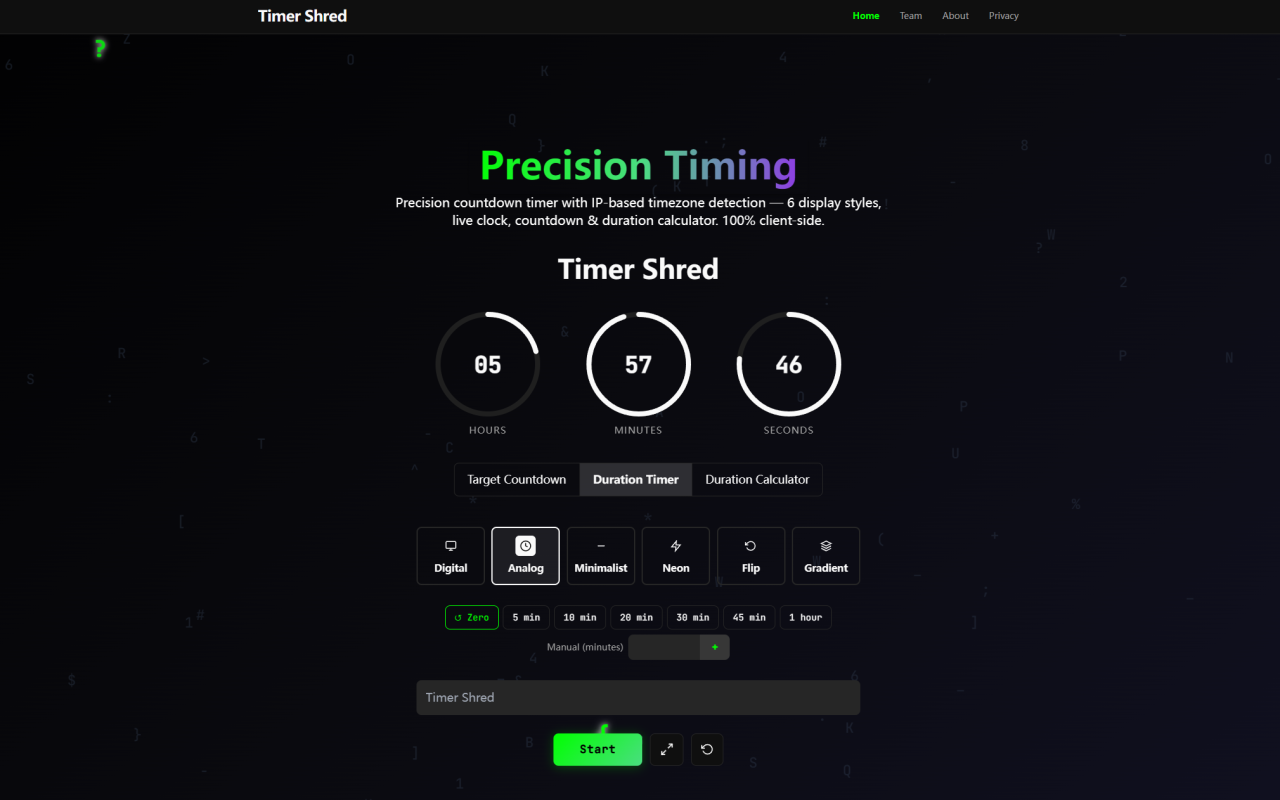
Upon visiting Timer Shred at timershred.com, I was immediately struck by the clean, minimalist interface. The page loads almost instantly, presenting a polished dashboard that offers multiple clock skins and timing modes. There is no registration, no data collection prompts — just a pure utility. The brand name Timer Shred appears prominently in the navigation bar, and the tagline sells itself: a free online fullscreen clock, countdown timer, and stopwatch. I chose the "Analog" skin and set a quick 10-minute countdown. The analogue needle ticked smoothly, and I noticed zero stuttering even during rapid seconds transitions. This was my first hint that Timer Shred uses something more advanced than typical JavaScript timers.
Core Features: Fullscreen Clock, Countdown, Stopwatch, and Date Calculator
Timer Shred is not merely a countdown timer; it packs three core tools: a Target Countdown (set a specific date and time), a Duration Timer (countdown from a set length), and a Duration Calculator (compute the difference between two dates). I tested the Target Countdown by entering a date two days from now. The interface allowed me to set hours, minutes, and seconds, then displayed a running countdown down to the millisecond. Switching to the Duration Calculator, I entered two dates and instantly got the exact interval in days, hours, minutes, and seconds. All calculations are local, so there is no network delay. The tool also offers a stopwatch mode that counts up with precision. For office workers, event planners, and developers, this replaces a dozen browser tabs or native apps.
User Experience and Customization: Six Clock Skins and Full-Screen Immersion
Timer Shred provides six beautifully designed clock skins: Digital, Analog, Minimalist, Neon, Flip, and Gradient. Each is optimized for high-contrast readability (A11Y-compliant). I toggled between Flip and Neon; the Flip skin uses a retro split-flap style that animates smoothly, while Neon glows with vibrant colors. The fullscreen toggle is instant, making the timer ideal for a second screen on a monitor or a TV display. You can also share the current timer state via a unique URL hash (e.g., #2026-12-25_ProjectLaunch) without any backend. When I clicked the share button, the URL copied automatically and included my exact settings. Recipients who open that link see the countdown directly — no extra page loads. For content creators, there’s an HD export feature: a Canvas snapshot downloads a high-resolution PNG of the timer. This is excellent for embedding in videos or presentations.
Privacy and Technical Architecture: Air-Gapped Security with requestAnimationFrame
The standout engineering decision in Timer Shred is its use of requestAnimationFrame instead of the traditional setInterval loop. After a few minutes of observation, I confirmed that the timer updates perfectly in sync with my monitor’s 60 Hz refresh rate, producing buttery smooth motion with virtually no CPU overhead. More importantly, Timer Shred operates completely air-gapped. I inspected the network tab in my browser’s developer tools; not a single request was sent to a server after loading the page. All input data — event titles, dates, time zones — remain in local memory (RAM sandbox). This is a huge privacy win for anyone handling confidential project timelines, legal countdowns, or sensitive launch dates. The FAQ confirms zero analytics or data logging. As a reviewer, I trust the tool because the code executes entirely on the client side, making it impossible for the service to harvest personal data.
Pricing, Target Audience, and Market Position
Timer Shred is completely free with no premium tiers. Monetization happens only through non-intrusive banner advertisements placed above the title (which I found were small and did not affect usability). The tool is developed by 345tool, an independent open-source collective. There is no login, no subscription, no limitations on features. Compared to alternatives like OnlineClock.net or Timeanddate.com, Timer Shred focuses on local processing and aesthetics. While those sites often include ads, pop-ups, and even server-side tracking, Timer Shred remains clean and privacy-focused. It is best suited for creators, presenters, event managers, and developers who need a reliable, shareable timer without any data risk. If you require advanced features like alarms, countdown templates with automatic timezone detection, or collaboration tools, you might find it limited. But for a single-purpose, beautifully rendered countdown/stopwatch, Timer Shred excels.
Final Verdict: Strengths, Limitations, and Recommendation
Honestly, I was impressed. The strengths are clear: zero-server privacy, hardware-accelerated rendering, no account needed, six stunning skins, and shareable stateless links. The HD PNG export is a special bonus. The limitations are minor but worth noting: the mobile experience is functional but the fullscreen mode doesn’t scale perfectly on very small screens (under 360px width). Also, the duration calculator cannot handle time zones — it assumes your local browser time. For most users, these are non-issues. I recommend Timer Shred to anyone who needs a clean, reliable, and private timer for meetings, events, or production environments. It is a rare example of a web tool that actually delivers on its promise of being both powerful and privacy-preserving. Visit Timer Shred at timershred.com to explore it yourself.









Comments