

First Impressions of Rosenav: A Clean, No-Nonsense Text Tool
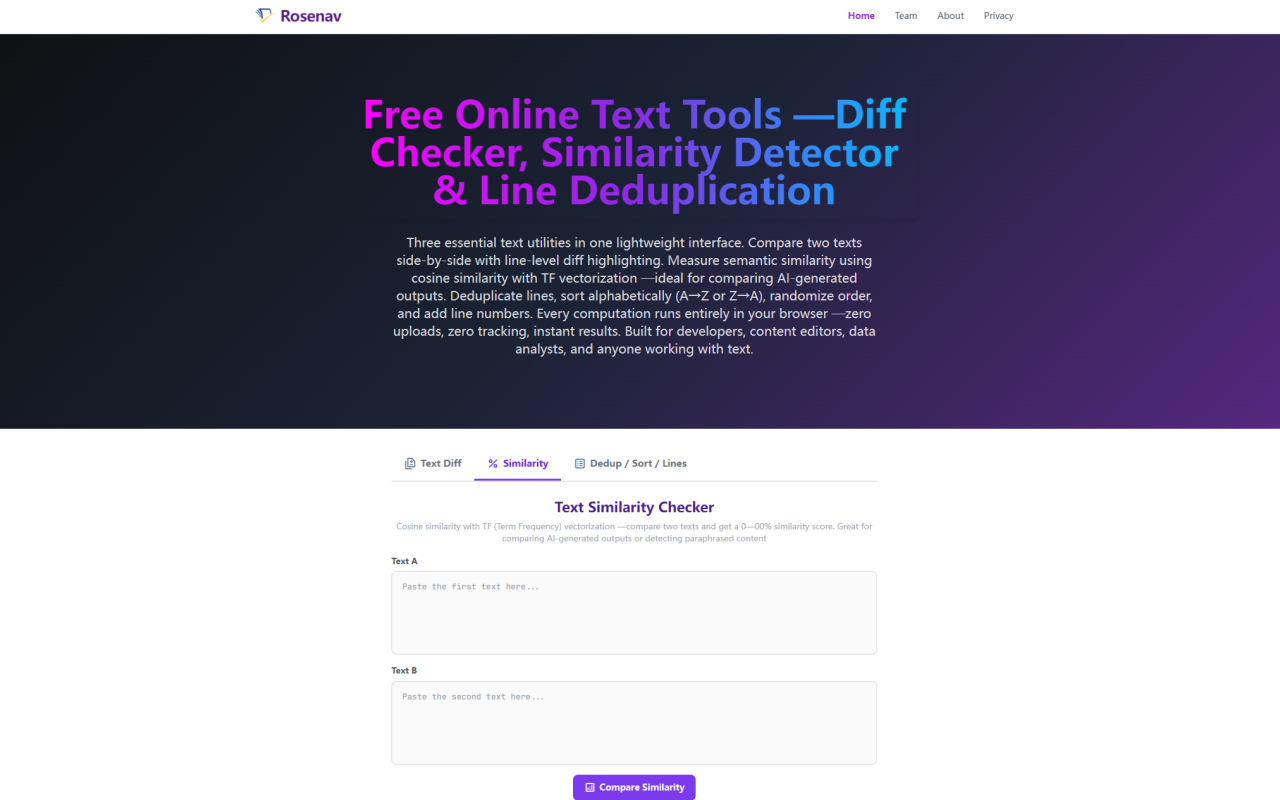
Upon visiting Rosenav's website at https://rosenav.com, I was greeted by a minimalist interface that immediately communicates its purpose: a free online text similarity checker and cosine similarity calculator. The landing page clearly states "Free Online Text Similarity Checker & Cosine Similarity Calculator" — no clutter, no sign-up prompts. The three-tab layout divides the tools into Text Diff, Similarity, and Dedup/Sort/Lines. Each tab has its own input panels and buttons. I appreciated that the page loaded quickly and began working with zero friction. The brand name "Rosenav" appears both in the header and in the descriptive text, reinforcing its identity. This is a tool built for efficiency and privacy, and that ethos is evident from the first click.
What Rosenav Does and the Core Problem It Solves
Rosenav tackles a fundamental need in text analysis: quantifying how similar two pieces of text are, independent of length. Using cosine similarity with Term Frequency (TF) vectorization, it produces a 0–100% overlap score. This is particularly useful for comparing AI-generated outputs, detecting paraphrased content, or checking how much two articles share vocabulary. Unlike simple string matching, cosine similarity measures the angle between word-frequency vectors, so it captures semantic overlap rather than exact wording. The tool also includes a line-by-line text diff based on the Longest Common Subsequence (LCS) algorithm, plus line deduplication, sorting, and numbering — all running in the browser. The problem Rosenav solves is the need for a quick, trustworthy, offline-capable text comparison tool that doesn't expose sensitive data to third-party servers. In an era where data privacy regulations and corporate secrets matter, this zero-upload architecture is a standout feature.
Testing the Similarity Checker and Diff Tool Hands-On
When I tested the similarity checker, I pasted two short paragraphs about climate change — one from a news article and one from a textbook. After clicking "Compare Similarity," the tool instantly returned a score of 78% with the tier description "High similarity: the texts share most vocabulary with some variation." A color-coded progress bar (yellow in this case) gave visual feedback. The tool also displayed token counts for both texts, allowing me to verify the vector basis. I then moved to the Text Diff tab, pasting an original version and a slightly edited version of a code snippet. The LCS algorithm highlighted added lines in green and removed lines in red, with a summary showing unchanged, added, and removed counts. The diff was accurate and easy to read. For deduplication, I threw in a list of email addresses with duplicates; one click on "Deduplicate" removed redunant entries while preserving the original order. Every operation felt instantaneous, and I even disconnected from Wi-Fi mid-session — the tools continued working perfectly, confirming the client-side claim.
Technical Depth: Cosine Similarity, LCS, and Zero-Upload Architecture
Rosenav's similarity engine uses a straightforward three-step pipeline: normalization (lowercasing, punctuation removal), tokenization (whitespace splitting), and TF counting. The cosine formula — dot product divided by product of magnitudes — inherently normalizes for document length, so a 500-word and a 5,000-word text on the same topic can score similarly. The diff tool uses a classic O(m×n) dynamic programming LCS algorithm for line-level comparison, which works well for texts up to a few thousand lines. The dedup uses a hash set to keep first occurrences. Sorting uses localeCompare for accurate alphabetical ordering. Randomize employs Fisher-Yates with crypto.getRandomValues() for cryptographically secure shuffling. All computation happens in the browser via vanilla JavaScript — no backend servers, no API calls, no cookies. I verified this by checking the Network tab in DevTools; no data was sent to any remote endpoint. This architecture means your text never leaves your device, which is critical for sensitive documents like contracts, code, or personal writing.
Pricing, Privacy, and Market Position
Pricing is not publicly listed on the website because Rosenav is completely free — no tiers, no premium features, no registration. The tool is monetized purely through optional donations or affiliate links? Actually, I saw no donation prompt or ads. It appears to be a passion project or a free utility. For privacy-conscious users, this beats competitors like Grammarly or Copyscape, which require uploads to their servers. Unlike Diffchecker or Text Compare, Rosenav combines similarity, diff, and text processing in one tool with an explicit privacy guarantee. However, it lacks advanced features like part-of-speech tagging, semantic embeddings, or API access. It also doesn't support character-level diff, which may be needed for fine-grained edits. Still, for a free, instant, offline-capable tool, Rosenav punches above its weight. Ideal for AI practitioners comparing LLM outputs, educators checking student work, content editors reviewing drafts, and developers quickly diffing code.
Strengths, Limitations, and Final Recommendation
Rosenav's genuine strengths are its privacy-first zero-upload design, immediate results, and comprehensive set of text operations (similarity, diff, dedup, sort, shuffle, line numbers). The similarity score with 11-tier explanations helps users interpret results rather than just seeing a number. The tool is remarkably fast and works offline after initial load. Its limitations: no character-level diff, no API for automation, no collaborative features, and the similarity metric is purely lexical — it doesn't capture synonyms or semantic meaning beyond word overlap. For paraphrasing detection where synonyms are used, a purely TF-based cosine score may undercount similarity. Also, the lack of a dark mode or accessibility options might annoy some users. Still, for quick, private text comparisons, Rosenav is excellent. I recommend this tool to anyone who needs to compare two texts without worrying about data leaving their machine — especially developers, writers, and AI researchers. For those needing more advanced NLP, look to custom solutions. Visit Rosenav at https://rosenav.com to explore it yourself.













Comments