

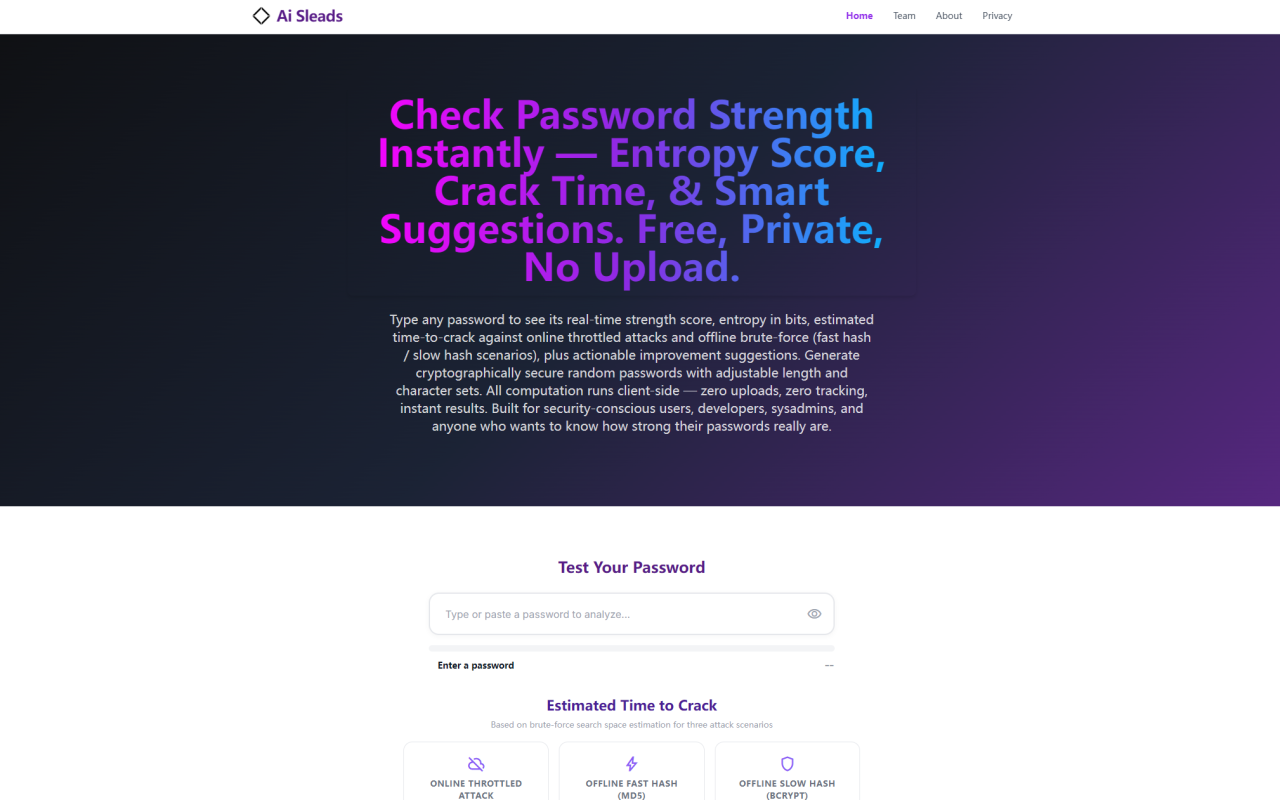
First Impressions of Ai Sleads' Password Strength Checker
Upon visiting aisleads.com, I was greeted by a clean, single-purpose interface dominated by a text input field labeled “Test Your Password” and a prominent progress bar. There are no sign-up prompts, no cookie banners, and no distracting ads—just a focused tool that immediately invites you to type something. The dashboard shows three crack-time scenario cards (Online Throttled, Offline Fast Hash, Offline Slow Hash) and a random password generator panel. I typed a test password—“Travel2024!”—and watched the strength bar animate from red to yellow in under a second, accompanied by a numeric score of 48/100 and an entropy reading of 42.3 bits. The estimated crack time for an offline fast hash (MD5) displayed “less than 1 second.” That stark visual feedback is exactly what you expect from a serious security tool.
How the Entropy and Crack Time Calculations Work
Ai Sleads uses the standard entropy formula H = L × log₂(N), where L is length and N is the character-set size. But the tool goes beyond pure math: it applies pattern penalties for common passwords, keyboard walks (Q/AZERTY), sequential runs, and character repetition. For my test password, the initial combinatorial entropy was ~46 bits, but after penalties for a year-like suffix pattern, it dropped to 42.3 bits. The tool displays entropy in bits alongside a 0–100 percentage score, mapped to five color-coded tiers from Very Weak (red) to Very Strong (bright green). The crack-time estimation models three realistic adversary speeds: 1,000 guesses/sec for a rate-limited online attack; 100 billion guesses/sec for offline MD5 on 8× RTX 4090 GPUs; and 10,000 guesses/sec for slow hashes like bcrypt cost 10. These numbers align with published hashcat benchmarks and give users a grounded sense of how their password would fare in different breach scenarios.
The Zero-Upload and Offline Architecture
Ai Sleads positions privacy as its core differentiator. Every computation runs locally via the Web Crypto API, and the page can be loaded once, then disconnected from the internet—it continues working fully offline. I verified this by opening Chrome DevTools’ Network tab while typing passwords: zero outbound requests appeared. The entire source is readable, unobfuscated JavaScript. This air-gapped design means security professionals in classified environments or penetration testers on isolated networks can use it without transmitting sensitive data. The random password generator relies on crypto.getRandomValues(), not Math.random(), ensuring cryptographically secure output. The tool stores nothing in localStorage, sessionStorage, or cookies related to password input—closing the tab literally erases every byte.
Strengths and Limitations
Strengths: The most obvious strength is privacy-first engineering—no accounts, no tracking, no server-side processing. The mathematical depth (entropy bits, three calibrated crack scenarios) is rare in free checkers that typically show only a vague “strong/weak” label. The pattern detection (common passwords, keyboard walks, sequences) catches the real-world mistakes that pure entropy misses. The tool also includes a built-in, customizable random password generator. The interface is responsive and instantly updates as you type or paste.
Limitations: The tool only analyzes one password at a time—there is no bulk upload or batch mode for auditing multiple credentials. It does not check passwords against the Have I Been Pwned breach database (the 800M+ pwned list). While the local blacklist covers 35 common passwords, that is a tiny fraction of real-world leaked credentials. The crack-time estimates assume a brute-force search from scratch; they don’t account for more advanced attacks like Markov chains or targeted dictionary generation based on personal information (e.g., date of birth, pet names). Additionally, there is no API or integration option for developers to embed password strength checks into their own applications.
Market Positioning and Alternatives
Ai Sleads competes with several free online password strength checkers. The most well-known is probably zxcvbn, an open-source JavaScript library by Dropbox that powers many password meters (including Bitwarden’s). Unlike zxcvbn, which offers a configurable library and API, Ai Sleads is a pure web app—no integration, no npm package. Another alternative is the Have I Been Pwned “Pwned Passwords” API, which checks against actual breach data but requires an internet call. Ai Sleads explicitly avoids that, prioritizing zero-upload privacy over breach data coverage. For enterprise use, tools like Specops Password Policy or ManageEngine Password Manager Pro offer deep Active Directory integration and policy enforcement—far beyond Ai Sleads’ single-password scope. Ai Sleads sits in a niche: a mathematically rigorous, privacy-first, one-off checker best suited for security-conscious individuals and small teams who don’t need bulk analysis or breach lookups.
Who Should Use This Tool and Final Recommendation
I recommend Ai Sleads’ password strength checker to three main audiences: (1) Privacy advocates who refuse to upload passwords to any server—this tool gives verifiable zero-data-leakage through client-side computation. (2) Security professionals in air-gapped or high-security environments who need to evaluate password policies without network risk. (3) Casual users who want a free, no-frills checker that provides more granular feedback than “You’re doing great!” or “This password is too common.” That said, if you need bulk auditing of hundreds of passwords, integration into a web app, or breach database cross-referencing, look elsewhere. The lack of an API and the small local blacklist are genuine shortcomings. But for its intended purpose—a private, real-time password education tool—Ai Sleads delivers with surprising technical depth and uncompromising privacy architecture. Visit Ai Sleads at https://aisleads.com to explore it yourself.













Comments