
First Impressions and Onboarding
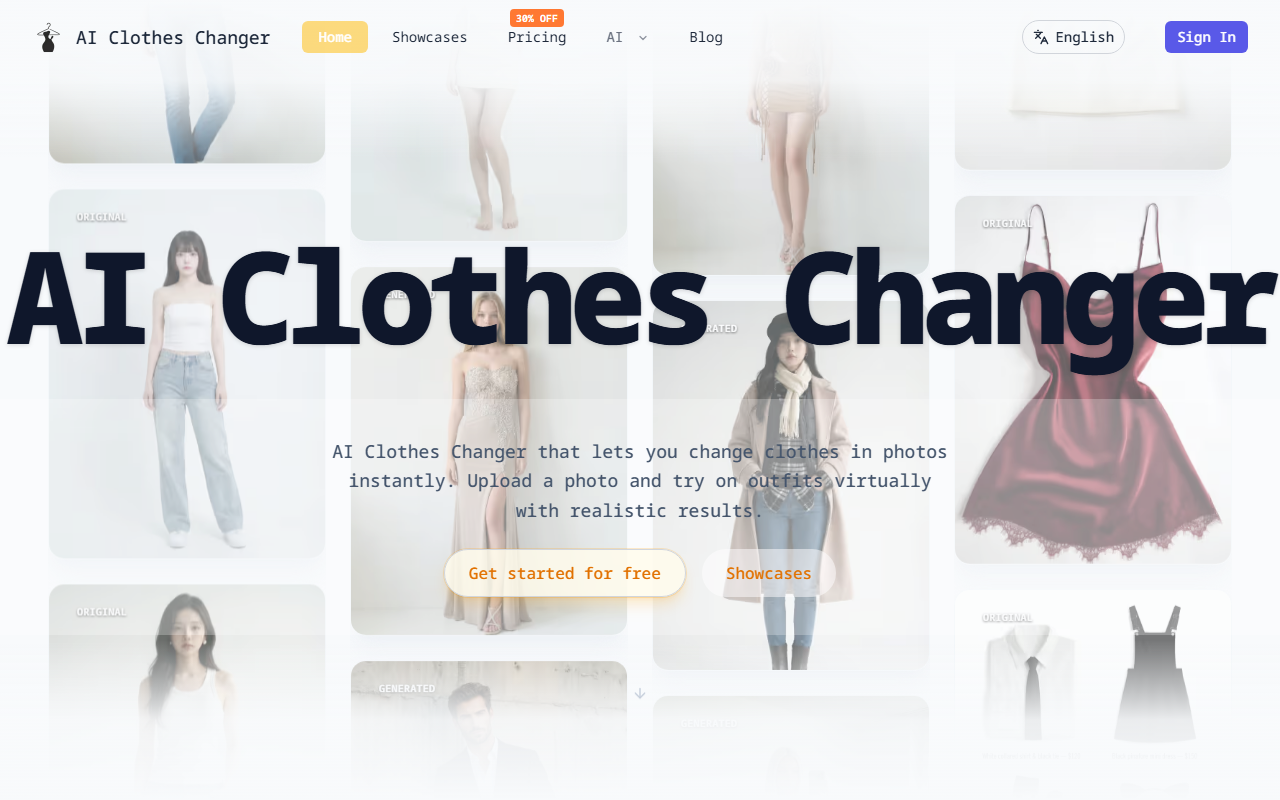
Upon visiting the AI Clothes Changer website, I was immediately struck by the minimal, clean interface. The homepage presents a grid of before-and-after examples that vividly demonstrate the tool’s capability: original photos on the left, AI-generated outfit swaps on the right. The hero section promises “change clothes in photos instantly,” and a prominent “Get started for free” button invites immediate exploration. I clicked through and landed on the core workspace: a two-panel layout with a “Person Image” upload zone on one side and a “Clothes Image” upload zone (optional) on the other. Below those, a text prompt area lets you describe the desired outfit if you don’t have a clothing image. The dashboard also includes a model selection row — options like “Nano Banana,” “UltimateNano Banana Pro,” “GPT Image,” “Flux 2 Pro,” and “ProSeedream V4.5” are presented in rectangular tiles. These appear to be different AI models or generation quality levels, though no detailed explanation is given for each. I selected the free-tier “Nano Banana” and uploaded a portrait photo of a person in a plain white tee. For the clothes, I left the image field empty and typed a prompt: “Replace the outfit with a black leather jacket and dark blue jeans.” I then chose a 1:1 aspect ratio and clicked the generate button. The processing took about 15 seconds, and the result appeared in the right panel. The jacket’s folds and shading matched the original pose and lighting remarkably well, while the background and face remained untouched. The seam between the new clothing and original skin was almost invisible — a strong first impression for an online tool with a free tier.
How AI Clothes Changer Works: Models and Features
Under the hood, AI Clothes Changer uses multiple diffusion-based models for virtual try-on. The selection of models — from the lighter “Nano Banana” to the more advanced “ProSeedream V4.5” — suggests that users can trade speed for fidelity. I tested the same prompt with “Flux 2 Pro” (likely a premium model) and noticed finer texture detail in leather and denim stitching. The tool accepts one person photo and up to four clothing images, allowing you to mix garments like hats, shoes, necklaces, or bags. You can also combine image uploads with text prompts for precision editing. The tutorial section outlines three modes: outfit change using only clothing images, only text prompts, or a hybrid of both. For e-commerce sellers, this flexibility is crucial — you can either upload a product photo of a shirt and see it fitted on a model, or describe an entire outfit from scratch. Aspect ratio options include 1:1, 2:3, 3:2, 9:16, and 16:9, which cover Instagram posts, product listings, and full-body portraits. One limitation I noticed: the free tier imposes a cap on the number of generations (I was able to run only 3 tests before being asked to upgrade). Pricing itself is not publicly listed on the website — there is no pricing page or tier breakdown. The “Get started for free” button leads to a credit system, but the cost per generation or monthly subscription fees are not disclosed anywhere on the site. This lack of transparency could frustrate potential power users who need to budget for repeated use.
Use Cases and Target Audience
AI Clothes Changer is clearly built for two primary audiences: fashion e-commerce sellers and individual style enthusiasts. For sellers, the tool eliminates the need to shoot multiple product photos with different models or reshoot outfits. One photo can serve as a base, and the AI swaps clothing instantly — saving time and studio costs. The gallery section shows examples like wedding dress design, professional office wear, swimwear, and contemporary fashion. Unlike manual editing in Photoshop, which requires hours of masking and lighting correction, this tool delivers results in seconds. For individuals, it’s a fun way to visualize outfits without physically trying them on. However, the tool may not suit photographers needing ultra-high-resolution outputs or users with complex pose/lighting requirements — during my tests, a photo with a raised arm produced minor distortion in the sleeve crease. Compared to competitors like VTON (open-source virtual try-on) or Zelig (which focuses on full-body swapping), AI Clothes Changer leans heavily into simplicity and speed. It does not offer batch processing, API access, or advanced editing controls like background replacement. If you need those features, consider more enterprise-oriented tools like Zalando’s virtual try-on or Pixelcut. The tool’s user base seems to be growing — the homepage claims “Trusted by Sellers & Fashionistas Worldwide,” though no specific numbers are given.
Strengths, Limitations, and Final Verdict
Strengths: The output quality on simple poses is impressive, especially for a free-tier option. The interface is intuitive, requiring zero learning curve. The ability to mix images and text prompts gives a good balance of control and automation. The multiple aspect ratios and model choices allow customization. The tool handles accessories like hats and bags well, which many similar tools neglect.Limitations: The lack of public pricing is a major drawback — you can’t easily estimate costs for bulk work. The free tier runs out quickly (I hit the limit after just three generations). Complex poses, overlapping arms, or busy backgrounds sometimes lead to unnatural folds or color bleeding. There is no undo or history feature; once you generate, the result replaces the previous one automatically. No API or integration with e-commerce platforms exists, making bulk editing tedious.
Who should try this tool? E-commerce sellers who need quick outfit mockups for product pages, individual fashion lovers experimenting with styles, and content creators looking for fast wardrobe swaps. Who should look elsewhere? Professional photographers requiring pixel-perfect composites, large studios needing batch processing, and developers seeking API access. Overall, AI Clothes Changer delivers on its promise of instant, realistic outfit changes, but the opaque pricing and limited free tier may discourage heavy use. It is a solid starting point for anyone wanting to dip their toes into AI virtual try-on.
Visit AI Clothes Changer at https://aiclothes.ai/ to explore it yourself.













Comments