

First Impressions and Interface
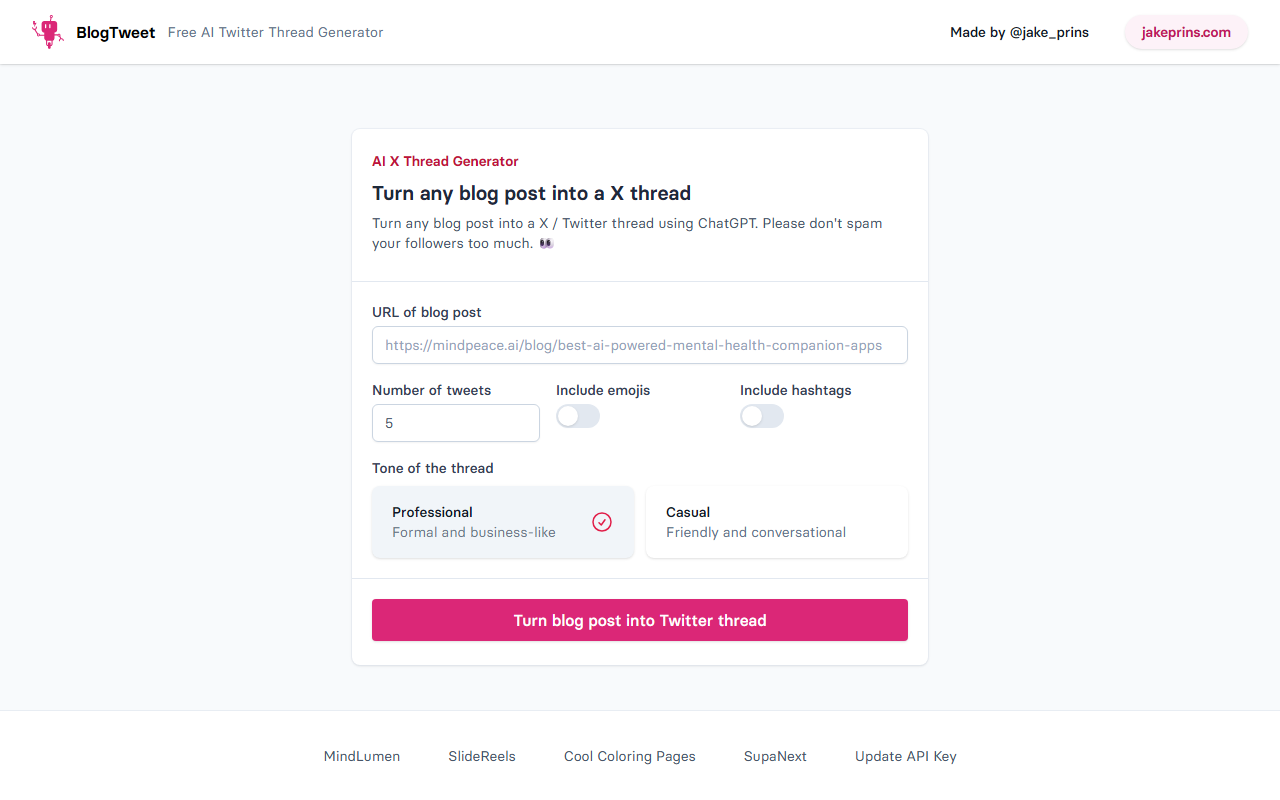
Upon visiting BlogTweet at blogtweet.xyz, I was met with a minimal, single-purpose landing page. The design is straightforward: a simple form asking for a blog post URL, the desired number of tweets, and a few optional toggles for emojis, hashtags, and tone. There is no dashboard, no account creation visible, and no mention of a free trial or pricing tiers. The entire experience feels like a lightweight wrapper around ChatGPT’s API, which is both a strength and a limitation. I immediately noticed the tagline: “Turn any blog post into a X thread using ChatGPT. Please don’t spam your followers too much. 👀” — a cheeky nod to the tool’s intended use case. The tone selection offers only two options: Professional (formal) and Casual (friendly). No advanced customization like audience targeting or brand voice settings is present.
How It Works and Features
BlogTweet’s core promise is simple: paste a blog post URL, choose your preferences, and let AI generate a Twitter thread. I tested it with a sample tech article. The form asks for a URL — no option to paste raw text, which limits use for offline or locked content. I selected 8 tweets, enabled emojis and hashtags, and chose the Casual tone. After clicking “Turn blog post into Twitter thread,” the tool processed the URL and returned a thread draft within seconds. The generated tweets were coherent, retained the original article’s key points, and naturally broke the content into digestible chunks. Each tweet was designed to hook the reader, with the last tweet including a call-to-action to read the full post. The emojis were used sparingly and relevantly — no over-the-top reactions. Hashtags were appended only in the final tweet, which helped keep the thread clean. However, I noticed the thread sometimes missed nuanced arguments from the original article, flattening complex ideas into simplistic statements. This is expected given the prompt-based nature of the tool, but it means users should review and edit threads before publishing.
Pricing and Limitations
Pricing is not publicly listed on the website. There is no pricing page, no subscription tiers, and no indication of whether the tool is free or paid. This lack of transparency is a significant barrier for serious users. I suspect BlogTweet may be running on a per-request credit system or a free trial with limits, but without clear information, I cannot confirm. The tool also lacks integrations: no direct API, no Zapier connection, and no export to scheduling tools like Buffer or Hootsuite. Another limitation is the dependency on a public blog URL. For articles behind paywalls or unpublished drafts, this tool is useless. Additionally, the output cannot be edited in real-time within the tool — you must copy the entire thread and make edits elsewhere. Compared to competitors like Typefully (which offers thread drafting, scheduling, and analytics) or Chirr App (with AI thread generation and multi-platform support), BlogTweet feels more like a proof-of-concept than a production-ready product.
Who Should Use BlogTweet?
BlogTweet is best suited for casual bloggers, small content creators, or marketers who need a quick, no-frills way to repurpose a blog post into a Twitter thread. The tool excels at speed and simplicity — it takes seconds to generate a draft that is usually 70-80% ready to publish. However, power users, social media managers, or brands requiring detailed analytics, team collaboration, or API access should look elsewhere. The lack of pricing transparency and absence of premium features make it risky for professional workflows. My honest recommendation: try BlogTweet for an occasional thread if the project handles your type of content, but be prepared to manually edit the output. For regular, high-quality thread creation, invest in a more mature tool like Typefully or even a custom GPT prompt in ChatGPT itself. BlogTweet serves its niche well but cannot replace a comprehensive content repurposing strategy.
Visit BlogTweet at https://blogtweet.xyz/ to explore it yourself.













Comments