

First Impressions: Instant Access, Zero Friction
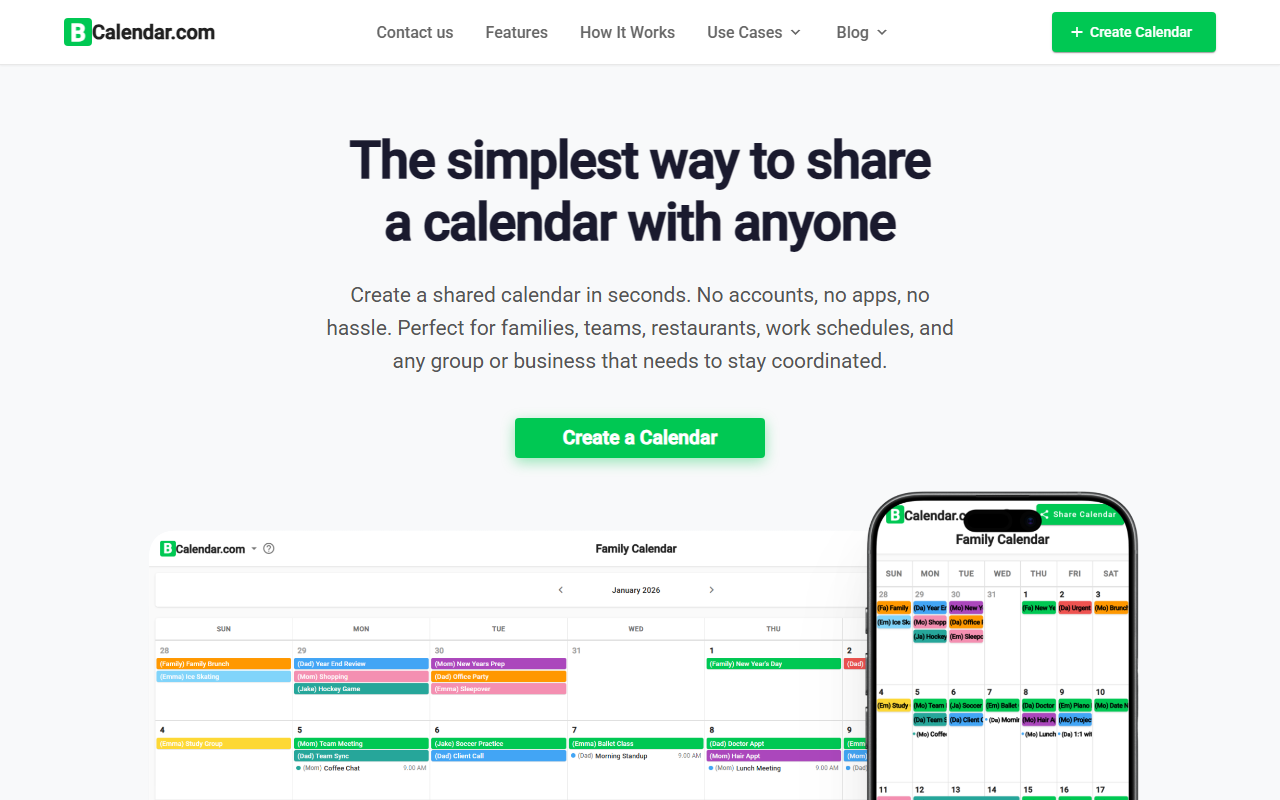
Upon visiting CalendarScan (which redirects to BCalendar), I was greeted by a clean, minimal homepage. The tagline—“The simplest way to share a calendar with anyone”—is backed by immediate action: a prominent “Create a Calendar” button. I clicked it, and within seconds I had a blank calendar. No account creation, no email verification, no password. The onboarding flow is the fastest I’ve ever seen for a scheduling tool. You’re asked to add names for each person (they get a color), then a shareable link is generated. I shared it with a colleague on a mobile browser; they could add events without downloading anything. The whole process took under 30 seconds.
The dashboard itself is straightforward: a week or month view, with events displayed as colored blocks. There are no menus, no settings—just the calendar. If you’re looking for a tool that doesn’t get in the way of coordination, CalendarScan delivers exactly that.
Key Features and Technical Details
CalendarScan (powered by BCalendar) focuses on a set of core features that solve one specific problem: instant, frictionless calendar sharing. The product highlights six key points: no login, color-coded members, real-time sync, works on any device, easy sharing via link, and being 100% free forever.
From my testing, the real-time sync is genuine. When I added an event from my phone, it appeared on a colleague’s laptop within a second. There is no refresh button—changes propagate instantly via WebSocket or similar technology (not explicitly stated, but observable). Each member gets a distinct color, making it easy to see who added what. The sharing link uses a unique URL; anyone with that link can view and edit the calendar. There is no authentication, which is both a strength and a security concern.
The tool works on all devices—I tested on Chrome desktop, Safari on iOS, and Firefox on Android. No app download is required; it’s fully web-based. The underlying technology appears to be a lightweight JavaScript frontend with a real-time backend. Notably, CalendarScan is not an AI tool—despite being listed under “AI Office,” there is no natural language processing, smart scheduling, or any AI feature. The website itself makes no mention of AI. This categorization feels misleading, so approach this review knowing it’s a plain shared calendar.
Pricing and Market Position
CalendarScan (BCalendar) is 100% free forever. There are no tiers, no trial periods, and no credit card required. The site explicitly says “no hidden fees.” This is a rare proposition in a market where most competitors either have a free tier with limits (like Google Calendar’s integration with Google accounts) or require subscription for advanced sharing (like Cozi Gold).
Compared to alternatives, CalendarScan’s biggest differentiator is the absence of signup. Google Calendar requires a Google account; Apple Calendar needs iCloud; Cozi asks for an email. For groups with less tech-savvy members (like grandparents), CalendarScan removes every barrier. However, it lacks features those competitors offer: recurring events, reminders, integration with other apps, API access, or permissions controls. The comparison table on the site proudly shows “No account required,” “Works without app download,” and “100% free” as advantages over “Others.” Indeed, most traditional calendar tools require accounts or apps.
It is best suited for families, roommate groups, small teams (under 20 people), event planning committees, and couples who need a dead-simple schedule. For businesses that require role-based permissions, synchronization with Outlook or Google Workspace, or any kind of automation, CalendarScan will fall short.
Limitations and Final Verdict
While CalendarScan excels at simplicity, it has genuine limitations. First, no security or privacy controls—anyone with the link can edit, so sharing with untrusted parties is risky. There is no way to remove a member or revoke access once the link is out (you’d have to create a new calendar). Second, the feature set is extremely basic: no recurring events, no notifications, no integration with email or other services. For power users, it’s a toy, not a tool.
Additionally, as noted, this is not an AI tool. If you came looking for smart scheduling or natural language event creation, you will be disappointed. CalendarScan is what it is: a bare-bones shared calendar. But for its intended audience, it works remarkably well.
I recommend CalendarScan for anyone who needs a quick, no-commitment shared schedule for a small group—especially if some members dislike creating accounts or using complex apps. If you need more advanced features (recurring events, permissions, cross-platform sync with professional tools), look at Google Calendar or Teamup. CalendarScan (BCalendar) is a refreshingly simple solution in an overcrowded market, but it’s not for everyone.
Visit CalendarScan at https://calendarscan.app/ to explore it yourself.













Comments