

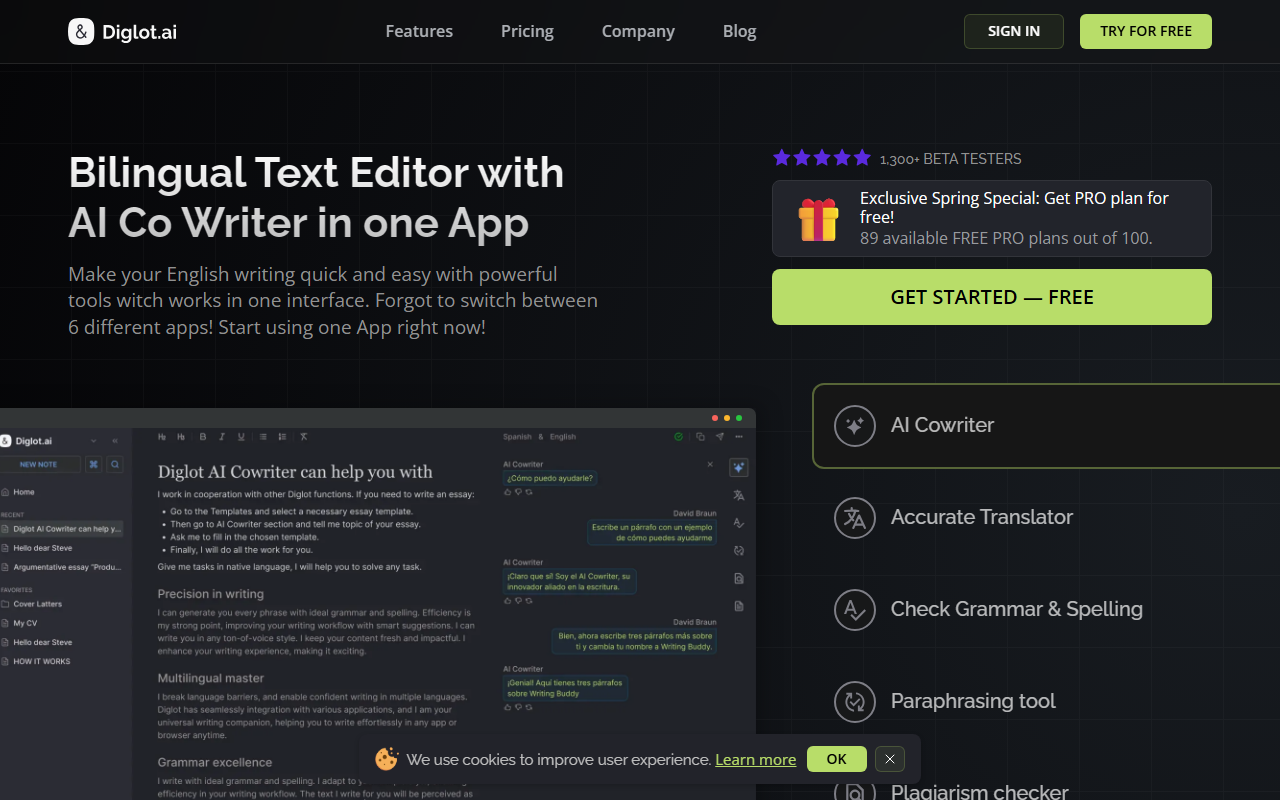
Upon visiting the Diglot website, the first thing that strikes me is how clearly the tool positions itself: a bilingual writing app built specifically for non-native English speakers. The landing page wastes no time explaining the core problem — you think in one language but need to publish in English — and promises a calm, integrated workspace that eliminates the frantic toggling between a translator, a grammar checker, and a text editor. The design is clean, with six feature cards displayed prominently: AI Writing Assistant, AI Translator, Grammar Checker, Paraphrasing Tool, Plagiarism Checker, and Writing Templates. After exploring the site and its beta program description, I can see this is more than just another writing helper; it is a workflow redesign for anyone who drafts bilingually.
A Workspace Tailored for Bilingual Writers
What sets Diglot apart from generic AI writing assistants is its insistence on keeping the entire writing process inside one editor. When I imagine using it, I see myself starting with a rough draft in my native language, then translating, rewriting, and polishing English output without ever jumping to a separate chatbot or tab. The site highlights “translation in context” as a key feature: you translate words or full phrases, compare alternative translations, and edit the result immediately, all while maintaining the original source text visible. This is a meaningful improvement over working with DeepL in one window and Grammarly in another. Unlike those point solutions, Diglot attempts to unify drafting, translation, grammar review, paraphrasing, and originality checking into a single, document-centric experience. The rich text editor supports hotkeys and advanced formatting, which suggests it is built for serious writing, not just quick corrections.
A Full Toolkit Under One Roof
Diglot packs six tools into one app, and each addresses a distinct pain point for non-native writers. The AI Writing Assistant helps you move from a rough draft to a polished English version, with options to rewrite selected passages and adjust tone. The AI Translator goes beyond simple text replacement by allowing side-by-side comparison of translation options. The Grammar Checker catches not only standard errors but also awkward phrasing that results from direct translation — a detail that shows the developers understand the specific struggles of bilingual writers. The Paraphrasing Tool rewrites sentences for fluency while preserving meaning, and the Plagiarism Checker scans for overlap against sources, letting you inspect flagged passages and rewrite them inside the same editor. Finally, Writing Templates offer pre-built structures for emails, essays, reports, and proposals, reducing the blank-page anxiety. Together, these modules aim to cover the entire writing lifecycle from ideation to publication.
Security, Privacy, and the Beta Experience
During my review, I noted that Diglot emphasises security with SOC2 certification, GDPR compliance, and full encryption. Documents are stored in Google Cloud, and the tool promises multiplatform support along with browser plugins for major browsers. However, pricing is not publicly listed on the website. The tool is currently in a beta phase, and interested users must join a waitlist for early access. This suggests the product is still maturing, and while the feature list is ambitious, the lack of transparent pricing and the beta label may give some potential users pause. On the positive side, the security credentials are solid, and the beta program offers early adopters a chance to shape the tool’s development. I would also like to see more details about which languages are supported for translation and grammar checking; the site does not specify, which is a notable gap for a bilingual app.
Who Should Use Diglot?
Diglot is best suited for non-native English speakers who regularly write in English for academic, professional, or personal purposes and who value a unified, context-aware workflow. People who currently juggle Grammarly for grammar, DeepL for translation, and QuillBot for paraphrasing will find Diglot’s integration appealing. However, if you only need one of these functions — say, just a grammar checker — a tool like Grammarly may be simpler and more mature. Diglot’s beta stage means it may still have rough edges, and without clear pricing, it is hard to compare value. That said, the vision is compelling: a single workspace that respects your bilingual thinking process and reduces context-switching. I recommend signing up for the beta waitlist if you are tired of copying text between multiple tools and want to test a dedicated bilingual writing environment. Visit Diglot at https://diglot.ai/ to explore it yourself.













Comments