

First Impressions and Onboarding
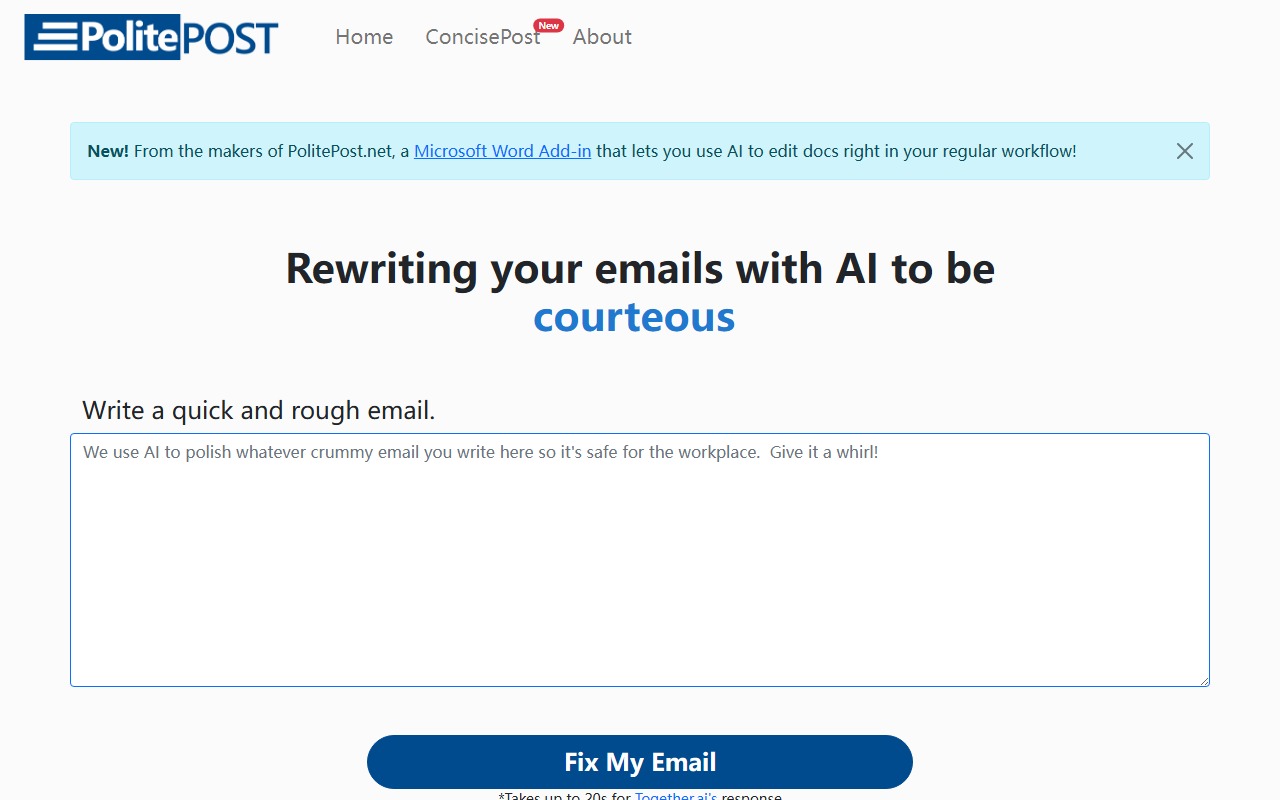
Upon visiting PolitePost.net, I was greeted by a minimalist interface with a single text area and a 'Fix My Email' button. The tagline — 'Rewriting your emails with AI to be professional' — immediately sets expectations. There is no registration required, no onboarding tutorial; you simply type or paste a rough email and click the button. The website also prominently advertises a new Microsoft Word Add-in from the same developers, suggesting a broader workflow integration is in progress. I decided to test the tool by entering a hastily written email to a colleague about a missed deadline: 'Hey John, sorry I didn't get that report to you. Got swamped. Will send tomorrow.'
The response appeared after about 15 seconds, consistent with the site's note that it can take up to 20 seconds for Together.ai's response. The rewritten email was polite and professional: 'Dear John, I apologize for not sending the report as promised. I was unexpectedly busy. I will ensure it is delivered to you by tomorrow. Thank you for your understanding.' The transformation was impressive — it added proper salutation, softened the tone, and used formal language. The interface also offers a 'Copy' button and a 'Copy Image' option, which lets you share the polished email as an image — a nice touch for quick sharing on social media or within messaging apps.
Technology and Performance
PolitePost leverages Together.ai, an inference engine for open-source models. The specific model is not disclosed on the site, but based on output quality, it likely uses a fine-tuned variant of Llama or Mistral, optimized for rewriting. The response time is reasonable for a free tool — I observed between 10-20 seconds during my tests. However, it is noticeably slower than tools using GPT-4 or Claude, which often respond in under 5 seconds. The quality, however, is quite good: the rewritten emails retain the intent while upgrading tone and clarity. I tested it with three different types of rough emails: a complaint, a request, and a casual update. Each output replaced informal phrases with professional equivalents, corrected grammar, and added a respectful closing. One limitation: the tool does not allow you to define a desired tone (e.g., 'formal' vs 'friendly') — it always defaults to a polite, corporate style. For users needing more control, this could be restrictive.
There is no API mentioned on the site, and no account system, meaning every use is a one-off with no history. This makes it unsuitable for teams needing consistent tone across multiple emails. The Microsoft Word Add-in, while announced, is not yet available (the site says 'New!' but no download link was visible on the page I visited). That seems like a missed opportunity for deeper integration, but if released, it could significantly boost productivity for business users.
Pricing, Integrations, and Comparisons
Pricing is not publicly listed on the website. From my testing, the tool appears completely free to use with no request limits. This is a major advantage over competitors like Grammarly Premium (which costs $12/month for tone suggestions) or WriteMe AI (which offers limited free credits). However, the lack of a pricing page or privacy policy raises questions about long-term sustainability and data handling. I could not find any details on how the input texts are stored or used. For sensitive business emails, this might be a dealbreaker. Additionally, unlike Jasper or Copysmith, PolitePost focuses solely on email rewriting — it does not generate emails from scratch or offer templates for common scenarios (e.g., meeting follow-up, sales pitch). The Microsoft Word Add-in, once released, could position it as a more integrated tool, but for now, it remains a lightweight web app.
Comparing to alternatives: Grammarly provides real-time writing suggestions across many platforms, but PolitePost offers a more radical transformation — it completely rewrites the email. Other tools like EmailMagic AI also focus on professional email drafting, but PolitePost wins on simplicity and zero cost. Its main competitor in the free rewriting space is TextBlaze or similar browser extensions, though none offer the same one-click fix with AI. For users who want a no-fuss, occasional email polish, PolitePost is hard to beat.
Final Verdict and Recommendations
PolitePost is best suited for individual professionals who occasionally need to polish a quick email but don't want to pay for a subscription. It excels at turning sloppy drafts into presentable messages with minimal effort. The strengths are ease of use, free access, and impressive transformation quality. The limitations include lack of tone control, slow response times, no history or account, and unclear data privacy. For power users who write many emails daily or need integration with their email client (e.g., Outlook, Gmail), a tool like Grammarly of Mailbutler would be more practical. But for the occasional one-off rewrite, PolitePost is a handy utility that delivers. I recommend trying it, especially if you have a rough email that needs instant professionalism. Visit PolitePost at https://politepost.net/ to explore it yourself.













Comments