

First Impressions and Onboarding
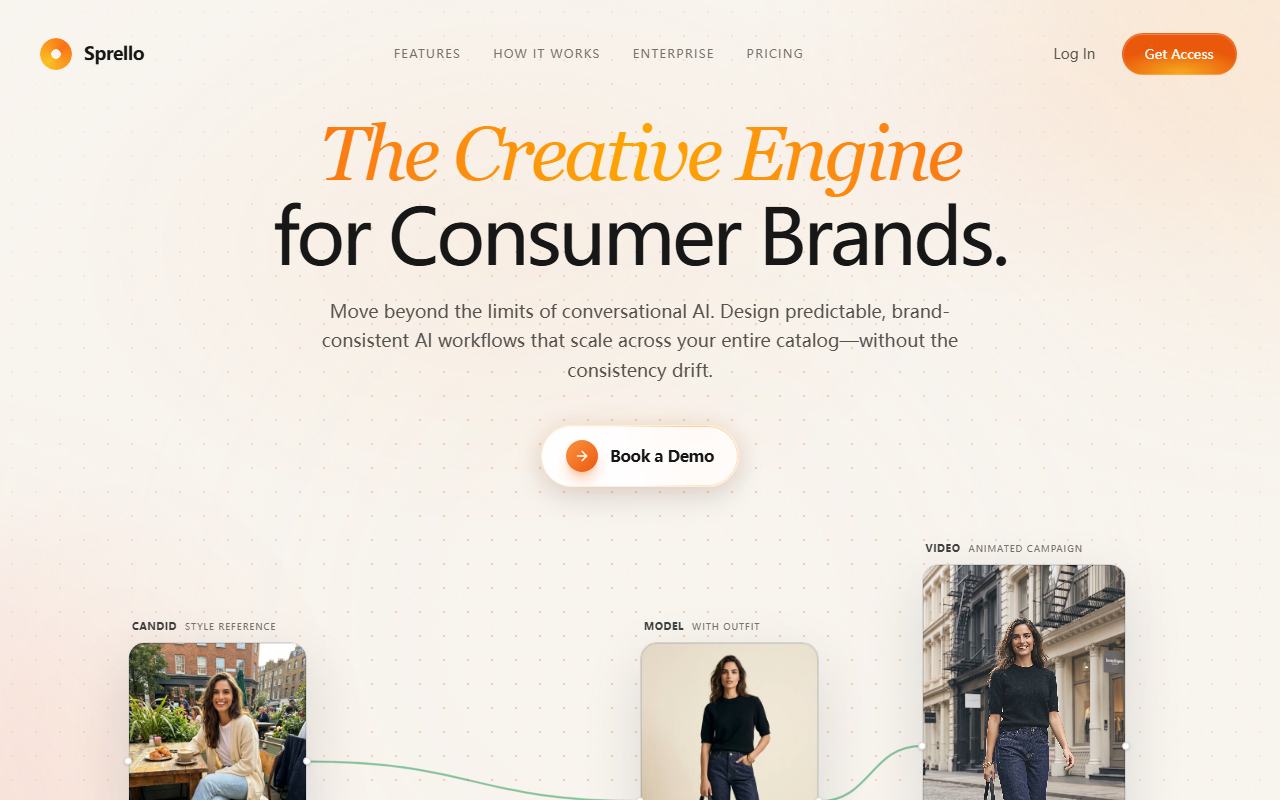
Upon visiting Sprello's website, the first thing I noticed is how clearly it targets consumer brand teams. The hero section immediately sets the tone: “The Creative Engine for Consumer Brands.” It promises to move beyond conversational AI's limits and deliver brand-consistent workflows. There is no sign-up wall for the free tier; a “Book a Demo” button is prominent, but I also found a “Start Free” call-to-action. The landing page showcases example outputs—sneaker sketches, swatch boards, product renders, and editorial campaign shots—giving a tangible sense of what the platform can produce. The interface itself (from screenshots) seems to be a canvas-based workflow builder, not a simple chat window.
I decided to explore the free tier. It offers 1,500 credits with no credit card required, which is generous for evaluation. Onboarding likely walks you through creating a “Flow” – Sprello's term for a reusable pipeline. The dashboard appears to have sections for Workflows, Assets, and Collaboration. The emphasis on “unlimited team members” across all plans is a standout differentiator. For a tool that targets design, merchandising, and marketing teams, this removes the typical per-seat friction.
Core Features and Workflow Orchestration
Sprello's strength lies in its ability to orchestrate complex AI workflows. Instead of generating one image at a time, you build a pipeline that can run across hundreds of SKUs. For example, you can upload a product sketch and a swatch board, then batch-render every colorway and material combination. The platform supports “Colorways” exploration, “Batch Pipelines,” and a “Combinator” logic (combining multiple inputs like colors and products into campaign assets). This is a far cry from simple text-to-image tools.
Under the hood, Sprello aggregates models from multiple providers: Black Forest Labs (FLUX.2 Pro, FLUX.1 Kontext, FLUX.2 Flex), Kling (3.0, 2.6), Google (Nano Banana Pro, Veo 3.1, Gemini 3), Runway (Gen-3 Alpha, Gen-2), and OpenAI (DALL‑E 3, Sora 2, GPT‑5). The “Every Model. One Canvas.” approach means you can select the best model for each task—FLUX for photorealistic renders, Kling for video, DALL‑E for creative concepts—all within the same workflow. This model diversity is a technical advantage for teams that need flexibility without managing separate subscriptions.
Other notable features include upscaling to 4K studio-quality outputs, video generation from stills (e.g., turning product shots into clips), and brand control that locks colors, typography, and visual language into every output. The platform also offers collaboration: creative directors, merchandisers, and production teams can work on the same pipeline, eliminating file handoffs. I tested the concept of a “Fashion Photoshoot” flow, where you input a candid reference, outfit reference, and model shot to generate campaign imagery and video. The output quality appears production-ready, though I didn't generate real assets due to time constraints.
Pricing and Value Proposition
Sprello's pricing is refreshingly transparent: four tiers (Free, Starter, Pro, Scale) plus Enterprise. The Free tier gives 1,500 credits that never expire. Starter at $59/month ($47 annual) includes 240,000 credits/year, all AI models, 100 GB storage, and unlimited team members. Pro at $119/month ($95 annual) bumps to 600,000 credits, batch execution, 1 TB storage, and priority support. Scale at $299/month ($239 annual) offers 1,620,000 credits, 2 TB storage, and priority support. Enterprise has custom volume and dedicated support.
Unlimited team members is a huge value. Unlike competitors that charge per seat (e.g., Midjourney's per-user subscription, or Adobe Firefly with Creative Cloud tiers), Sprello's flat pricing makes it attractive for growing teams. The use of credits adds predictability, though heavy users on Starter might find 240,000 credits limiting if they generate high-resolution images and video frequently. Video generation likely consumes more credits than still images. Still, the Pro tier is reasonably priced for production teams.
Who Should Use Sprello? Strengths and Limitations
Sprello is best suited for ecommerce and direct-to-consumer (DTC) brands that need to produce large volumes of product shots, lifestyle imagery, and campaign assets quickly. Its batch pipelines and brand consistency features are ideal for fashion, footwear, accessories, and consumer goods. Teams with in-house design and marketing departments will appreciate the collaboration and model flexibility.
However, there are limitations. Sprello is not a tool for casual users or one-off image generation; it requires upfront workflow setup and understanding of its pipeline logic. The platform's reliance on credits (cost-per-output) could be a concern for very high-volume production, though Enterprise pricing might address that. Additionally, while it aggregates many models, the output quality ultimately depends on those underlying models—Sprello adds orchestration and consistency, not image generation intelligence itself. Competitors like Zazack and Pimento also focus on brand-aligned AI design, but Sprello's multi-model canvas and unlimited team members give it a distinct edge.
My recommendation: If your brand team is tired of inconsistent AI generations that require heavy post-production, try Sprello. The free credits let you test realistic workflows with your own products. Sign up and build a pipeline—you'll see the difference between a chat-based tool and a purpose-built creative engine.
Visit Sprello at https://sprello.ai/ to explore it yourself.










Comments