

First Impressions and Onboarding
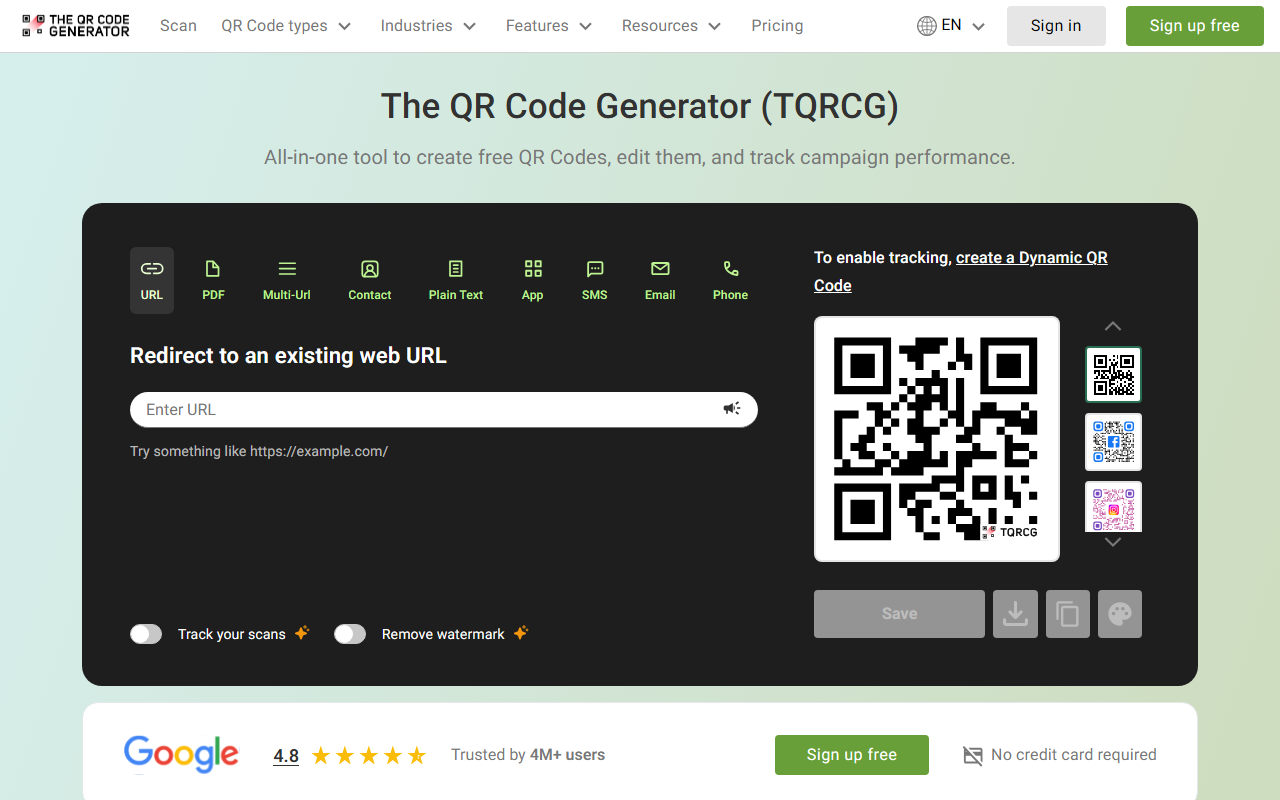
Upon visiting The QR Code Generator (TQRCG), I was greeted by a clean, modern interface with a prominent “Sign up free” button and a dashboard preview of QR code types. The homepage presents a grid of categories—Communication, Social Profiles, Files & Media, Forms & Scheduling, Business & Marketing, Location & Event—making it easy to choose a use case. I appreciate the quick-start option: you can enter a URL directly and generate a static QR code without signing up. However, many advanced features like dynamic codes, logos, and tracking are locked behind a free account or a paid plan. When I clicked “Customize code,” a modal appeared with style options (Classic, Rounded, Thin, Smooth, Circles) and color pickers for background, squares, and pixels. The preview updated in real time, which was responsive and helpful for branding.
The tool also offers a Chrome extension and a mobile app, which I noted as a plus for on-the-go generation. The dashboard itself is simple: a left sidebar for QR code types and a central area for content input and preview. I tested creating a dynamic URL QR code: after entering the URL, I was prompted to sign up to enable tracking and logo insertion. The flow is smooth but heavily encourages account creation—understandable given the freemium model.
Core Features and Technical Depth
TQRCG is far more than a basic QR generator. It supports 18+ specific QR code types, including vCard, WhatsApp, Telegram, Google Drive, Spotify, Calendly, and even a “Multi-URL” option that shows multiple links in one landing page. This is excellent for marketing campaigns where you want to direct users to different destinations based on time or language. The dynamic QR codes are the star: they let you edit the destination without reprinting, track scan location, device, and time, and integrate with Google Analytics via a built-in Campaign URL Builder. I particularly liked that you can add campaign parameters (like utm_source) directly from the tool—this is a thoughtful addition for marketers.
Static QR codes are free and unlimited, but dynamic codes require a paid plan starting at $5/month (billed yearly). The free tier offers basic static generation with limited resolution (up to 1000px? Actually free tier only allows 100px and 200px? The site shows “Customize” and “Image size” options, but during my test, leaving the free tier locked higher resolutions behind a paywall). Dynamic codes also unlock SVG download, logo embedding, PDF linked QR codes, and an ad-free scan experience. The technology appears to be proprietary, with no visible mention of underlying models or APIs, but the tracking dashboard is powered by the platform’s own analytics.
Pricing and Market Positioning
Pricing is clearly indicated: paid plans start at $5/month when billed yearly. No monthly-only option is mentioned, which could be a downside for short-term users. The free tier is generous for basic static QR codes, but the real value—dynamic codes, logos, and tracking—is gated. Compared to competitors like QRCode Monkey (free dynamic codes with logo but limited tracking) or QR Stuff (more enterprise-focused), TQRCG strikes a balance between simplicity and power. It does not offer bulk generation or team collaboration, so it’s best suited for individual creators, small business owners, and marketers who need one-off or low-volume tracked QR codes. Event organizers and real estate agents, mentioned as target industries, will find the specific templates (e.g., “Coupon,” “Google Review,” “Resume/CV”) very useful.
One limitation: the free tier forces you to generate static codes only, and dynamic codes cannot be tested without signing up—a friction point if you want to evaluate tracking capabilities first. Additionally, the “Sign up free” buttons appear frequently during the customization flow, which can feel pushy.
Strengths: extensive QR type support, intuitive design, tracking analytics, Google Analytics integration, and multi-URL feature. Weaknesses: no free dynamic QR codes, forced account creation for customization, and lack of monthly billing option. The tool is also missing advanced features like QR code templates with variable data, API access, or password-protected scans.
Final Recommendation
The QR Code Generator is a polished, user-friendly solution for anyone who needs to create branded, trackable QR codes quickly. Its 18+ content types and industry-specific use cases make it versatile. I recommend it for small business owners, marketers, and content creators who are willing to pay $5/month for dynamic codes and analytics. If you only need static codes and no tracking, free alternatives like QRCode Monkey (which allows logos for free) might be better. But for integrated campaign tracking and multi-URL flows, TQRCG delivers solid value. Test the free static generator first, then consider the paid plan.
Visit TQRCG at https://the-qrcode-generator.com/ to explore it yourself.










Comments