
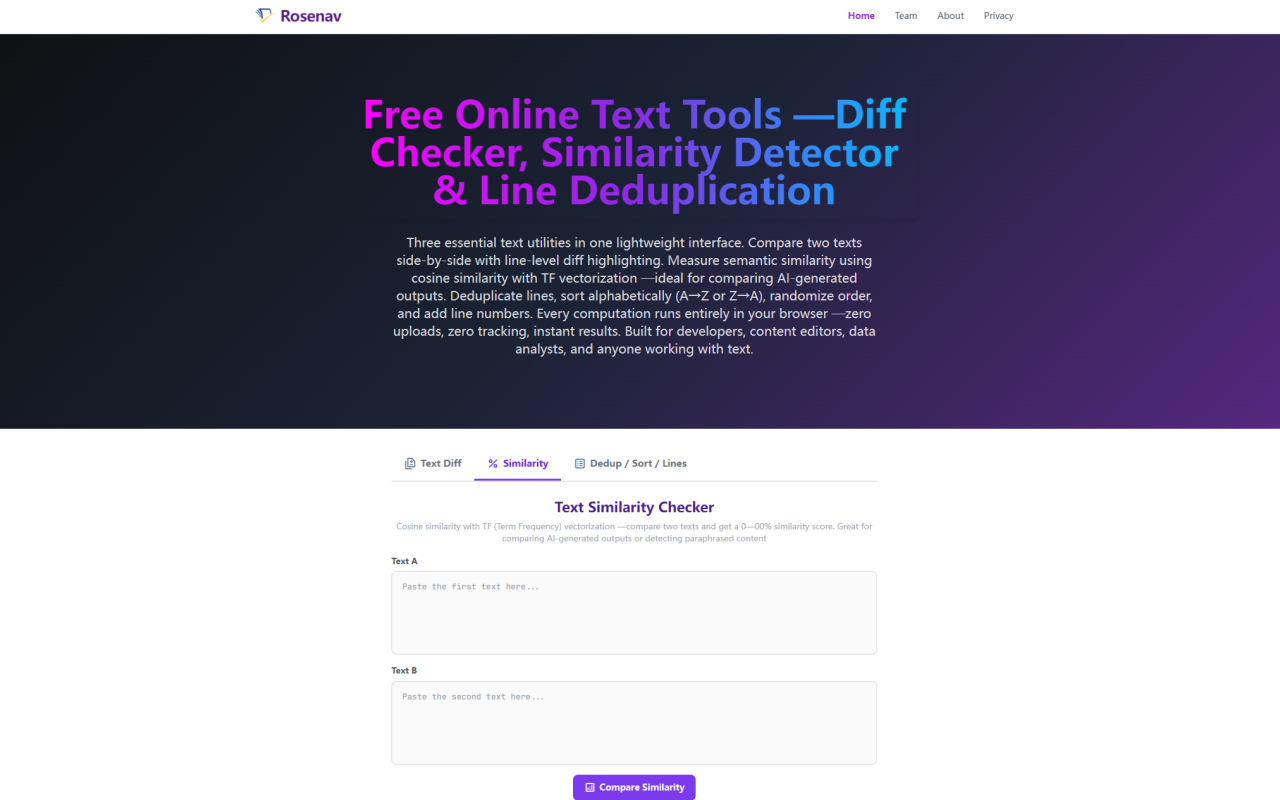
First Impressions — A No-Frills Utility That Respects Your Privacy
Upon visiting Rosenav at rosenav.com, the first thing you notice is how stripped-down and purposeful the interface is. There are no sign-up prompts, no cookie consent pop-ups begging for acceptance, and no flashy animations. You land on a clean white page with a three-tab interface: Text Diff, Text Similarity Checker, and a third tab for Dedup, Sort, and Line Numbering. Each tab reveals a straightforward input area with two text boxes for comparison. The entire vibe says, "Paste your text and get your answer — nothing more." For someone who regularly compares AI-generated outputs from ChatGPT, Claude, and Gemini, this immediately felt like a tool built for actual work, not for harvesting data. The site loads fast, and because everything runs client-side in your browser, you could literally disconnect from the internet after the page loads and the tools keep working.
Cosine Similarity — How It Actually Works and Why It Matters
Rosenav's text similarity checker uses cosine similarity powered by Term Frequency (TF) vectorization. Under the hood, the tool normalizes both texts by lowercasing and stripping punctuation, then tokenizes the words into a shared vector space. Each unique word becomes a dimension, and the tool counts how many times each word appears in each text. The cosine of the angle between the two resulting vectors becomes your similarity score from 0% to 100%. What makes cosine similarity particularly useful for text comparison — and why Rosenav chose it over simpler string-matching — is that it normalizes for document length. A 500-word article and a 5,000-word article on the same topic will score similarly because the metric measures the angle between word proportion vectors, not their magnitude. When testing this with two AI-generated summaries of the same news article, one written by ChatGPT and one by Claude, the tool returned 76% similarity with the description "High similarity: the texts share most vocabulary with some variation." That felt accurate and immediately useful.
Using the Similarity Checker for AI Output Comparison
This is where Rosenav shines brightest in my testing. I fed the same prompt — "Explain quantum computing in three paragraphs for a general audience" — into ChatGPT, Claude, and Gemini, then compared the outputs pairwise. ChatGPT vs. Claude returned 72% (High similarity). ChatGPT vs. Gemini scored 58% (Moderate similarity). Claude vs. Gemini landed at 61% (Noticeable similarity). The tool provides an 11-tier qualitative description alongside the raw percentage, ranging from "Completely unrelated" (0-9%) up to "Identical vocabulary distribution" (100%). A color-coded progress bar accompanies every result: green for scores above 90%, yellow for 70-89%, orange for 40-69%, and red for anything below 40%. This tiered system makes the output instantly scannable — I can glance at the color bar and know whether two texts are worth comparing line-by-line in the diff tool. For prompt engineers and content creators working with LLMs, this is genuinely useful. It quantifies how deterministic a model is for a given prompt and helps catch when an AI is producing boilerplate output that may need rewriting.
Text Diff — The LCS Algorithm in Action
While the similarity checker tells you how much two texts overlap, the text diff tool shows you exactly where they differ. It implements the Longest Common Subsequence (LCS) dynamic programming algorithm at the line level — the same algorithmic foundation behind git diff and professional code review tools. The interface displays a unified diff format with green lines prefixed by + for additions, red lines prefixed by - for removals, and uncolored lines for unchanged content. A stats summary at the top shows the total count of unchanged, added, and removed lines. I tested it by comparing two drafts of a blog post — the tool instantly highlighted the three sentences I had rewritten and the two I had deleted. The diff is clean, readable, and surprisingly fast even with a 300-line document. Rosenav uses line-level diffing rather than character-level, which I actually prefer for content and code comparisons. It keeps the output focused on structural changes and avoids the visual noise of inline character highlighting. The development journal on the site notes that this design choice was intentional — line-level diffing groups related changes together and produces cleaner, more actionable output for most real-world use cases.
Deduplication, Sorting, and Line Operations
The third tab bundles five practical line operations into one minimal interface. You can remove duplicate lines while preserving first-occurrence order, sort lines A→Z or Z→A using locale-aware string comparison, randomize order using Fisher-Yates shuffling with cryptographic randomness, and add padded line numbers. The dedup feature reports how many lines were removed, which is great for cleaning email lists or deduplicating scraped datasets. The shuffle function uses crypto.getRandomValues() — the same cryptographically secure PRNG used for key generation — ensuring genuinely unbiased shuffling rather than the subtle biases you get with Math.random(). I found this third tab particularly useful for a quick workflow: copy a list of keywords from an AI output, deduplicate it, sort alphabetically, and add line numbers — all within seconds and without ever touching a server. Each operation updates instantly, and the output box supports copy-and-paste seamlessly.
Zero-Upload Architecture — Verifiable Privacy Guarantees
Rosenav's strongest selling point is what it doesn't do: upload your text anywhere. Every computation — cosine similarity, LCS diff, dedup, sorting, shuffling, line numbering — executes entirely within your browser's JavaScript runtime. There is no backend server, no third-party API integration, and no database storing your pastes. The site has no login wall, no registration form, and no tracking cookies of any kind. The development journal explicitly states, "You can open your browser's DevTools Network tab and verify that zero data leaves your machine after the page is loaded." I did exactly that during testing. With DevTools open and the Network tab recording, I pasted two full articles and clicked Compare Similarity. Zero network requests fired. The computation happened entirely on my local CPU. For anyone dealing with confidential documents, proprietary code, or sensitive AI outputs — this is a genuinely meaningful privacy guarantee. It's refreshing to see a free tool that treats user data as something to protect rather than monetize.
Pricing and Limitations
Rosenav is completely free with no pricing tiers, no premium features, and no paid plans. Pricing details are not publicly listed on the website because the tool has no paid version — every feature described here is available to anyone with a browser. There are no usage limits, no daily caps, and no "upgrade to unlock" prompts. The tool works offline after the initial page load, requires no account creation, and appears to be funded simply as a utility offering. In terms of limitations, the text diff operates strictly at the line level, so if you need character-level inline highlighting — showing exactly which characters changed within a line — you'll need to look elsewhere. For very large documents (thousands of lines), the LCS algorithm's O(m×n) complexity may cause noticeable lag in the browser. The dedup tool uses first-occurrence-wins logic, which is reasonable but doesn't offer options like "keep last occurrence" or "remove all duplicates entirely." These are minor constraints for a free tool, but worth noting if your workflow demands more granular control.
Visit Rosenav at rosenav.com to explore it yourself.


コメント