

First Impressions and Onboarding
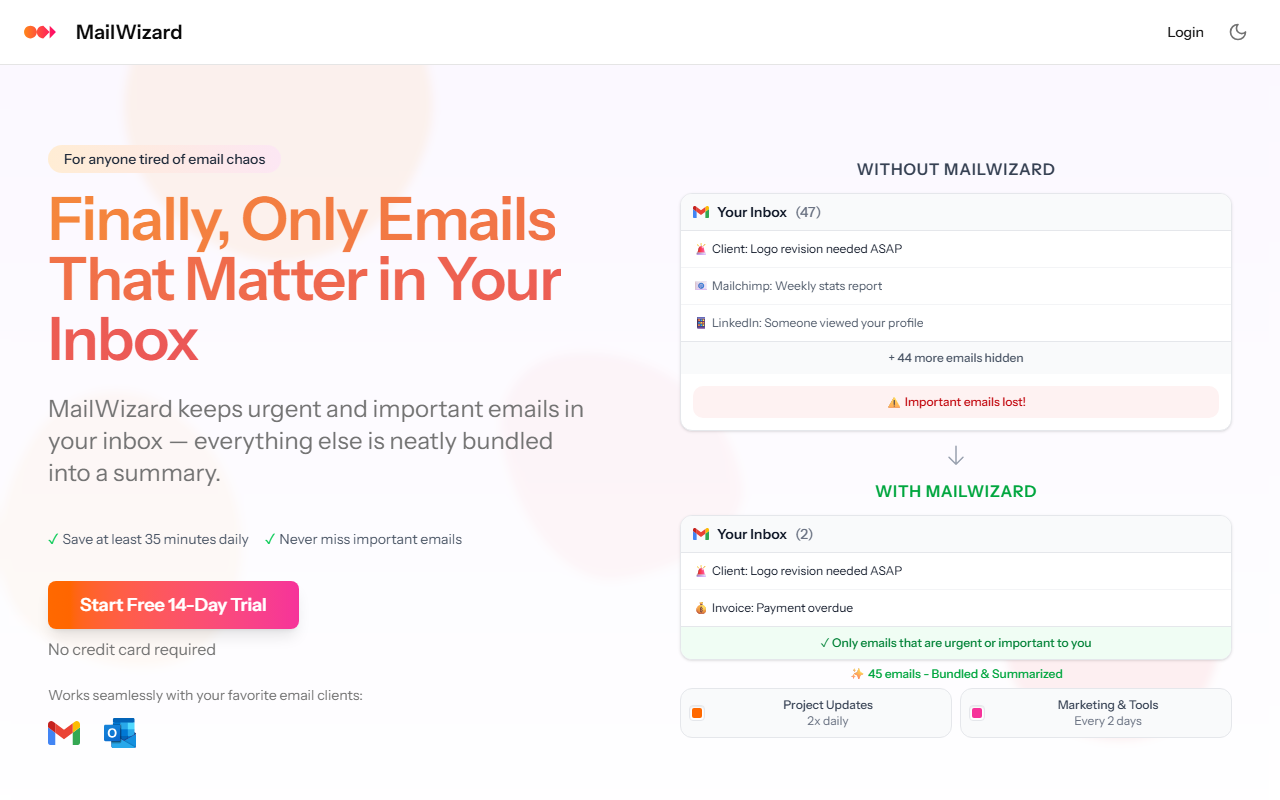
Upon visiting MailWizard, the clean, modern landing page immediately contrasts the "inbox chaos" it promises to solve. The animated comparison—showing a cluttered inbox of 47 emails reduced to just 2—makes the value proposition crystal clear. I signed up for the 14-day free trial (no credit card required), and the onboarding flow guided me through connecting a Gmail account. The process was smooth; within minutes, MailWizard began analyzing my inbox patterns. The dashboard is straightforward: a left sidebar shows "Smart Workflows" and "Email Digests" as primary features, with a clear status bar indicating how many emails have been processed. I particularly appreciated the plain-English rule creation—typing "Emails from my boss with deadlines" felt natural, and the system instantly generated a workflow.
Core Features: Smart Workflows and Email Digests
The heart of MailWizard lies in its dual approach: intelligent filtering and scheduled summaries. Smart Workflows let you describe what matters in natural language—MailWizard then translates that into custom rules that directly manipulate your Gmail or Outlook inbox. I tested a workflow for "client emails with attachments," and it automatically labeled them while keeping them in my main view. Non-urgent items, like newsletters, can be routed to folders or skipped entirely. The One-Click Cleanup feature executes actions directly in the email service, not just within MailWizard, which is a significant integration depth.
Email Digests are equally impressive. Instead of disappearing filtered emails, MailWizard bundles them into concise summaries—"14 client emails: 2 urgent, 3 updates, 7 follow-ups"—with individual AI summaries for each. You schedule delivery times, and there’s even an option to listen to the digest as an audio podcast. I tried the audio feature during a morning walk; the AI-generated narration was clear and well-paced, covering key points without overwhelming detail. This feature alone can save frequent commuters valuable time. The AI summaries felt accurate, capturing the intent of each email without exposing sensitive content—a testament to the underlying anonymization.
Security and Pricing
MailWizard takes data privacy seriously. It operates entirely within EU-based infrastructure, uses AES-256 encryption in transit and at rest, and anonymizes personal data before processing by European AI partners. The company follows GDPR, with plans to pursue SOC 2 Type II and ISO 27001 certifications as it scales. This is a strong differentiator for European professionals concerned about data sovereignty. Pricing is transparent: Starter at €9/month (up to 750 emails, 1 account) and Pro at €19/month (permanently for first 1,000 users, then €29 — unlimited emails, 1 account still? The site implies "1 Email Account" only on Starter, but Pro likely supports more; unclear fully). The free 14-day trial is generous, with no credit card required, making it easy to evaluate.
Compared to competitors like SaneBox or Clean Email, MailWizard stands out with its AI-powered summaries and audio feature. However, it currently supports only Gmail and Outlook (the site shows logos for these two); users of other email clients (e.g., Apple Mail, ProtonMail) may need to wait. Additionally, the Starter plan’s 750-emails-per-month cap might feel restrictive for heavy users, though the Pro limit is generous. No API is mentioned, which limits custom integrations for power users.
Final Verdict and Recommendations
MailWizard excels at reclaiming inbox sanity without sacrificing control or security. Its strength lies in the marriage of smart filtering (via plain-English workflows) and digest summaries—especially the audio option. The biggest limit is platform compatibility; if you rely on a non-Gmail/Outlook client, this tool isn’t for you yet. I also noticed that the "one-click cleanup" works only for emails that match a workflow; manual bulk sorting outside workflows isn’t as seamless. Still, for professionals drowning in email—especially executives, project managers, and remote workers—MailWizard can genuinely save 35+ minutes daily. The European data sovereignty is a major plus for GDPR-conscious users. I recommend starting the free trial, connecting your work account, and testing a few custom workflows. It’s a solid investment for those who want email to work for them, not against them.
Visit MailWizard at https://mailwizard.ai/ to explore it yourself.


Comments