
First Impressions and Onboarding
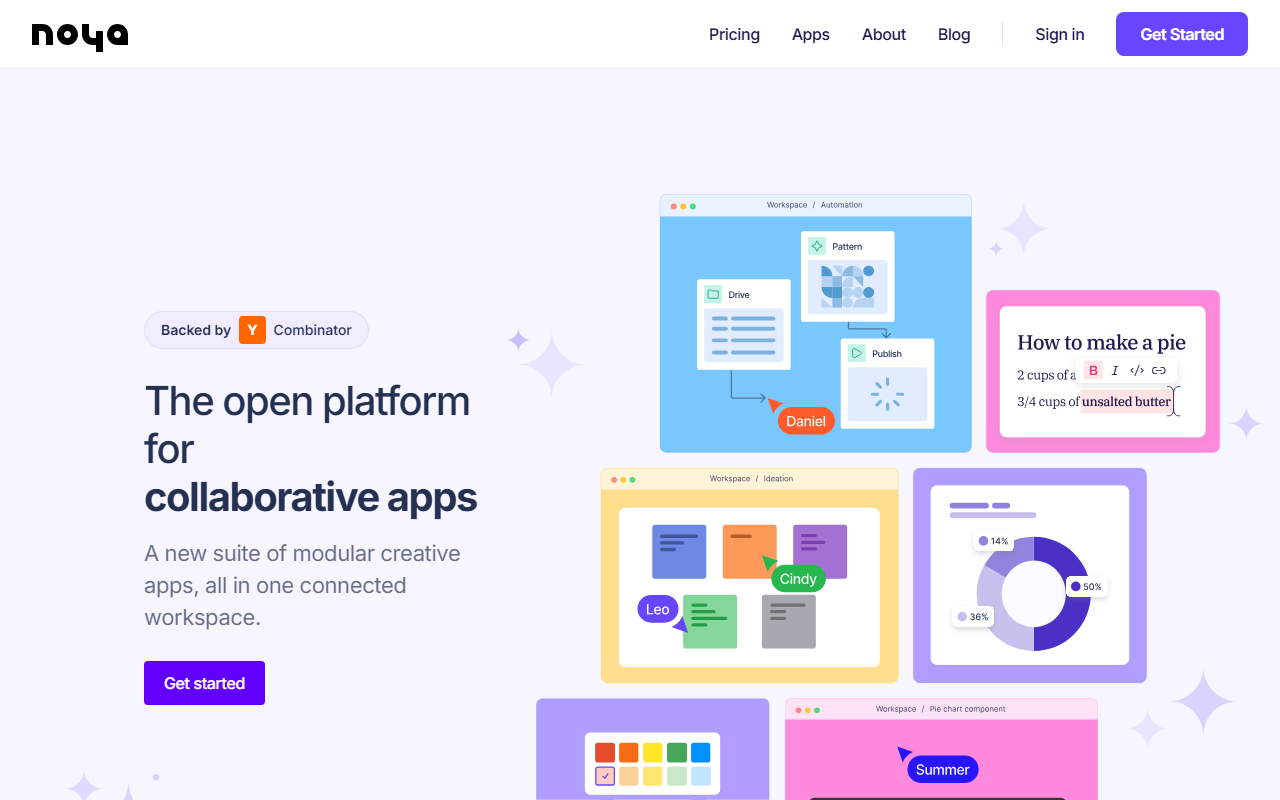
Upon visiting the Noya website, the first thing I noticed is a clean, modern interface that immediately emphasizes the platform's open and modular nature. The hero section declares 'The open platform for collaborative apps' and invites you to 'Get started'. There is no immediately obvious pricing page or tier breakdown, and clicking the 'Pricing' link in the navigation simply scrolls down to a call-to-action. This suggests that Noya is still in an early access or invite-only phase for many features. When I attempted to sign up via the 'Get Started' button, I was directed to create an account, but the site does not explicitly detail a free tier or trial period. The onboarding flow appears minimal: after authentication, users are likely presented with a dashboard that houses templates and tools. However, without a live account, I can only infer from the tool screenshots on the page. The layout seems to prioritize a workspace that combines writing, whiteboarding, and design tokens. Notably, the platform is backed by Y Combinator, which adds a layer of legitimacy and suggests strong startup momentum.
Core Features and What Sets Noya Apart
Noya positions itself as more than just a design tool—it is an operating system for collaborative app building. The core features listed include 'Write and structure text content', 'Whiteboard', 'Drive', 'Action', 'Pattern', 'Design tokens', 'Pipeline', and 'Web editor'. These are not just standalone apps; they are interconnected modules that can be embedded across the workspace. For example, you can write structured content and then directly push it into a design or a published site. The real-time collaboration is described as 'live with instant updates', which is essential for team workflows. The AI assistant is built-in and can automate tedious tasks like filling tables or organizing assets. This is a differentiator from competitors like Notion or Coda, which focus more on docs and databases, or Figma, which is primarily a design tool. Noya blends both—it offers a web editor for building interfaces and a pipeline for version control, making it versatile for teams that need to move from ideation to deployment quickly. The platform also includes one-click publishing and third-party sync, meaning you can push your work to external services without leaving Noya. The templates selection is professionally crafted, which should reduce the friction of starting a new project.
Pricing and Market Positioning
Pricing is not publicly listed on the website. The only mention of monetization is the 'Pricing' button in the navigation, which scrolls to a generic call-to-action section. It is likely that Noya operates on a freemium or subscription model common among SaaS design tools, but without concrete numbers, potential users must apply or sign up to see costs. This lack of transparency can be a barrier for individuals or small teams comparing budgets. In terms of market positioning, Noya competes with platforms like Framer, Supernova, and even low-code tools like Bubble. Unlike Framer, which focuses on interactive prototypes, Noya emphasizes a modular workspace where content, design, and code coexist. Its Y Combinator backing suggests it has resources to grow but also implies it may still be finding product-market fit. The strengths are clear: an all-in-one collaborative suite with AI assistance and real-time sync. However, one real limitation is the lack of public documentation or community forums currently visible on the site. This could hinder troubleshooting for new users. Additionally, the breadth of features may overwhelm users who just need a simple design tool.
Who Should Use Noya?
Noya is best suited for product teams that need a unified space to manage content, design, and deployment without switching between multiple apps. It is ideal for startups and agencies that value modularity and AI-powered automation. If you are a solo designer looking for a lightweight sketching tool, Noya might be overkill. Likewise, if you require extensive offline capabilities or native mobile apps, Noya may not yet be the answer based on what is visible. The platform’s real-time collaboration is a strong draw for distributed teams, and the AI assistant could save hours on repetitive formatting tasks. I would recommend trying Noya if your workflow involves frequent handoffs between writers, designers, and developers. The open platform philosophy encourages extensibility, which could become a key advantage as the tool matures. Visit Noya at https://noya.io/ to explore it yourself.


Comments