
What Brat Tool Actually Does
Upon visiting the site, it becomes clear within seconds that Brat Tool is built for one very specific job: recreating the visual identity of Charli XCX's 2024 album brat. That means the acidic lime-green background, plain lowercase text, and the soft motion-blur that turned the cover into a meme template overnight. You type a word, name, or lyric into the input box, and the tool renders it live on an HTML5 canvas before letting you export a high-resolution PNG. There is no font to install, no template library to dig through, and no design experience required. The target audience is obvious from the first screen — fans making lyric edits, social media managers chasing the trend, and meme makers who want the look without opening Photoshop. It is a single-purpose utility rather than a broad design suite, and it commits fully to that focus.
First Impressions of the Interface
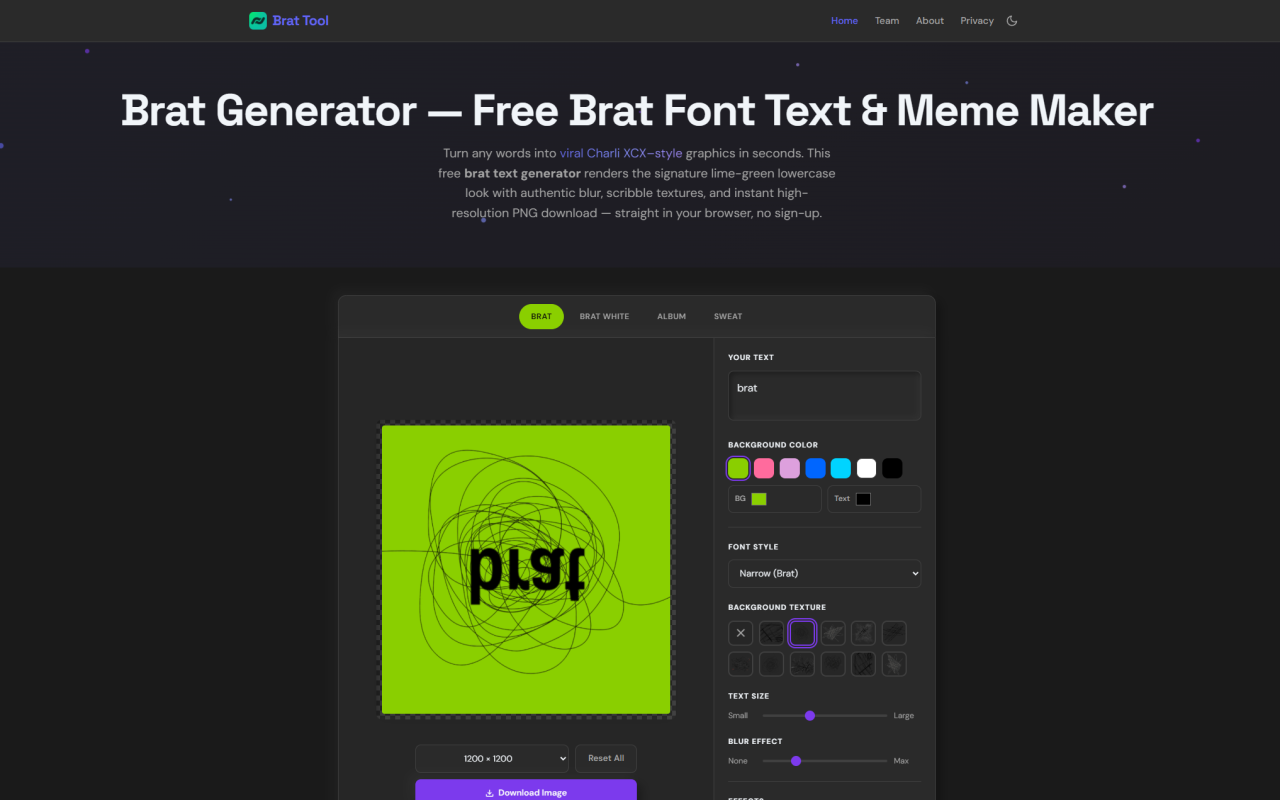
The first thing you notice is that the generator and its controls share the screen with the preview, so there is no separate editor to load into. At the top sit the four style presets — Brat, Brat White, Album, and Sweat — alongside the export size options. Below the live preview, the control panel is laid out as a vertical stack: a text field pre-filled with the word "brat," background and text color pickers, a font style dropdown, a background texture option, a text size slider, and a blur slider. A row of toggles handles the Effects — Lowercase (on by default), Mirror, Flip Vertical, and Noise. Everything updates instantly as you type or drag a slider, which makes experimentation feel immediate rather than committal. There is no onboarding flow, no tutorial overlay, and no account wall — you land directly on a working tool. For a utility this narrow, that directness is the right call.
Style Presets, Colors, and the #8ACE00 Question
Each of the four presets sets its own starting point. Brat is the iconic green-on-black-blur; Brat White is the clean white variant; Album mirrors the original cover layout; and Sweat uses the blue-and-red deluxe palette. The signature green is preselected at hex #8ACE00 (RGB 138, 206, 0), which is the genuinely useful detail here — matching that exact acidic lime by eye in a normal editor is fiddly, and one click gets you the authentic shade. From there, the color picker lets you build any palette you want, so the tool doubles as a general-purpose bold-text graphic maker if you swap the green for pink, blue, or a brand color. The font menu goes beyond the narrow brat-style typeface to include Arial, Impact, Helvetica, Georgia, and others, plus roughly 30 Unicode fancy-letter sets for bold, script, and gothic glyphs. Layering scribble textures and the blur slider lets you move from a clean cover look to a rougher marker-on-paper feel.
Export Options and Output Quality
When testing the download, you get four export sizes: 800×800, 1200×1200, and 2000×2000 squares, plus a 1080×1920 vertical for Stories and Reels. Critically, the export does not just screenshot the preview — the site states that each export redraws your design on a separate high-resolution canvas, so the downloaded PNG stays crisp at full size rather than looking like an upscaled thumbnail. The 2000×2000 option is large enough for print or detailed fan edits, while the vertical preset covers the most common social formats directly. Every download arrives as a PNG saved straight to your device with no watermark stamped across it, which is the kind of thing paid generators often hold back. There is no batch export and no animated output, so if you need a moving version of the blur effect you will have to handle that elsewhere — but for static graphics, the output quality and the watermark-free policy are both genuinely competitive.
Privacy, Offline Use, and Pricing
This is where Brat Tool quietly distinguishes itself. The entire generator runs client-side on an HTML5 canvas, meaning your typed text and the rendered image are processed locally and never uploaded to a server or stored in a database. You can verify the claim yourself: load the page, disconnect from the internet, and the typing, color, blur, texture, and PNG download all keep working offline. The only external requests are for Google Fonts and anonymized Google Analytics page views — the analytics never receive your typed content, and your theme preference is kept in the browser's localStorage. On pricing, there is nothing to report in the usual sense, because the tool is completely free: no paywall, no sign-up, no usage limit, and no watermark, with the ability to create and download as many graphics as you like. For commercial use, the images you generate are yours, though the site sensibly notes that the word "brat" and the album artwork remain Charli XCX's intellectual property.
Honest Limitations and Who Should Use It
The honesty cuts both ways. Brat Tool does exactly one thing, and if you want anything beyond static brat-style typography, it is not the tool for you — there is no multi-line layout engine, no image import, no animation, and no collaboration. The narrow typeface is a close Arial-Narrow approximation rather than the literal album font, so purists comparing pixel-for-pixel may notice small differences. Short text genuinely works best, since the canvas auto-fits the size and longer phrases lose the punch of the original look. None of these are flaws so much as the natural boundaries of a deliberately minimal utility. If you are a fan making lyric graphics, a social manager riding the trend, or anyone who wants the green-and-blur aesthetic in under a minute, it delivers cleanly and without friction. Made by the 345tool Team, an independent collective focused on privacy-first client-side utilities, it reflects that philosophy throughout — fast, local, and free of accounts.
Visit Brat Tool at https://brattool.com to explore it yourself.


Comments