

Brat Tool: First Impressions of the Free Charli XCX Style Generator
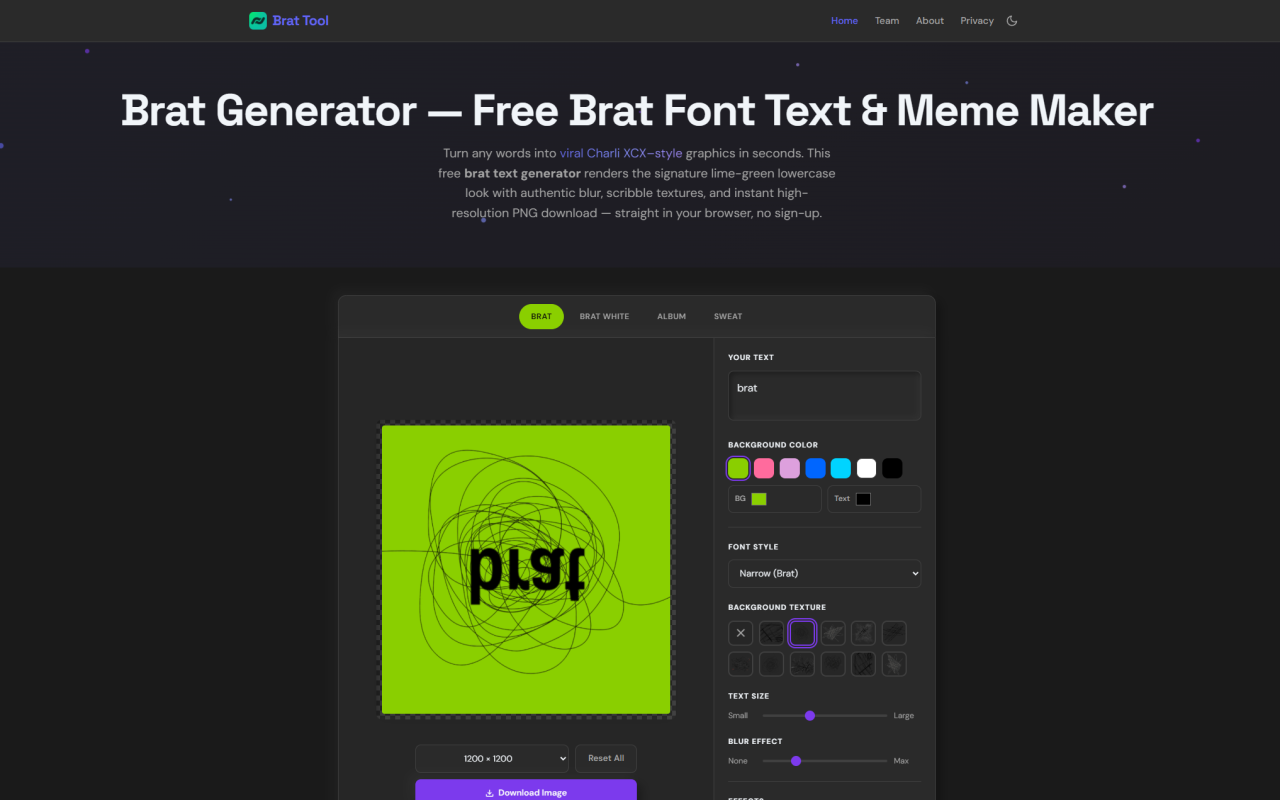
Upon visiting brattool.com, Brat Tool greets you with a single-page canvas generator stripped of any clutter: a text input, a few style preset buttons, and sliders for blur, size, and effects. No sign-up modal pops up, no cookie banner interrupts the flow. The entire tool is a clean, fast-loading interface that instantly invites experimentation. I typed “brat” — the default placeholder — and within milliseconds saw the signature lime-green background with a slightly blurred, lowercase Arial Narrow-esque typeface, exactly mimicking Charli XCX’s 2024 album cover. The tool lives up to its promise of turning any words into viral Charli XCX–style graphics without touching a design app.
How Brat Tool Works and the User Experience
The workflow is deliberately minimal. After landing on the page, you type your text into a prominent input box. Short phrases work best because the canvas auto-scales the font size to fill the 800 × 800 default square. A “Lowercase” toggle is on by default to match the authentic all-lowercase brat look. Next, you pick a style preset: Brat (green-on-black blur), Brat White (clean inverse), Album (mirrored layout), or Sweat (blue/red deluxe palette). Each adjusts colors and orientation automatically. A color picker lets you set any custom background and text shade, though the default brat green (#8ACE00) is one click away. Then you tweak the blur slider — ranging from none to a heavy motion-blur effect — and optionally layer a hand-drawn scribble texture, noise grain, mirror, or vertical flip. Everything updates on an HTML5 canvas in real time, so you see the changes instantly. The whole process from concept to finished graphic took me under 30 seconds on a desktop browser, and it felt equally snappy on mobile.
Image Export, Memes, and Real-World Use Cases
When your design looks right, you choose an export size: 800 × 800, 1200 × 1200, 2000 × 2000 for square posts, or 1080 × 1920 for vertical Stories and Reels. Clicking “Download Image” triggers a high-resolution render on a separate off-screen canvas, ensuring the downloaded PNG stays crisp at full resolution without upscaling artifacts. I exported a 2000-pixel square with the phrase “vroom vroom” and the file was pixel-perfect. The same interface doubles as a brat meme maker and lyric graphic generator — just punch in a punchline or a song lyric, hit download, and you have a share-ready asset. Social media managers, fan accounts, and anyone wanting to jump on the green meme trend will find this immediate. Unlike Canva or Photoshop templates, there’s no account creation, no watermark, and no confusion about licensing; your output is yours immediately.
Technical Architecture and Privacy First Design
Brat Tool runs entirely client-side using JavaScript and the HTML5 canvas API. The text you type and the final image never leave your device — nothing is uploaded to a server, stored in a database, or shared with third parties. The team even states you can disconnect from the internet after the page loads and the generator will keep working, including PNG export. I tested this: turning off Wi-Fi after the tool was open, I could still tweak colors, adjust blur, and download a fresh graphic. The only external requests are for Google Fonts (typeface loading) and Google Analytics with anonymized page-view counting, which never includes your typed content. There are no accounts, no passwords, no hidden surveillance. This fits squarely within the 345tool collective’s philosophy of elite, private, client-side utilities — a refreshing departure from SaaS tools that often demand emails and store user data.
Strengths and Limitations of the Generator
The generator’s strongest point is its simplicity and speed. In under a minute, anyone can produce a graphic that captures the exact visual language of the brat album — lime-green background, narrow lowercase text, and that signature soft-focus blur. It’s genuinely free, watermark-less, and works offline, which is rare even among meme generators. The ability to remix colors, add scribble textures, and choose from 30 fancy Unicode letter sets extends it beyond a one-trick pony. However, the tool’s scope is narrow by design. There are no image uploads, no multi-layered compositions, and output is limited to PNG raster files — no vector export for scaling beyond 2000 pixels. While the font approximates the original, it isn’t a licensed brat typeface, so sticklers for exact typography may notice slight differences. Additionally, the aspect ratios are fixed; you can’t create custom dimensions like banner ads or wide cover photos directly. For basic meme and lyric needs, these limits barely matter, but anyone needing full graphic design flexibility would quickly outgrow it.
Who Should Use Brat Tool and Final Verdict
Brat Tool is perfect for Charli XCX fans, social media creators, and meme-makers who want to hop onto the brat aesthetic without downloading fonts or learning Photoshop. It’s also a standout example of privacy-respecting web tools — if you care about not handing over your text to a server, this is a safe bet. Marketers running quick campaigns or needing fan-style lyric graphics will appreciate the zero-friction workflow. On the other hand, professional designers seeking precise font matching, vector outputs, or complex layouts should look toward dedicated design platforms like Canva’s brat text templates (which come with account requirements) or manual editing in photo software. For everyone else, the tool delivers exactly what it promises. Visit Brat Tool at https://brattool.com to explore it yourself.













Comments