
What SoloTrade Is and Who It Serves
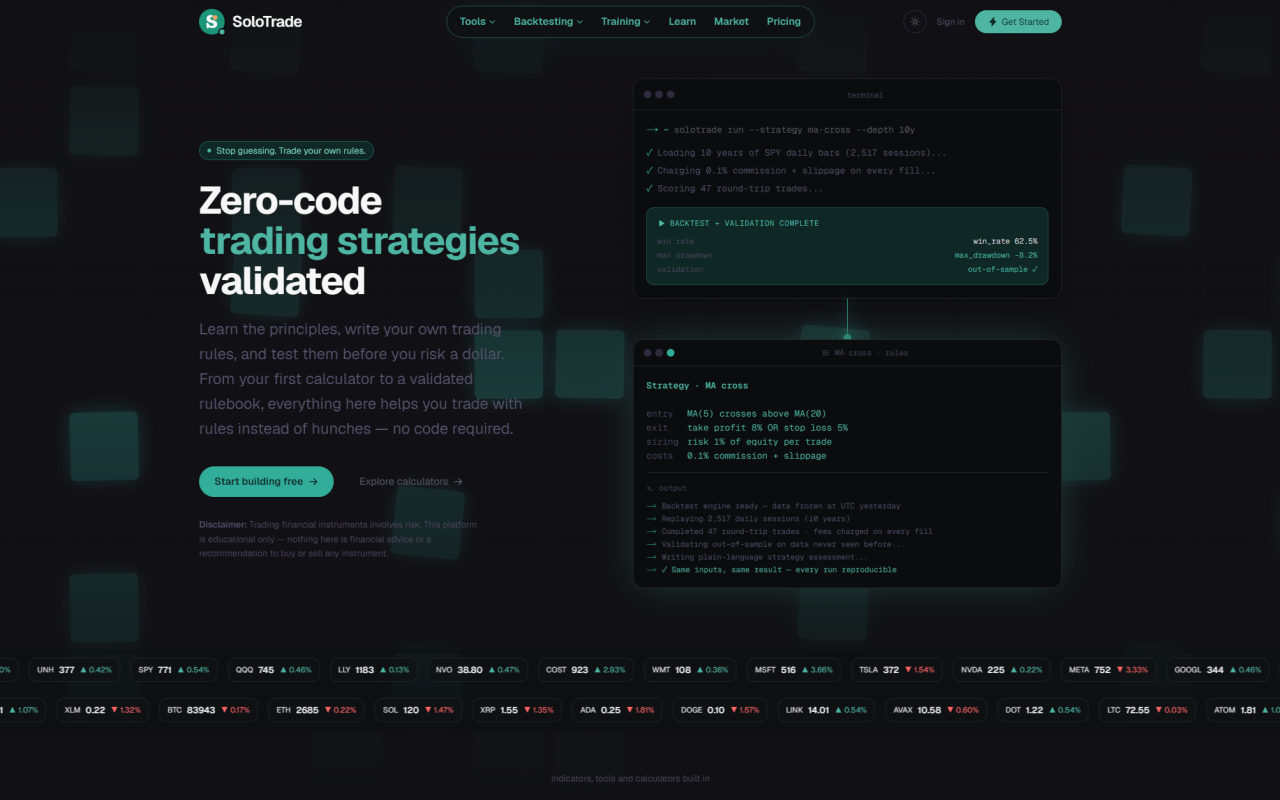
Upon visiting solotrade.io, the first thing you notice is the hero line: "Stop guessing. Trade your own rules." Beneath it runs an animated ticker cycling through US equities — AAPL, NVDA, MSFT, SPY, QQQ, JPM, XOM — then crypto pairs including BTC, ETH, SOL and XRP. The framing is set before you click a single button: this is not a broker and not a signal feed. It is a workspace for writing down a trading rule, replaying it against historical prices, and finding out whether the idea holds up.
The navigation splits into six destinations — Tools, Backtesting, Training, Learn, Market and Pricing — which maps cleanly onto the loop the site is built around. A beginner can read a concept in the learning center, run the numbers in a matching calculator, then test the resulting rule in the backtesting engine. The site is openly aimed at people who trade their own account and have no interest in writing Python.
The Front Door: 31 Calculators, No Account Required
The calculator library is the most immediately useful part of the site, and it is completely open. Every tool runs anonymously in the browser without sign-up, and each one displays its formula alongside the inputs so you can check the arithmetic rather than trust it. The list is broader than most free suites: position size, stop loss and take profit, risk-to-reward, profit and loss, win rate, profit factor, trade return, equity curve, drawdown, drawdown recovery, risk of ruin, CAGR, compounding, DCA, VWAP, Fibonacci, pivot points, Monte Carlo simulation, Value at Risk, volatility, break-even price, Kelly criterion, Sharpe ratio and market hours conversion.
Coverage extends beyond equities too. There is a Hong Kong trading fees calculator, plus crypto-specific tools for liquidation price and funding rate, and forex tools for margin, swap and pip value. Two entries — Volatility and Market Calendar — are flagged as pulling live data, while the rest work from numbers you type in. The calendar covers earnings, dividends and splits. If you want to size a position for a Hong Kong-listed stock, charge the right commissions, and see the resulting risk of ruin in one sitting, this is a fast way to do it.
Building a Strategy Without Writing Code
The strategy studio is where SoloTrade departs from most retail backtesting tools. Instead of a code editor, you assemble entry, exit and position rules as visual blocks with AND/OR logic, and the platform writes your strategy back to you in plain language in real time. The onboarding breaks the process into three steps: pick a market and set your starting capital and per-trade risk, write the rules, then replay them and read the result.
Risk handling is treated as a first-class feature rather than an afterthought. You get account-level risk tiers, trailing stops and a cap on maximum additions, with position sizing available in fixed, Kelly or risk-percent modes. Commissions and slippage are charged on every fill, which matters more than it sounds — plenty of free backtesters quietly ignore costs and produce flattering equity curves as a result. Outputs include total return, maximum drawdown, win rate, profit factor, Sharpe, Sortino and Calmar, plus sensitivity checks across neighbouring parameter values and a confidence rating for the result.
The Training Ground and What Validation Actually Means
The Training Ground is the piece I found most interesting. You build and rehearse a strategy on one slice of history, then run blind validation on data the strategy has never seen — the standard defence against overfitting, and something most beginner-oriented platforms skip entirely. Each validation run costs three credits, the same as a backtest.
Sitting alongside it is an AI strategy review that explains in plain language why a strategy made or lost money, rather than only reporting that it did. It covers whether the rules tend to perform better in trending or sideways conditions. On the free plan you trigger this manually; on paid plans it runs automatically after each backtest and costs two credits. A stored review can be reopened at no charge, and failed or abandoned runs are refunded automatically — a detail the pricing page states explicitly, and which I have rarely seen promised this plainly.
Pricing: One Free Plan, Two Paid Ones
The dividing line between plans is data resolution and history depth, not features. The free plan costs $0 permanently — not a trial — and includes all 31 calculators, daily-bar backtesting up to two years, the training ground on daily bars, the learning center and market pages, plus 50 one-off signup credits. At three credits per engine run, that is roughly ten backtests each with a review. No card is required.
Pro at $29 per month adds daily history out to ten years, 30-minute intraday backtesting and training ground sessions, and 360 credits monthly — about 72 runs with reviews. Max at $69 per month brings every interval: 30-minute bars with up to 1,095 days, 15-minute with 365 days, 5-minute with 180 days, and 1-minute with 60 days, along with 1,000 monthly credits, roughly 200 runs with reviews. Credit costs per run are identical on every tier, including free, so upgrades buy resolution rather than cheaper runs.
One practical wrinkle: automated checkout is not live yet. Paid plans exist at those list prices, but you request access and the team sets it up manually via Telegram or email. Monthly billing is the only period offered — there is no annual discount — and a 14-day money-back guarantee applies to the first paid charge.
Where SoloTrade Falls Short
The platform is new enough that its own homepage states there are no customers yet and therefore no testimonials to show, which is unusually candid but also means there is no outside track record to lean on. Nothing connects to a broker — strategies are exported as JSON or CSV files and nowhere else, so this is a research and practice environment rather than an execution one.
There is also a small inconsistency worth flagging: the homepage advertises "33 trading calculators" in one section while the tools page and the rest of the site consistently say 31. The count is stated correctly everywhere else, so it reads as an oversight rather than a misrepresentation, but it is the kind of slip that makes you double-check other numbers. The learning content is organized from classic trading books — Michael Covel's Trade Your Way to Financial Freedom and Way of the Turtle, Ernest Chan's Quantitative Trading — and presents itself as study notes rather than original research, which is the honest way to label it.
For a retail trader who wants to stop improvising and start testing rules, the free tier is a genuinely complete product rather than a teaser. Visit SoloTrade at https://solotrade.io to explore it yourself.


Comments