

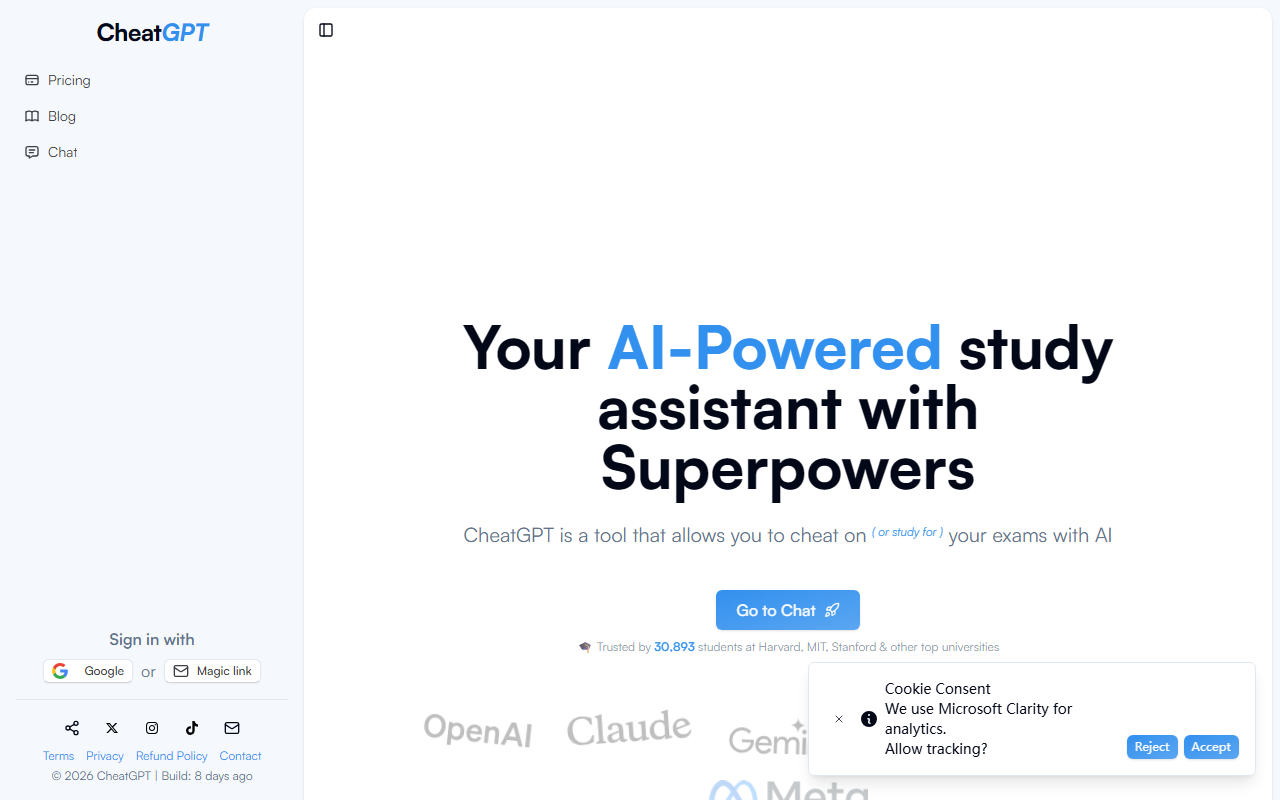
First Impressions and Onboarding
Upon visiting CheatGPT.app, I was greeted by a clean, modern landing page that immediately pitches its value proposition: an AI assistant for students and developers that costs a fraction of what you'd pay for ChatGPT, Claude, or Gemini separately. The top navigation is minimal — Pricing, Blog, Chat — and the main call-to-action buttons let you sign in with Google or a magic link. I clicked 'Go to Chat' and was prompted to authenticate; the process took under a minute. Once inside, a sidebar appeared with options like 'Chat,' 'Web Search,' 'PDF Analysis,' and 'Quiz Creation.' The interface feels streamlined, though not as feature-packed as some dedicated study platforms. I particularly appreciated the toggle for light/dark mode and the clear message estimate counters near the model selector.
Core Features and Performance
CheatGPT markets itself as an all-in-one study assistant with multiple modes. During my exploration of the free tier (which requires no credit card), I tested the web search function by asking a complex history question. The response came back in under three seconds — noticeably faster than the free version of ChatGPT. The PDF analysis tool let me upload a sample research paper and ask for a summary; it extracted key points accurately, though it struggled with dense tables. The quiz creation mode is a standout: you paste your notes or a textbook excerpt, and it generates multiple-choice questions with answer explanations. I found this genuinely useful for exam prep. The platform also claims to use high-speed API models, but the exact underlying technology isn't disclosed. Based on response style, it feels like a fine-tuned GPT variant. One limitation I observed is that the message counter can run down quickly if you ask long, complex questions — the pricing page includes a vague token usage disclaimer that might surprise heavy users.
Pricing and Value Proposition
The headline pricing is bold: $5/month vs. $60+/month for the big-name competitors. Subscriptions come in monthly and annual options, with a 100% money-back guarantee, no auto-charge, and cancel-anytime terms. Compared to paying for ChatGPT Plus ($20), Claude Pro ($20), and Gemini Advanced ($20) separately, CheatGPT clearly wins on cost — if it can replace all three. In my testing, it handled basic Q&A, code generation, and subject-specific explanations competently, but it lacks the multimodal capabilities of Gemini and the deep reasoning of Claude. For pure text-based study needs, though, the $5 tier is compelling. The site proudly claims trust from thousands of students at Harvard, MIT, and Stanford, though I couldn't verify this independently. There's no public API or team plan listed, so this is exclusively a direct-to-student tool; developers may need to look elsewhere for programmatic access.
Who Should Use CheatGPT?
CheatGPT is best suited for undergraduate and graduate students who need a fast, affordable AI assistant for homework help, exam preparation, and quick explanations. The PDF analysis and quiz creation features make it a solid alternative to tools like Quizlet or Khan Academy's AI tutor. However, serious researchers or professionals requiring advanced reasoning, multimodal inputs, or custom fine-tuning will find it limiting. The platform's name and marketing may raise ethical eyebrows — it explicitly mentions 'cheating' — but the actual use cases are legitimate study aids. A genuine strength is its price-to-performance ratio; a real limitation is the lack of transparency about underlying models and the potential for hidden token overages. Overall, I recommend CheatGPT for budget-conscious students who need a single, fast AI study companion and don't require cutting-edge features. Others should test the free tier critically before committing.
Visit CheatGPT at https://cheatgpt.app/ to explore it yourself.







Comments