

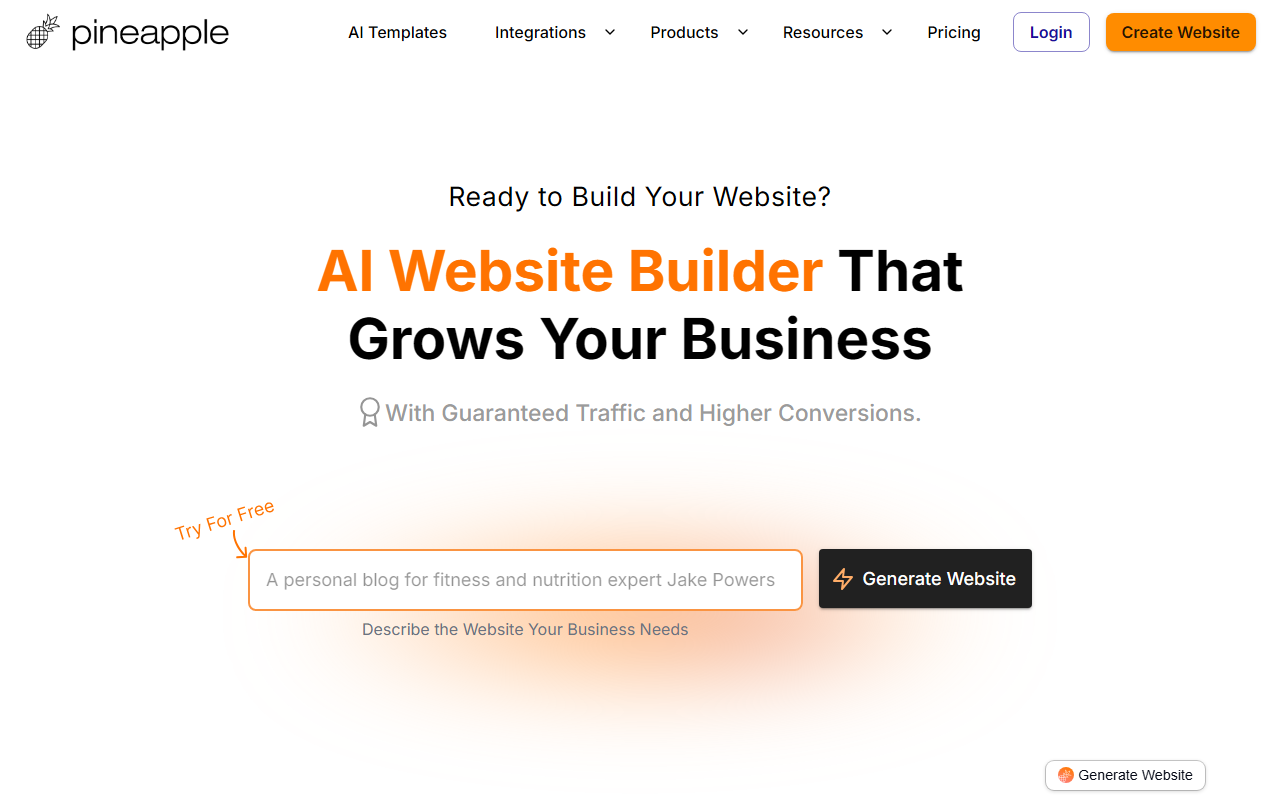
First Impressions: What Pineapple Builder Offers
Upon visiting the Pineapple Builder homepage, the first thing you notice is the simplicity of the value proposition: describe your business, and an AI builds a website that drives traffic and conversions. The dashboard shows a large prompt field asking you to describe your business—for example, 'Website for my Laundry Service with Pricing'—and a single 'Generate Website' button. No clutter, no endless templates. This immediate focus on output feels refreshing compared to traditional website builders that overwhelm you with options.
When I tested the free tier—no credit card required, which is always a good sign—I was taken through a short onboarding wizard. I typed a simple description for a hypothetical coffee shop, and within 30 seconds, the AI produced a full landing page with headline, copy, images, and a call‑to‑action. The speed is impressive. The tool then introduces you to your 'AI Team': an AI CMO, Designer, and Developer. You can chat with any of them to adjust the design, rewrite copy, or plan a marketing strategy. It feels like having a remote agency on standby.
Pineapple Builder clearly positions itself not just as a site generator but as a business growth platform. The AI SEO assistant suggests titles and meta descriptions, and built‑in analytics track user engagement without GDPR headaches. Integrations for bookings, forms, payments, and email marketing are baked in, so you don’t need to patch together third‑party services yourself. For a small business owner who wants a professional online presence without technical headaches, this all‑in‑one approach is a major draw.
How It Works and Key Features
The core workflow is simple: you describe your business, the AI generates a customized website, and then you can edit using a drag‑and‑drop editor or ask the AI to make changes. The AI is trained on your specific business details—goals, target audience, tone of voice—so responses are tailored. For example, an AI blog feature lets you write posts 3x faster by aligning with your chosen keywords and tone. The generated pages are optimized for SEO and load quickly, thanks to modern hosting infrastructure.
Pineapple Builder appears to use a combination of large language models (likely GPT‑based) for copy generation and a proprietary design engine for layouts. The dashboard includes sections for style configuration (fonts, colors, buttons), page management, and analytics. I observed that you can add custom domains and integrate with Google Analytics easily. The platform claims to be trusted by over 50,000 businesses worldwide, which suggests a solid user base and ongoing development.
Pricing is not publicly listed on the website. The only option shown is 'Try For Free – No Credit Card,' which implies a freemium or trial structure. Without pricing details, it’s hard to evaluate long‑term value, but the free trial gives you enough to test the core features. For a full assessment, you’d need to explore the paid plans, but the transparency around pricing is a notable gap.
Who Should Use Pineapple Builder?
Pineapple Builder is clearly built for small business owners, freelancers, creatives, and consultants who need a fast, professional website and want to avoid spending weeks on design and copy. The AI handles the heavy lifting, letting you focus on running your business. It’s especially suitable for service‑based businesses like yoga teachers, acupuncturists, and marketing consultants—the testimonials on the site reflect exactly those personas.
Compared to competitors like Wix ADI or Jimdo, Pineapple Builder leans harder into AI as a growth assistant rather than just a site builder. Wix offers more design flexibility but less integrated business guidance. Jimdo’s AI builder is simpler but lacks the chat‑based AI team feature. Pineapple sits in a niche where the AI doesn’t just build the site but also helps you market it daily. However, advanced users who need custom code, complex e‑commerce setups, or extensive third‑party integrations might find the platform restrictive. The drag‑and‑drop editor is straightforward but not as powerful as dedicated page builders.
Final Verdict: Strengths, Limitations, and Recommendation
Pineapple Builder excels at speed and ease of use. The AI generates a coherent, SEO‑ready site in under a minute, and the ongoing AI assistant saves time on content and strategy. The built‑in analytics and integrations reduce the need for multiple subscriptions. For a busy entrepreneur, this is a genuine productivity booster.
On the downside, the lack of transparent pricing is a concern. You cannot gauge long‑term costs without signing up for a trial. Additionally, the design templates, while clean, may feel generic for brands that require a very unique aesthetic. The AI’s copy is good but sometimes lacks nuance—you’ll want to review and tweak it to match your voice perfectly. Finally, the platform’s focus on small business websites means it’s not ideal for large content‑driven sites or advanced e‑commerce.
Overall, I recommend Pineapple Builder to any small business owner who wants a no‑fuss website that also helps with traffic and lead generation. Try the free tier, build your site in minutes, and see if the AI team fits your workflow. If you need maximum design control or complex functionality, look at Wix or WordPress instead. Visit Pineapple Builder at https://pineapplebuilder.com to explore it yourself.













Comments