
What Findsight AI Does and How It Works
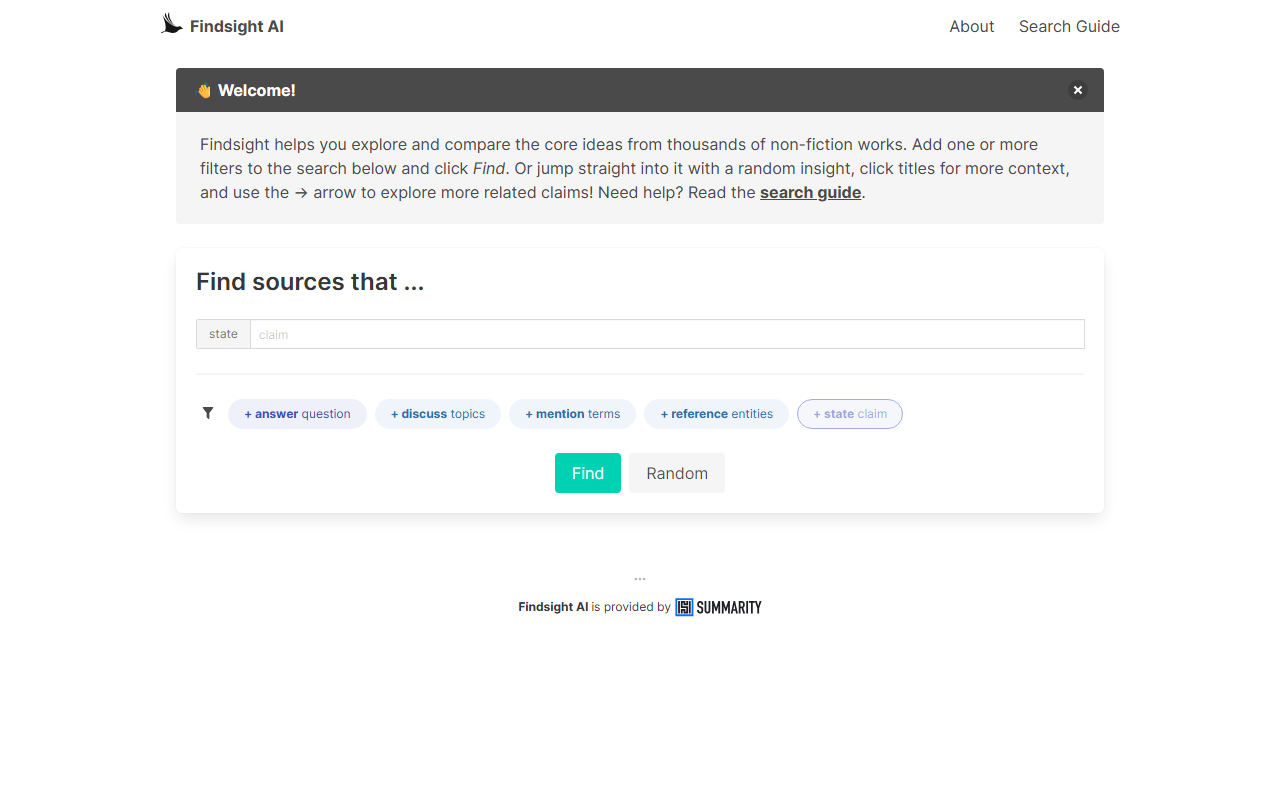
Findsight AI is a specialized search engine designed for syntopical reading — the practice of exploring multiple non-fiction sources to compare core claims. Upon visiting the site, I was greeted by a clean, minimal dashboard with a clear mission: help you discover and contrast ideas from thousands of books and articles. The tool uses a claims-based approach rather than traditional keyword matching, extracting the key points made by authors and allowing you to navigate between related claims.
The search interface is built around several filter types. The mention filter works like a standard text search, but you can refine with the reference filter, which picks up named entities (e.g., "Skill: running" vs. "Run (baseball)") and the discuss filter, which targets topic tags attached to each source. Two AI-powered filters — state and answer — unlock deeper functionality. The state filter lets you enter a custom claim and find related claims, while the answer filter returns claims that address a question you pose. Both rely on AI embeddings to surface semantically similar results.
Findsight also includes helpful discovery tools: a Random button that pulls up an insight from its database, and a → arrow that lets you explore claims related to any result. The interface is intuitive, with tooltips and a search guide, though the sheer number of filter options may overwhelm first-time users. During testing, I ran a mention search for "procrastination" and immediately saw highlighted claims from several books, each linked back to the original source — exactly what syntopical reading needs.
First Impressions and User Experience
When testing the free tier, I noticed a prominent banner stating: "You can run 50 searches using AI filters per day." Non-AI filters (mention, reference, discuss) appear unlimited. I started with a basic mention filter for "growth mindset." The results page listed multiple claims, each with a snippet and source title. Clicking on a title expanded context around the highlighted claim, making it easy to understand the author's argument. The → arrow then led me to related claims from different authors, demonstrating the core syntopical value.
The AI filters feel genuinely powerful. I tried the answer filter with the query "What are the benefits of meditation?" and received a set of claims that directly addressed different facets of that question — from stress reduction to improved focus. The state filter, used similarly to the Random button, surfaces claims that topically align with an input claim. This is where Findsight differentiates itself from a standard search: instead of pages of results, you get distillations of arguments.
One minor friction point: the filter design requires clicking "+" icons to add filters individually, and the layout can feel cramped on smaller screens. The potential matches section below the filters adds an extra step before seeing final results. Still, the workflow feels deliberate and scholarly.
Strengths and Limitations
Strengths: Findsight's syntopical search is genuinely novel. It saves hours of manual cross-referencing by directly surfacing claims from multiple works. The AI filters (state and answer) are accurate and return diverse, relevant insights. The tool also provides citations back to original books and articles, a boon for researchers. The Random button is great for serendipitous discovery — I found a fascinating claim about "feedback loops in habit formation" from an author I hadn't encountered before.
Limitations: The free tier's cap of 50 AI searches per day is restrictive. If your research involves heavy use of state or answer filters, you may hit the limit quickly. The tool currently appears to focus on English-language non-fiction, and the corpus size isn't disclosed — I wondered how comprehensive it is for niche topics. Additionally, the mention filter can be imprecise (e.g., searching "running" returns results about jogging, business operations, and political campaigns), requiring careful use of entity filters. Pricing beyond the free tier is not publicly listed, so potential power users must contact the team.
Compared to alternatives like Google Books or ChatGPT with custom instructions, Findsight offers a more structured, claim-centric approach. It lacks the raw breadth of Google Books but provides deeper semantic connections. For casual readers, the learning curve may feel steep; this tool is better suited for academics, writers, and deep learners.
Pricing and Target Audience
Pricing is not publicly listed on the website. The free tier offers 50 AI-filtered searches per day, which should be enough for light exploration or small research projects. Heavy users will likely need a paid plan, though no details are shared on the site. I assume a subscription model, given the tagline "Findsight AI is provided by" — likely the development team — but no pricing page exists.
This tool is best suited for researchers, students, and avid readers who practice syntopical learning — anyone who wants to compare ideas across books on a specific topic without reading each cover to cover. It's less ideal for casual readers seeking quick summaries or entertainment. If you're a blogger or journalist researching a theme, Findsight can accelerate the gathering of authoritative claims.
In summary, Findsight AI is a promising niche tool that fills a real gap in the information landscape. Its claim-centric search and AI filters are impressive, but the limited free tier and opaque pricing hold it back from mass adoption. I recommend it for anyone serious about deep reading research.
Visit Findsight AI at https://findsight.ai/ to explore it yourself.





Comments