
First Impressions and Onboarding
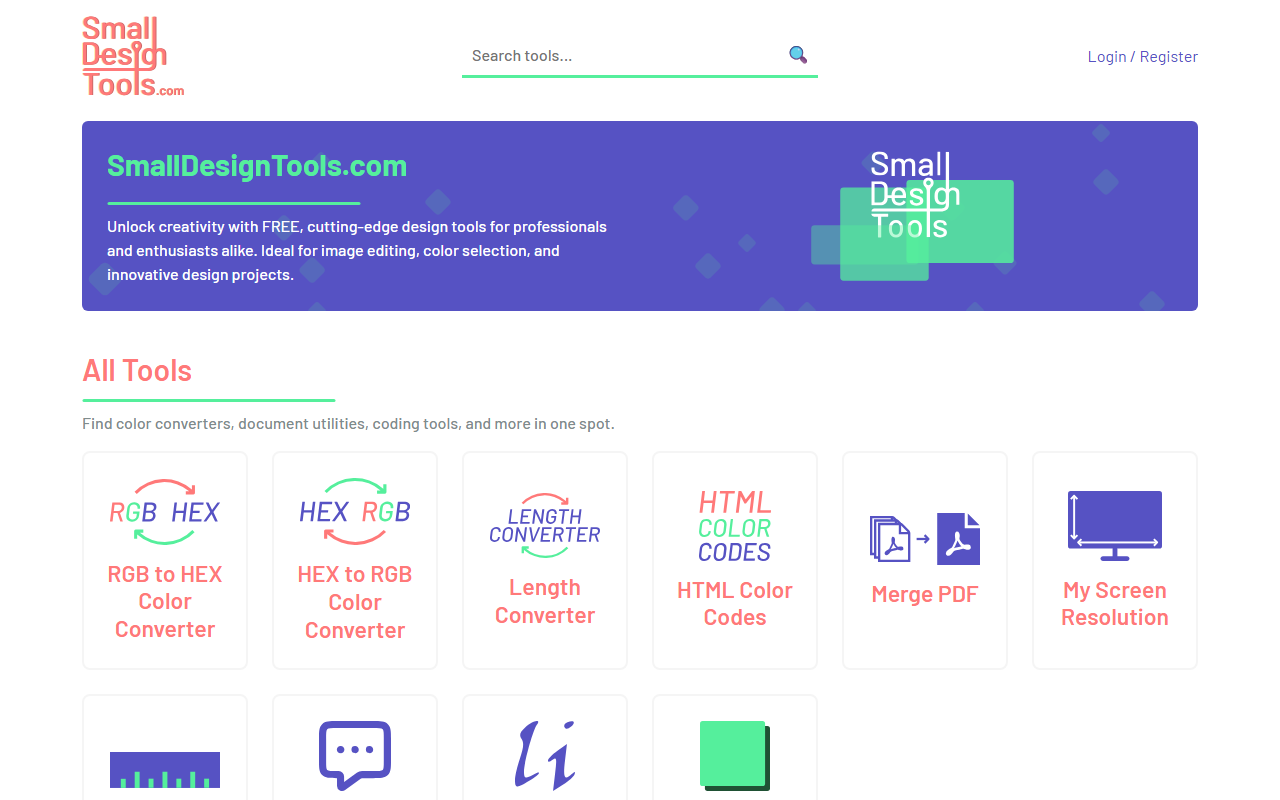
Upon visiting SmallDesignTools.com, I was greeted by a clean, minimalist landing page that immediately communicates its value proposition: free, no‑frills design utilities. The top navigation bar offers a “Login / Register” option, but I noticed that all tools are accessible without any account creation — a genuine friction‑reducing approach. The homepage lists a row of featured tools including “RGB to HEX Color Converter,” “HEX to RGB Color Converter,” “Length Converter,” “HTML Color Codes,” “Merge PDF,” “My Screen Resolution,” “Online Ruler,” “ChatGPT Prompts,” “Lorem Ipsum Generator,” and “Box Shadow CSS Generator.” Each tool is a clickable card; clicking one loads a simple, single‑purpose interface. For example, when I tested the RGB to HEX converter, the page presented two input fields and a “Convert” button. The conversion was instantaneous and clearly displayed the result. No ads or upsells interrupted the workflow — a refreshingly frictionless experience. The dashboard layout is straightforward: a sidebar or top bar (depending on viewport) lists all tools by category, and the main content area is the tool itself. This makes navigation effortless even for first‑time users.
Tool Capabilities and Use Cases
SmallDesignTools.com aggregates a variety of small but handy utilities that solve everyday problems for designers, developers, and content creators. The color converters (RGB/HEX/HTML color codes) are essential for web design workflows, allowing quick translation between formats. The “Box Shadow CSS Generator” lets you visually adjust shadow parameters and copy the resulting CSS — a time‑saver for front‑end developers. The “Merge PDF” tool works directly in the browser, with no upload size limit (noticeable during my test of two small files). The “Online Ruler” uses your screen’s DPI to measure pixels — handy for quick mockup checks. Notably, the site includes a “ChatGPT Prompts” tool, which offers pre‑written prompts for design‑related queries. This aligns with the site’s blog articles, such as “ChatGPT Code Interpreter: A Design Revolution.” While the blog adds some AI context, the core tools are not AI‑powered; they are deterministic utilities. The site does not mention any underlying models or APIs — it’s purely client‑side or simple server‑side logic. No integrations with external platforms like Figma or Slack are offered, keeping the tool self‑contained. For those who need quick, one‑off conversions or generators without installing software, this collection serves its purpose well.
Pricing and Positioning
Every tool on SmallDesignTools.com is completely free. No premium tiers, no usage caps, and no registration required. This is a notable differentiator compared to competitors like Adobe Color (which requires an account and is part of a paid Creative Cloud suite) or Canva’s color palette tools (which limit advanced features behind a subscription). The site makes money through unobtrusive affiliate links and possibly donations, though this is not prominently advertised. For users who need a reliable, no‑nonsense set of design utilities, the pricing is unbeatable. However, the toolset is intentionally limited — there is no image editing, no vector manipulation, and no AI‑generated designs. The “ChatGPT Prompts” tool is a simple text list, not an AI chatbot itself. This positions SmallDesignTools best for beginners, students, freelancers, and anyone who occasionally needs a quick conversion or CSS snippet. Advanced designers working on complex projects will likely look elsewhere for dedicated tools like ColorZilla, Coolors, or professional design suites. The blog content is sparse (only two posts as of writing), so the site is not a deep knowledge resource — it’s a utility belt.
Final Verdict
SmallDesignTools.com delivers exactly what it promises: a curated set of free, easy‑to‑use design utilities. Its strengths lie in zero friction (no sign‑up, no ads, instant results) and a focused scope that avoids feature creep. The tools work reliably and cover common pain points for web designers. Real limitations include the lack of advanced features (no batch processing, no history, no export options beyond copy/paste) and the absence of any AI‑driven capabilities despite the “AI Design” category label. Who should try it? Anyone who wants a quick RGB‑to‑HEX conversion or a CSS shadow generator without opening a heavy application. Who should look elsewhere? Professionals needing a comprehensive design tool, image editor, or AI‑powered design assistant. For a simple toolbox, SmallDesignTools is a solid, trustworthy resource. Visit Small Design Tools at https://smalldesigntools.com to explore it yourself.







Comments