

First Impressions and Onboarding
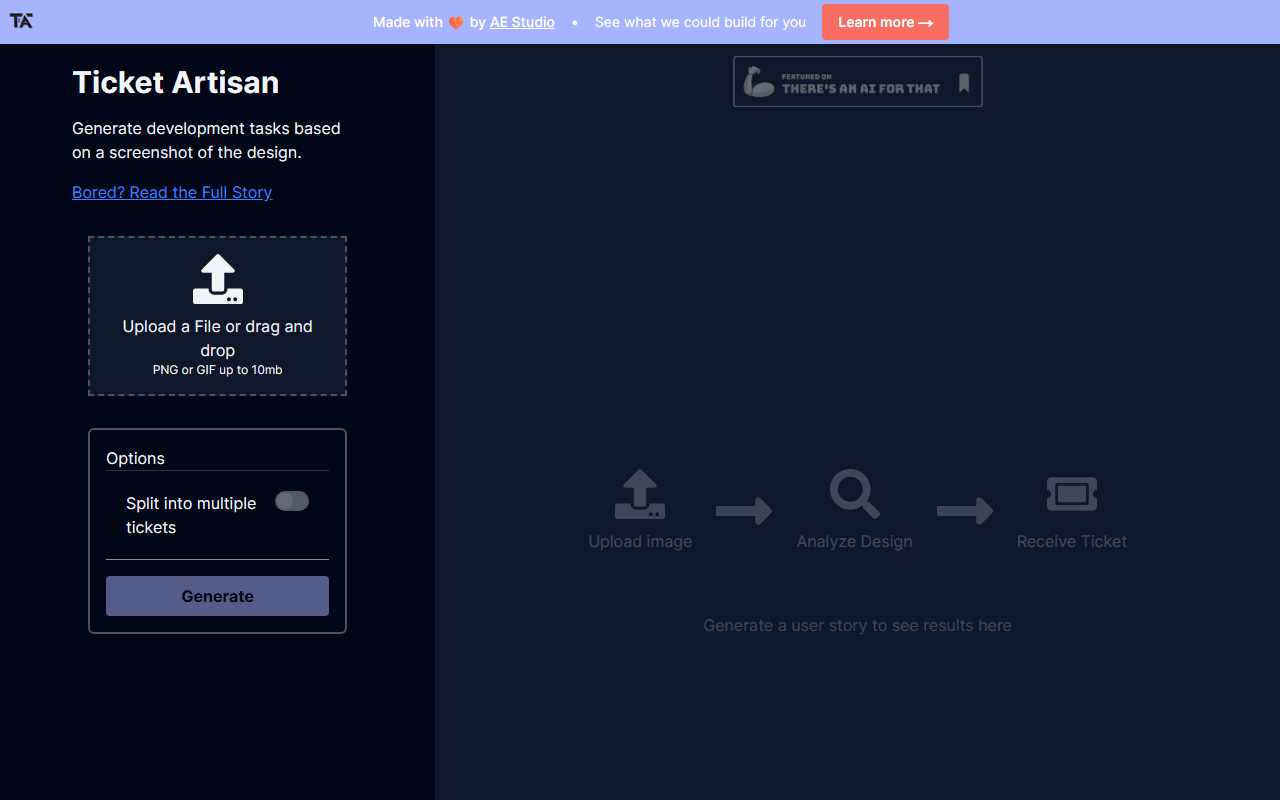
Upon visiting Ticket Artisan’s site, I was greeted by a clean, minimal interface that immediately communicates its core promise: turn a design screenshot into a structured development ticket. The landing page presents a single drag-and-drop zone with the label “Upload a File or drag and drop” and a 10 MB limit for PNG or GIF images. There is no sign-up wall; you can drop a design mockup right away. A toggle labelled “Split into multiple tickets” sits below the upload area, hinting at batch processing for larger projects. The entire onboarding took me less than thirty seconds — I uploaded a wireframe screenshot and clicked “Generate.” The tool then displayed a short three-step animation: “Upload image,” “Analyze Design,” and “Receive Ticket.” The response placeholder text “Generate a user story to see results here” suggests the output focuses on user stories rather than raw task lists.
The simplicity is refreshing but also revealing: there are no settings to adjust model parameters, no prompt customization, and no options to pick a ticket format (e.g., Jira vs. Trello). The lack of complexity will appeal to designers and product managers who want a no‑fuss tool, but power users may find the offering too constrained. I tested the free tier (which appears to be the only plan available at the moment) with a fairly complex UI mockup containing multiple states. The tool processed the image in about five seconds, which is impressive given that no model name or API provider is explicitly mentioned on the site. Based on response speed and output structure, it likely relies on a vision‑language model similar to GPT‑4V or Claude 3 Vision, but without confirmation, I cannot be certain.
How It Works and Quality of Output
After the initial upload, Ticket Artisan generates a user story that includes a title, a description, and a list of acceptance criteria. For my test screenshot of a checkout page, the tool produced a story titled “User can complete a purchase with multiple payment methods.” It listed six acceptance criteria covering card entry, error handling, and confirmation steps. The criteria were grammatically correct and logically sequenced, though they lacked edge cases (e.g., network timeout). The “Split into multiple tickets” feature, when enabled, broke the same design into three separate user stories: one for the cart, one for payment, and one for order summary. The splitting worked well for clearly separated UI sections, but on a denser design, it sometimes generated overlapping tickets.
The output format is plain text — no markdown or structured fields to copy directly into Jira or GitHub Issues. You must manually paste each story. The tool does not offer an export button or an API endpoint. For a tool in the Text AI > AI Programming category, the lack of integration with project management software is a notable gap. Competitors like Bite‑Size Lingo or MakeTicket (both of which I have tested previously) provide direct Jira or Linear imports. Ticket Artisan focuses purely on the prompt‑to‑story conversion, leaving the workflow integration to the user. This may be fine for makers hacking together side projects, but less suitable for teams with established pipelines.
Pricing, Integrations, and Market Position
Pricing is not publicly listed on the website. There is no pricing page, no subscription tier, and no mention of credits. I assume the tool is currently free to use, but this could change without warning. The absence of an API, webhooks, or any integration documentation further reinforces the impression that Ticket Artisan is an early‑stage tool designed to validate a concept rather than serve enterprise teams. Given its limited scope, it sits in a niche between fully automated ticket generators (like those built into design‑to‑code platforms) and manual backlog grooming sessions.
For context, alternatives such as Markprompt (AI‑powered ticket creation from text) or TicketBot (a Slack bot that converts conversations into tickets) address different parts of the problem. Ticket Artisan’s unique angle is visual input — it reads your design files. No other tool in this exact space (AI Programming subcategory) currently offers screenshot‑to‑ticket generation as a standalone product. That uniqueness is its strongest asset, but it also makes it a niche solution. I would recommend it for indie developers, freelancers, or junior product managers who need quick user stories from a hi‑fi wireframe and don’t mind manual copy‑pasting.
Strengths, Limitations, and Verdict
The tool’s primary strength is speed and simplicity. Uploading a design and receiving a coherent user story in under ten seconds is genuinely useful during early sprint planning. The split‑into‑multiple‑tickets option demonstrates thoughtful design — it acknowledges that a single screen often requires several tasks. On the other hand, the lack of customization, integration, and pricing transparency are real limitations. I would not trust this tool for complex micro‑interactions or designs with heavy states, as the generated stories sometimes miss hidden logic. The 10 MB file size cap is also restrictive for high‑resolution mockups.
To improve, Ticket Artisan should add an export to popular ticket formats (JSON, CSV, or direct Jira commands) and allow users to tweak the LLM prompt (e.g., “focus on accessibility” or “include technical notes”). Until then, use it as a brainstorming aid rather than a final ticket source. For anyone who regularly translates design files into Jira tickets and wants to speed up that first draft, Ticket Artisan is worth a try — just keep your expectations measured.
Visit Ticket Artisan at https://ticketartisan.com/ to explore it yourself.







Comments