
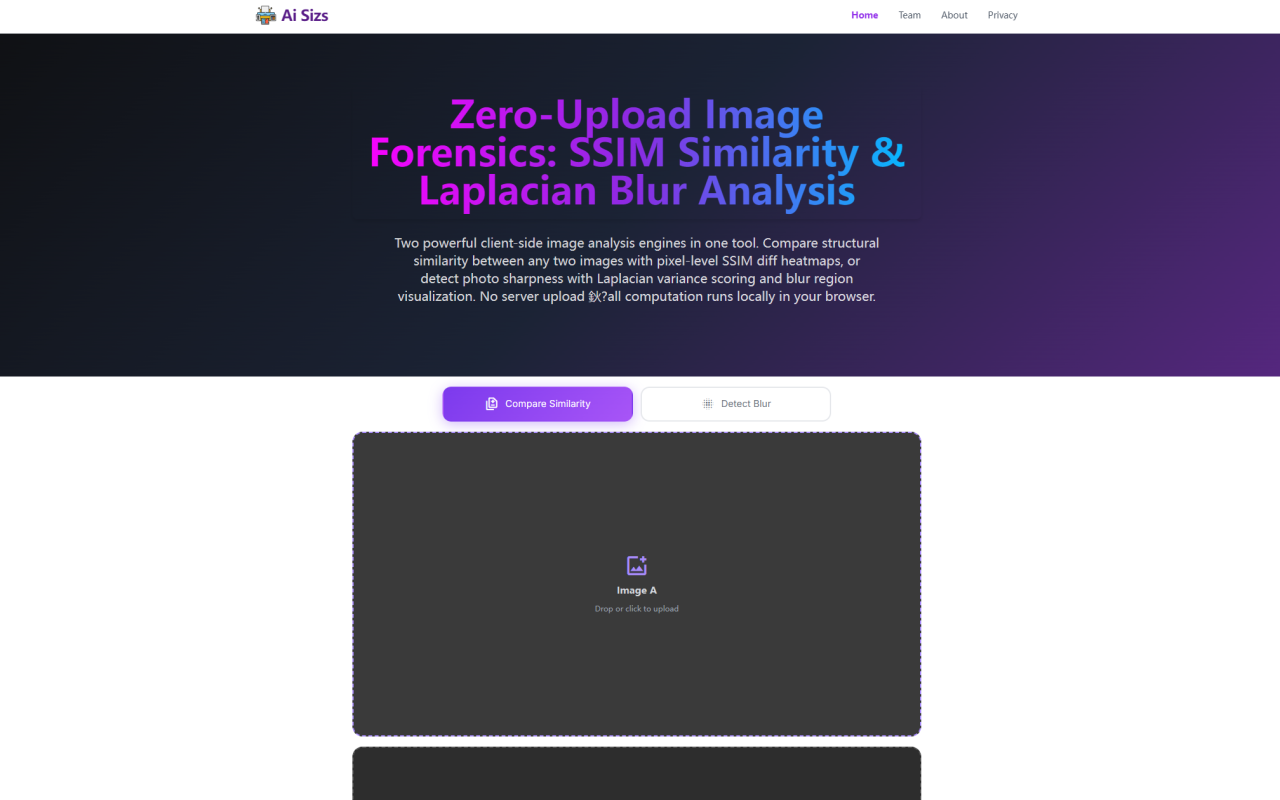
When I first loaded Ai Sizs, I was struck by the contradiction between its sophisticated engineering and its deliberately simple interface. No login wall. No cookie banner demanding I click something. Just a dark-themed page with two large buttons: "Compare Similarity" and "Detect Blur," each flanked by a drag-and-drop upload zone. The tool promises to run structural similarity index (SSIM) comparisons and Laplacian blur detection entirely in your browser, with zero image uploads. After spending an afternoon stress-testing it with everything from subtly compressed JPEGs to deliberately out-of-focus product shots, I can confirm the claim holds up. And yes—it is entirely free, with no premium tier or credit card upsell in sight.
Two Tools in One Browser Tab
The landing page makes its dual purpose immediately clear. A toggle bar sits above two distinct work areas, letting you switch between SSIM similarity comparison and Laplacian blur detection. In similarity mode, two side-by-side drop zones appear for Image A and Image B. You drag in two photographs, click "Run Comparison," and within a second or two—depending on resolution—a red-yellow heatmap overlays Image A, highlighting exactly where the two images diverge. Toggle to blur detection, and a single drop zone appears. Upload one photo, click "Run Detection," and you get a sharpness score from 0 to 100 along with a blue blur-region heatmap. The visual feedback is immediate and the workflow is so straightforward that I never once reached for a help button.
SSIM Comparison Under the Microscope
I ran several test pairs through the similarity engine to understand its limits. SSIM—Structural Similarity Index Measure—is the academic gold standard for perceptual image comparison, and Ai Sizs implements it faithfully. I compared a raw photo against its JPEG export at quality 80. The tool returned an 87.4 percent similarity score, and the heatmap showed concentrated red patches around high-frequency edges: leaves, text on a sign, the weave of a fabric. Regions like solid blue sky remained transparent, correctly identifying them as structurally identical despite mild compression artifacts. This is exactly what SSIM is designed to do, and the tool does not oversimplify the result into a binary "same or different" verdict.
The heatmap itself renders as a semi-transparent overlay on Image A. Areas with an SSIM score of 0.99 and above are left fully transparent. As dissimilarity increases, the overlay darkens from yellow through orange to deep red. This gradient lets you visually distinguish between a global brightness shift and a localized structural edit—for instance, finding a watermark added to a corner rather than a uniform exposure adjustment. The 8x8 sliding window with 50 percent overlap produces smooth boundaries, avoiding the blocky artifacts that plague naive per-pixel comparators. For photographers verifying that a client didn't retouch a delivered image, or for QA teams checking if a compressed asset matches its source, this is precisely the level of granularity you need.
Laplacian Blur Detection — Sharpness Scoring That Makes Sense
The blur detection engine was the feature I was most skeptical about, because "sharpness score" utilities often collapse complex optics into a meaningless number. Ai Sizs avoids that trap. It uses a classical computer vision approach: a 3x3 discrete Laplacian kernel convolves across the grayscale channel, measuring second spatial derivatives at every pixel. The variance of these responses is log-normalized to produce a 0–100 score. I tested it on a series of images: a sharp landscape shot at f/8, a portrait with intentional background bokeh, and a photo I deliberately threw out of focus by disengaging autofocus mid-shot.
The results were telling. The sharp landscape scored 87.2—firmly in the "Excellent Sharpness" tier. The bokeh portrait scored 63.8, landing in "Good Sharpness," which makes practical sense: the subject's eyes were sharp, but large blurry background regions dragged the average score down. The deliberately defocused image came in at 31.4—"Significant Blur." The blue heatmap overlay illuminated these results spatially, with deep navy blue covering the background bokeh regions and the sharp edges of the subject's eyes and hair staying transparent. This distinction is critical for photographers trying to evaluate whether a portrait has acceptable depth-of-field versus genuine focus failure. The tool does not conflate the two.
Zero-Upload Architecture Isn't Just Marketing
Many "free online tools" quietly ship your data to a remote server for processing. Ai Sizs genuinely does not. Every pixel operation—image parsing, grayscale conversion, SSIM window decomposition, Laplacian convolution, heatmap compositing—runs inside your browser via the HTML5 Canvas API. I verified this by opening my browser's DevTools Network tab while running both analyses. Zero outbound requests. No image uploads. No analytics pings carrying file metadata. I even disconnected from the internet after the page loaded, and both engines continued working perfectly offline.
This air-gapped design is the tool's strongest differentiator. For forensic analysts handling legal evidence photographs, for product photographers reviewing pre-release assets under NDA, or for medical imaging references, the assurance that no pixel ever reaches a server is non-negotiable. Ai Sizs also does not deploy cookies, has no registration system, and stores nothing in localStorage or IndexedDB. Close the tab, and every byte of image data evaporates from RAM. The only external dependency I found is Google Material Symbols for icon rendering—a static font fetch that transmits no user data. Google Analytics 4 is present for anonymous page-view counting, but it is configured without cross-device tracking or cookie-based identification.
Who Actually Needs This Tool?
Ai Sizs is not a general-purpose image editor. It is a focused forensic toolkit, and its value is clearest when you have a specific question about image fidelity or sharpness. Photographers can use the blur detector to quickly reject soft shots before sending them to clients. QA testers processing compressed image batches can pipeline the SSIM engine—both similarity.js and blur-detector.js are readable vanilla JavaScript files that developers can extract for custom integrations. Legal and security professionals dealing with evidentiary photographs benefit most from the zero-upload architecture, which sidesteps data residency concerns entirely.
The free tier is complete, not crippled. There is no watermark, no daily usage cap, and no nag screen to upgrade. The only limitation I encountered is the 5MB per-file size cap and automatic downscaling of images exceeding 4096 pixels on any edge. For most forensic use cases this is entirely adequate. If you need to compare 100-megapixel medium-format raws, you will need to pre-downsample them yourself. That is a reasonable trade-off for a tool that runs entirely in your browser with zero server costs.
Ai Sizs does one thing—image forensics—and does it with academic rigor and genuine privacy. There are no surprises, no data leakage, and no upsell. If you need to compare two images or check a photo for blur without trusting a third party with your files, this is the simplest and most trustworthy option I have found. Visit Ai Sizs at https://aisizs.com to explore it yourself.


Commentaires