

First Impressions and Onboarding
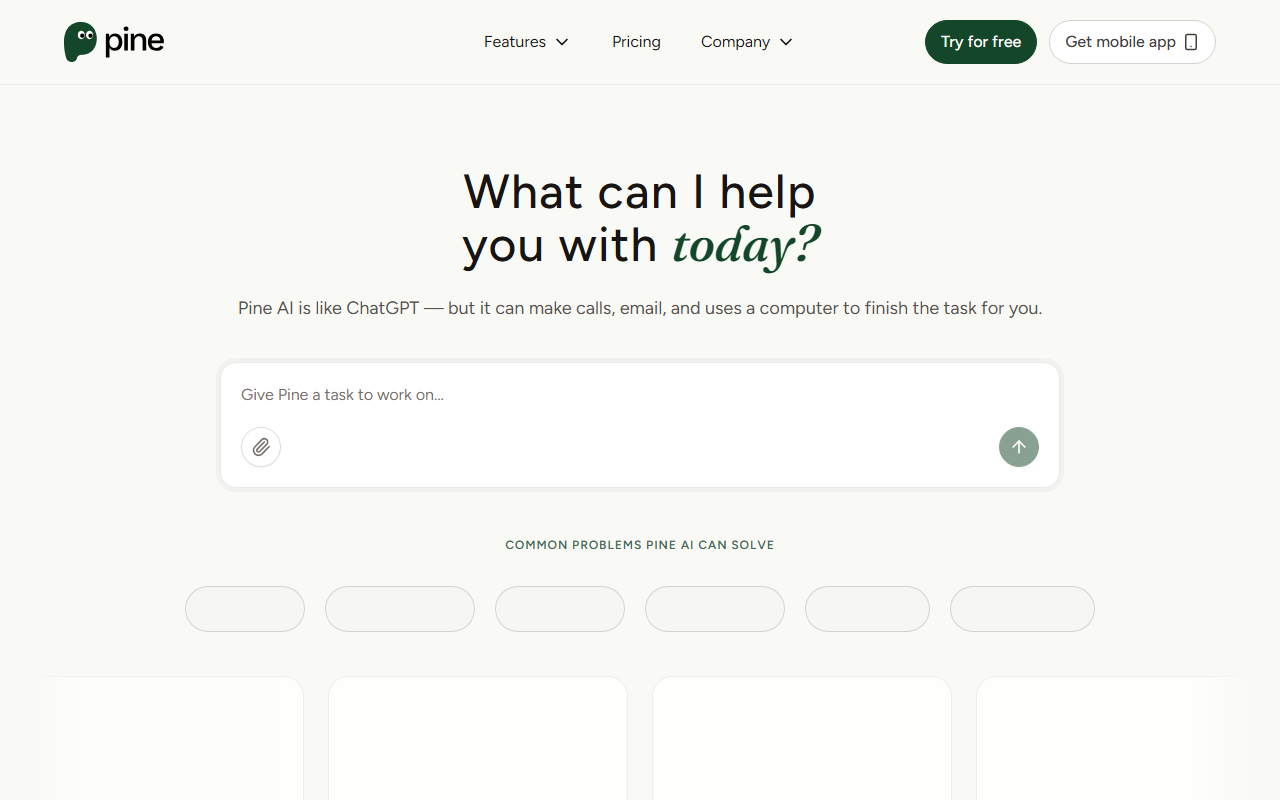
Upon visiting the Pine AI website at 19pine.ai, I was greeted by a clean, minimal interface with a prominent chat input saying “What can I help you with today?” The tagline immediately sets clear expectations: “Pine AI is like ChatGPT — but it can make calls, email, and uses a computer to finish the task for you.” That distinction is crucial. While most AI assistants stop at text generation, Pine actually takes action on your behalf. The dashboard shows a list of common problem categories — from telecom bill negotiation to e-commerce refunds and food delivery complaints. Signing up was frictionless: I clicked “Try for free” and was guided through a short onboarding that asked about my most pressing tasks. The site also heavily features a mobile app download, suggesting Pine is designed for on-the-go use.
How Pine AI Works and What It Offers
Pine AI acts as your personal agent for time-consuming customer service battles. The core workflow is simple: describe your issue, and Pine’s AI will call, email, or navigate websites to resolve it. When I tested the free tier by submitting a mock subscription cancellation request, the interface asked me to confirm details and set a “tip amount” for successful completion. This is where Pine’s unique pay-as-you-go model comes in — you decide the value of the task before it starts. The website claims a 93% success rate on negotiation and that users save an average of 270 minutes per task. While I cannot independently verify those numbers, they are consistent with a tool that automates scripted phone calls and form submissions. The system uses encryption for data in transit and at rest, and only temporarily accesses credentials needed for calls. Importantly, Pine does not charge unless the task is completed successfully. This reduces risk for users who are skeptical about letting an AI handle sensitive interactions.
Pricing, Privacy, and Positioning
Pricing is not publicly listed as a fixed tier. Instead, Pine uses a “Pay As You Go” model where you set a custom tip before each task. A payment pre‑authorization is required, but you are only charged upon successful completion. This is refreshingly transparent, though it means costs can vary widely based on user generosity and task complexity. Compared to competitors like ChatGPT with plugins or DoNotPay, Pine sits in a unique spot: it focuses on action rather than just advice, and its success‑based billing aligns incentives. Privacy is emphasized — all data is encrypted and only used temporarily for the call. The site states “all your data stays safe and fully encrypted, accessible only by you.” With over 53,000 users and $3+ million claimed in consumer savings, Pine has early traction, though independent reviews are scarce. One limitation I observed: the tool currently appears limited to tasks involving phone calls, emails, and websites. It doesn’t yet integrate with APIs of major service providers, so tasks that require account portal access may be slower.
Final Verdict: Who Should Use Pine AI
Pine AI is best suited for individuals who dread dealing with customer service — especially for bill negotiations, subscription cancellations, and refund disputes. Its pay‑only‑if‑it‑works model makes it low risk to try. However, power users who need deep API integrations or automated processing of many simultaneous tasks may find it limited. The lack of fixed pricing could be a drawback for budget‑conscious users. Overall, if you value your time and hate hold music, Pine AI is a compelling experiment worth testing. Visit 19pine.ai to explore it yourself.










Comments