

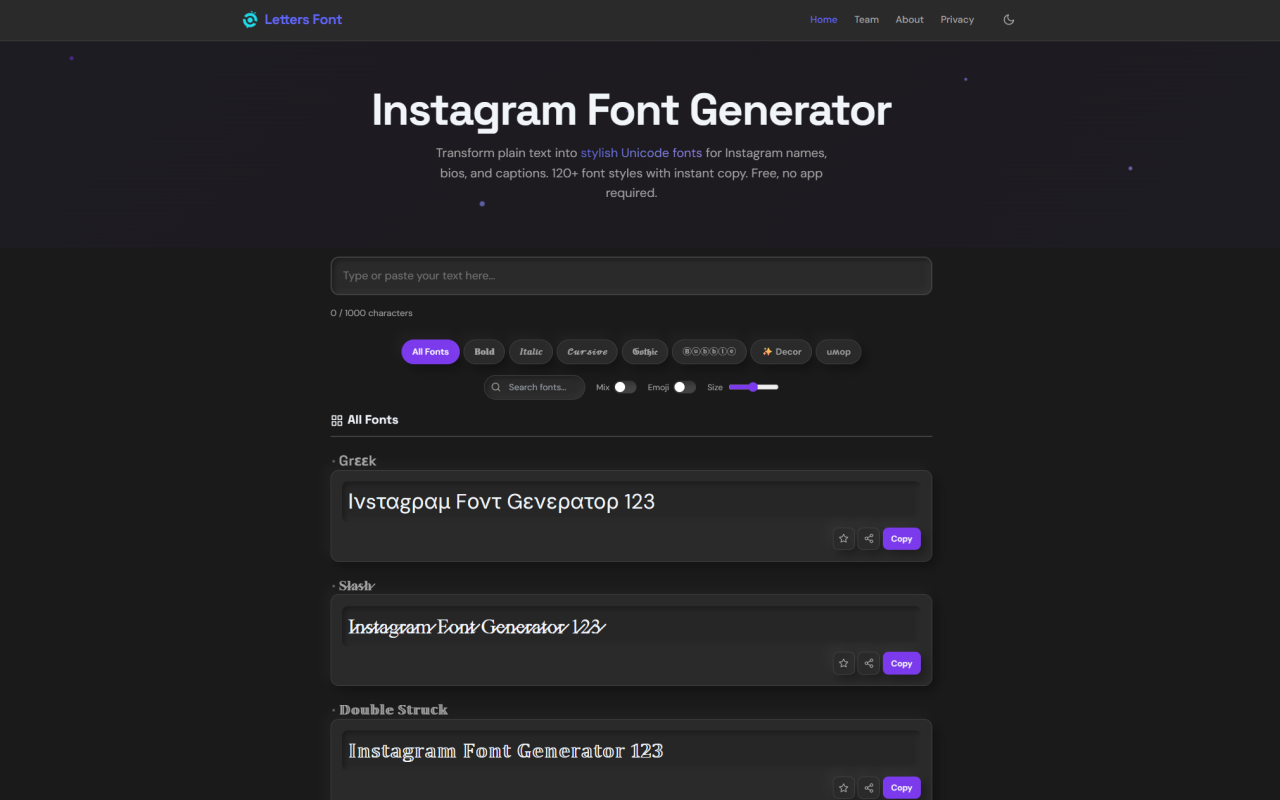
Upon visiting Letters Font, I was immediately struck by its simplicity. The tool is a browser-based font generator that transforms standard text into an impressive array of 135+ fancy Unicode styles — all ready to copy and paste into Instagram, TikTok, WhatsApp, or anywhere you type. There’s no download, no sign-up, and no paywall, which makes it instantly accessible for anyone looking to spice up a profile name or bio.
First Impressions: Navigating Letters Font
The Letters Font interface is refreshingly straightforward. A large text input box sits at the top, with a live character counter (0/1000) — a handy but firm limit. Below it, a grid of font preview cards updates in real time, each showing your entered text in a different style. I typed “Hello” and instantly saw variants from bold (𝐇𝐞𝐥𝐥𝐨) to cursive (𝒽ℯ𝓁𝓁ℴ) to upside-down (oןןǝH). Category chips — Bold, Italic, Cursive, Gothic, Bubble, Decor, Mix, Emoji — let you filter on the fly. A single tap on any card copies the styled text, and a discreet “URL Copied” toast confirms success. There’s no clutter, just a responsive grid that works equally well on mobile and desktop.
How the Unicode Magic Works
Letters Font doesn’t generate actual font files; instead, it leverages the Unicode standard’s Mathematical Alphanumeric Symbols and other decorative blocks. When you type “A”, a client-side JavaScript engine maps it to, say, the Mathematical Bold Capital A (𝐀) or Script Capital A (𝒜). The result is still plain Unicode text — not a download — which is why it renders reliably across iOS, Android, Windows, and macOS without any installation. The tool even handles cross-script mapping, borrowing glyphs from Cyrillic, Greek, Gothic, Runic, and Cherokee to create exotic “fancy letters.” All conversion happens locally in your browser; the text never leaves your device, a fact you can verify by disconnecting the internet after page load — everything still works offline.
Features Beyond Basic Font Copying
While 135+ styles are the headline, a few extras stand out. The “Mix” toggle randomizes each character’s font for a chaotic, eye-catching effect — perfect for a comment that stops scrollers. The “Emoji” button inserts cute icons (💕😎⭐) between letters, yielding a playful, decorated string. Categories cover everything from gothic (𝔊𝔬𝔱𝔥𝔦𝔠) and bubble (Ⓑⓤⓑⓑⓛⓔ) to number fonts (𝟙𝟚𝟛) and small caps (ˢᵐᵒˡ). There’s an integrated upside-down generator, and a favorites system that stores your picks via browser localStorage. During testing, I easily crafted an Instagram bio with a bold name, cursive tagline, and star emoji separators — all within Instagram’s 150-character limit. The live preview makes experimenting with combinations genuinely efficient.
Privacy and Offline Reliability
Letters Font’s client-side architecture is a privacy win. No user accounts exist, no passwords are collected, and typed text is never transmitted to a server. Even Google Analytics, the sole external request, receives only anonymised page-view counts, never content. I confirmed that after initial load, disconnecting Wi-Fi had zero impact: font generation, copying, filtering, and even the Mix and Emoji toggles worked seamlessly. This offline capability means you can style text on a plane or in a low-signal area, then paste later. For anyone wary of cloud-based generators that might store your inputs, Letters Font offers a genuinely transparent, no-strings-attached experience.
Strengths and Limitations: The Honest Verdict
Strengths are clear: a generous 135+ styles, true free access without registration, offline functionality, and a privacy-first design. The category filters and live preview make finding the right look fast, and the copy-paste workflow is flawless across platforms. However, limitations exist. The 1,000-character input cap can feel restrictive for longer captions. Unicode-based styling means these aren’t real fonts — you can’t use them in design programs like Photoshop or Canva for print projects, and some older devices or niche apps may display fallback boxes for rare characters. The tool also lacks an API or any integration with scheduling tools like Buffer or Later. Finally, while the “Mix” feature is fun, it can produce results that are unreadable, and there’s no undo history per character.
Who Should Use Letters Font (and Who Shouldn’t)
Letters Font is ideal for social media users, especially Instagrammers wanting a distinctive name or bio without design skills. It’s also great for Discord, TikTok, and Twitter handles, where a flashy font grabs attention. Casual content creators who value speed and privacy will love it. However, professional graphic designers needing vector fonts for branding should look elsewhere; this tool is for text-based social profiles, not Adobe Creative Suite. Among competitors like LingoJam or CoolSymbol, Letters Font stands out for its offline mode and no-signup approach, though others offer more niche decorative options. If you need something free, instant, and platform-agnostic, it’s a smart bookmark. For serious typography work, a classic font foundry remains the better bet. Visit Letters Font at https://lettersfont.com to explore it yourself.












Comments