

Inside AI Bikini Generator: A First Look at the Virtual Try-On Workflow
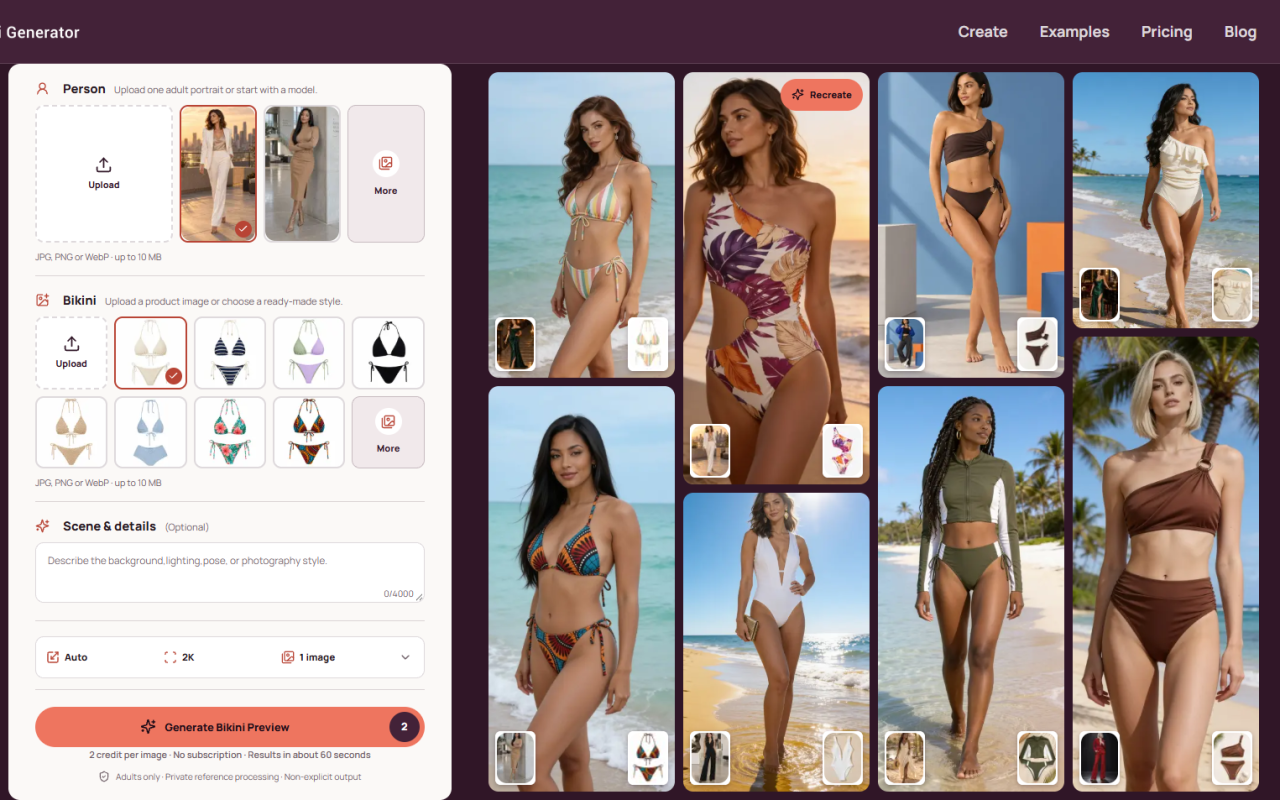
Upon visiting aibikinigen.com, the first thing that registers is how narrow the scope is — and that focus works in its favor. AI Bikini Generator does not pretend to be a general-purpose image editor; it is a single-purpose virtual swimwear try-on tool. The landing page opens on a two-column workspace: on the left, the upload and style controls; on the right, a swipeable gallery of before/after examples with "Recreate" buttons that pre-fill a prompt for you. Onboarding is essentially zero — no tutorial modal, no credit card prompt, just a labeled drop zone for the portrait and a second for the swimwear reference, plus a small "More" link that expands format and size guidance. There is no signup wall between you and the interface, which is refreshing given how many competitors hide the canvas behind an account form. A consent gate appears immediately, stating "Adults only · Consent required · Non-explicit results," and the same notice repeats under the generate button. That framing is deliberate, and it sets expectations before you upload anything.
How AI Bikini Generator Works Under the Hood
Functionally, AI Bikini Generator is a reference-driven garment transfer tool rather than a plain text-to-image generator. Three inputs drive each run: a source portrait (JPG, PNG, or WebP, up to 10 MB), a swimwear reference image or one of the built-in presets, and an optional scene prompt capped at 4,000 characters. A resolution toggle defaults to Auto with a 2K option, and a single run produces one image. The interface advertises four preservation targets — keep recognizable facial features, maintain natural body proportions, match fabric with existing shadows and lighting, and hold the original pose and scene. In practice that means the model is doing pose-conditioned inpainting over the torso region, then re-rendering straps, seams, and highlights so the garment inherits the ambient light of your photo.
The example gallery doubles as a prompt cheat sheet: six showcase pairs — olive bandeau, brown cross-front one-piece, ring-detail bikini, black swim dress, champagne pearl-trim bikini, white zip-front bikini — each carry a short prompt, which is genuinely useful for learning what phrasing the model responds to. The company does not disclose which underlying model or inference provider it uses, and I found no public API, plugin, or third-party integration listed — this is a browser-only workflow.
Testing the Free Tier: Output Quality and Honest Limitations
When testing the free tier, new accounts start with 5 credits and each 2K image costs 2 credits, so you get two clean generations plus a spare credit — enough to judge whether the engine suits your photo before paying anything. My first attempt used a sharp, front-facing portrait with flat outdoor lighting and a simple preset; the straps and fabric weave held up well and the shading matched the source. My second attempt used a slightly angled photo with a crossed arm; the result drifted on the arm boundary and the color of the reference bikini shifted a shade. That is typical of this class of tool and matches what the FAQ admits — "details such as straps, patterns, and seams may vary."
Two genuine strengths stand out: results stay non-explicit by design (there is no undress function, and the terms forbid it), and uploads are private by default with no watermarks on downloads. The real limitations are equally clear: one image per generation with no batch queue, no inpainting brush to fix a bad strap yourself, and a marketing claim of "4K downloads" that contradicts the 2K output shown in the generation panel and the credit math. Treat 2K as the working ceiling until the site reconciles that.
Pricing: One-Time Credit Packs With No Subscription
Pricing is transparent and refreshingly subscription-free. After the 5 free credits, AI Bikini Generator sells one-time packs through Stripe:
- Starter — $9.90 for 260 credits (~$0.038 per credit)
- Creator — $29.90 for 1,000 credits (~$0.030 per credit)
- Professional — $49.90 for 2,000 credits (~$0.025 per credit) with priority processing
- Studio — $99.90 for 5,000 credits (~$0.020 per credit) with the fastest priority queue
Every tier includes watermark-free downloads, commercial usage rights, and credits that never expire. Credits are only deducted after a successful generation, which is the right policy given how variable image models can be. At 2 credits per 2K image, the Studio pack works out to roughly $0.04 per image — cheap by the standards of dedicated virtual try-on services, though the effective cost doubles if you need several attempts to land a usable frame.
Where AI Bikini Generator Sits in the Market
Context matters here. General-purpose try-on engines like FASHN.ai and Kolors Virtual Try-On (available through Kling) handle the same garment-transfer problem but are built around apparel e-commerce, with broader garment categories and API access for developers. AI Bikini Generator deliberately narrows to swimwear and trades that flexibility for a tighter, consent-gated workflow. There is also no meaningful free alternative that matches its privacy posture — most "free" swimwear editors monetize through aggressive upsells or watermarked exports. As for backing, the site lists no company entity, funding, or user-count figures, so I cannot verify scale; the only trust signals are a published privacy policy, terms of service, Stripe checkout, and email support.
Who Should Use AI Bikini Generator — and Who Should Look Elsewhere
AI Bikini Generator is best suited to three groups: individuals previewing swimwear cuts and colors before buying, social creators building summer or vacation visuals without booking a shoot, and small fashion brands assembling mood boards or early campaign concepts with an authorized adult model. It is a poor fit for anyone needing bulk production with an API, retouchers who want manual masking control, or shoppers hoping to see an exact retail SKU — the tool openly warns that generated garment details may differ from the real product.
My recommendation: try it if you have a clean, well-lit portrait and want a fast, non-explicit swimwear preview with no subscription commitment. Spend the 5 free credits first, evaluate a single result at full resolution, and only then decide whether a Starter pack is worth $9.90. If your work depends on batch volume or pixel-level control, look at FASHN.ai or a desktop editor instead. Visit AI Bikini Generator at https://aibikinigen.com to explore it yourself.











Comments