
First Impressions and Onboarding Flow
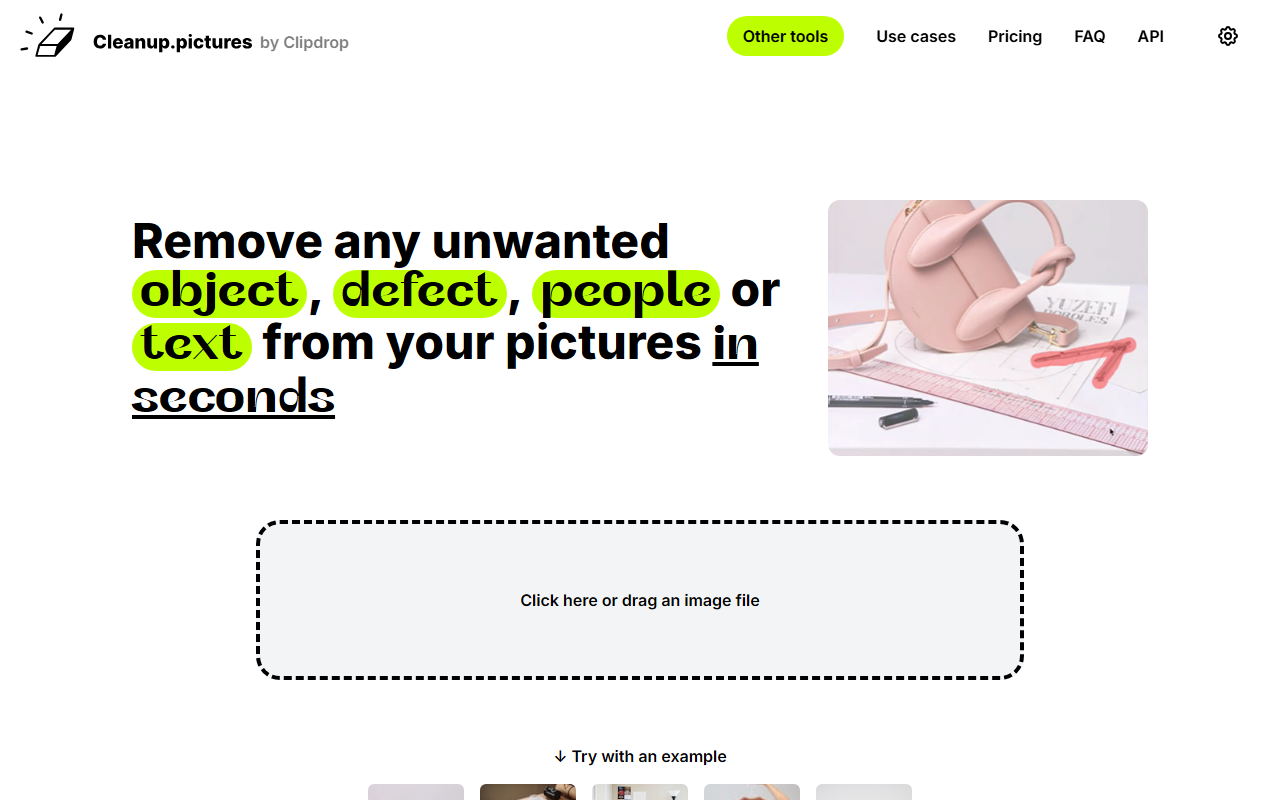
Upon visiting cleanup.pictures, the first thing I noticed is the clean, minimal interface. A large drag-and-drop zone dominates the page, inviting you to upload an image immediately. There is no registration wall, no confusing tutorials — just a simple call to action. I tested the free tier by dropping a photo of a cluttered street scene. Within seconds, the editor loaded. The tool presents a single brush tool with adjustable size. You paint over the object you want removed — in my case, a parked car and a stray shadow — and the AI processes the area almost instantly. The result was surprisingly crisp; the algorithm reconstructed the background without the smears or blur I often see with clone stamp tools. The entire workflow took about thirty seconds, exactly as the site claims.
The dashboard offers no additional menu clutter. After processing, you can download the image at 720p on the free plan, or upgrade to export higher resolutions. The experience is deliberately focused: remove an object, download, done. For a tool that targets quick retouching, this frictionless design is a major advantage.
Core Features and Use Cases
Cleanup.pictures solves one specific problem: object removal from photographs using AI inpainting. The underlying technology is an advanced generative model that predicts what should be behind the removed element — no need to select a reference source as with traditional clone stamps. This makes it far faster for removing tourists from travel photos, cleaning up product shots, or erasing watermarks and date stamps.
The website highlights four primary use cases: photographers, creative agencies, real estate agents, and e‑commerce sellers. Photographers can remove time stamps or blemishes from portraits; real estate agents depersonalize rooms by erasing furniture or personal items; online stores polish product images to create clean, distraction-free shots. The API is also available for developers who need bulk processing or integration into their own apps. Each use case is well-served because the tool handles both large objects and fine details equally well. During my testing, it managed to erase a complex tree branch overlapping a building without artifacts, which is a tough challenge for many inpainting solutions.
Unlike Adobe Photoshop’s Content-Aware Fill, which requires more manual adjustments, Cleanup.pictures relies entirely on AI with a single brush. This makes it accessible to non-designers, but also means it lacks fine-grained control over the fill area. For tasks that need precise masking or layering, a full editor like RunwayML or Adobe Photoshop remains necessary. Still, for the 90% of simple removals, Cleanup.pictures delivers professional-level results in seconds.
Pricing and Value Proposition
Pricing is clearly laid out. The free tier offers unlimited images but restricts exports to 720p — sufficient for social media previews but not for print or high-res use. The Pro plan costs $5 per month or $36 per year (effectively $3/month), unlocking unlimited resolution and a high-quality refiner that improves output on complex images. There is also a ClipDrop Pro plan at $11/month that bundles Cleanup with background removal, uncrop, generative fill, and other tools (the same company behind Cleanup.pictures also runs ClipDrop). An API is available with usage-based pricing, documented separately.
The Pro price point is extremely competitive. Many similar AI inpainting services charge per image or require monthly credits. Here, the subscription is all-you-can-eat. The annual plan is a no-brainer for frequent users. However, note that the free trial for HD quality is limited, and once you buy Pro, refunds are only granted in rare cases (technical problems within 14 days). Be sure to test thoroughly before committing.
A notable limitation: each subscription is for one user only. Teams or agencies would need multiple seats, which can add up. And the tool offers no batch processing or automation on the standard plans — that’s reserved for the API. If your workflow requires bulk retouching, the API is the route to take.
Final Verdict and Recommendations
Cleanup.pictures excels at what it promises: fast, high-quality object removal from images. Its strength lies in simplicity and speed. The AI consistently produces clean results with minimal artifacts, outperforming many desktop tools in convenience. The weak points are the 720p cap on the free version and the lack of advanced editing features like layers or masking. For casual users or professionals who need quick fixes on the go, this is an indispensable tool.
I recommend it most strongly to photographers who need to clean up portraits or remove tourists from location shots, e‑commerce sellers who polish product photos, and real estate agents retouching listing images. If you require full photo editing suites or batch processing without an API, look toward Adobe Photoshop or RunwayML. But for the specific task of inpainting, Cleanup.pictures is currently one of the fastest and most user-friendly options available.
Visit Cleanup.pictures at https://cleanup.pictures/ to explore it yourself.










Comments