

First Impressions and Onboarding
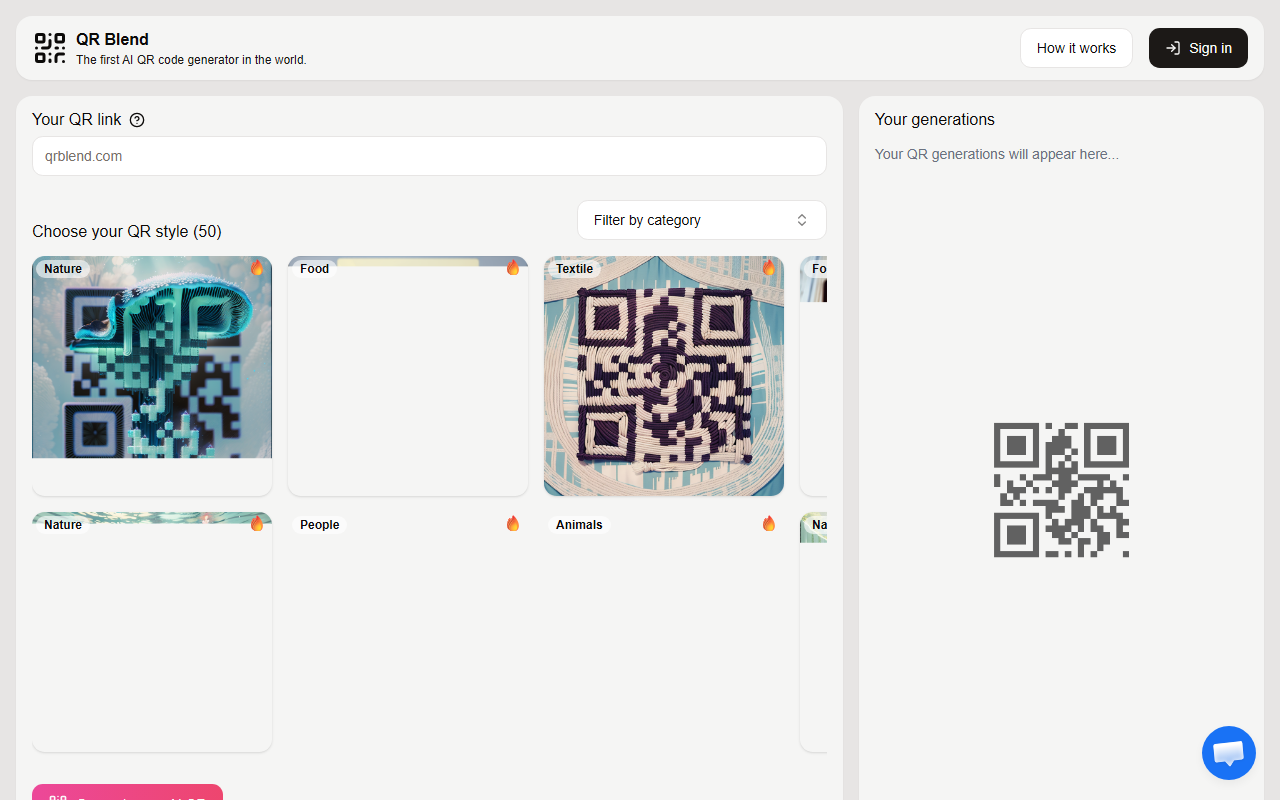
Upon visiting QR Blend, I was greeted by a clean, minimal landing page. A grid of example QR codes immediately loads—Spotify, Instagram, OpenAI, and others—each styled with abstract, harmonious patterns. The interface is straightforward: a top bar shows a text input for a URL, and below it a gallery of previous generations loads automatically. I tested the free tier by entering a simple link; the tool generated a QR code with a subtle gradient background and smooth curves. The design felt professional, though I noticed the resolution appeared limited for print use.
The onboarding lacks a tutorial, but the workflow is intuitive: paste a URL, click generate, and wait a few seconds. The gallery shows rendered thumbnails, each with a “View” button to inspect the full image. The site also highlights a new “Logo Embedding” feature, inviting users to email their logo and style description for custom work.
Core Functionality and Technology
QR Blend is an AI-driven design tool that transforms standard QR codes into visually appealing artworks. Instead of plain black-and-white squares, outputs feature organic shapes, color blends, and artistic textures while maintaining scannability. The underlying model appears to use generative AI trained on design aesthetics rather than any publicly named model. There is no API or integration mentioned, making it a standalone web tool. The logo embedding option is notable: users can submit their brand logo via email, and QR Blend’s team designs a custom QR code that fuses the logo with the pattern. This is a semi-manual process, not instant automation.
For businesses, QR Blend solves the problem of ugly, generic QR codes that users ignore. By adding brand identity into the design, the codes become marketing assets themselves. However, the lack of self-service customization beyond the basic generation limits its flexibility. Competitors like QR Code Monkey offer extensive styling options (colors, logos, frames) for free, while platforms like Visualead provide automated logo integration. QR Blend’s strength lies in its artistic quality, but its weakness is the manual email workflow for any branded customization.
Pricing and Availability
Pricing is not publicly listed on the website. The only indication of cost comes from the call-to-action: “Send us your logo along with a description….” This suggests a pay-per-use or subscription model for logo embedding and custom requests. For standard AI-generated QR codes, the service appears free to use, though I could not confirm any usage limits. The lack of transparent pricing is a drawback for potential enterprise customers who need to budget. In comparison, tools like QRFY or QRStuff provide clear free and paid tiers, while QR Blend keeps its cards close to the chest.
The site also notes special inquiries for “higher resolution, larger margins, or similar,” which hints at tailored enterprise solutions. Without pricing details, I recommend interested companies reach out via the provided email for a quote. The tool seems built for small to medium businesses needing unique designs, not for high-volume or automated production.
Verdict and Recommendation
QR Blend delivers on its promise of beautiful, AI-crafted QR codes that stand out. Its strength is the artistic quality of the generated designs—far superior to basic generators. However, the limitations are significant: no self-service logo embedding, no public pricing, and no API. The tool is best suited for marketers, event organizers, or brand managers who want a small batch of memorable QR codes for campaigns or product packaging. It is less suitable for developers requiring bulk generation or real-time branding.
If you value aesthetics over automation and are willing to work through email for custom work, QR Blend is worth a test. For a fully automated solution, consider alternatives. Overall, the tool shows promise but needs more transparency to earn trust at scale.
Visit QR Blend at https://qrblend.com/ to explore it yourself.











Comments