

First Impressions & Onboarding
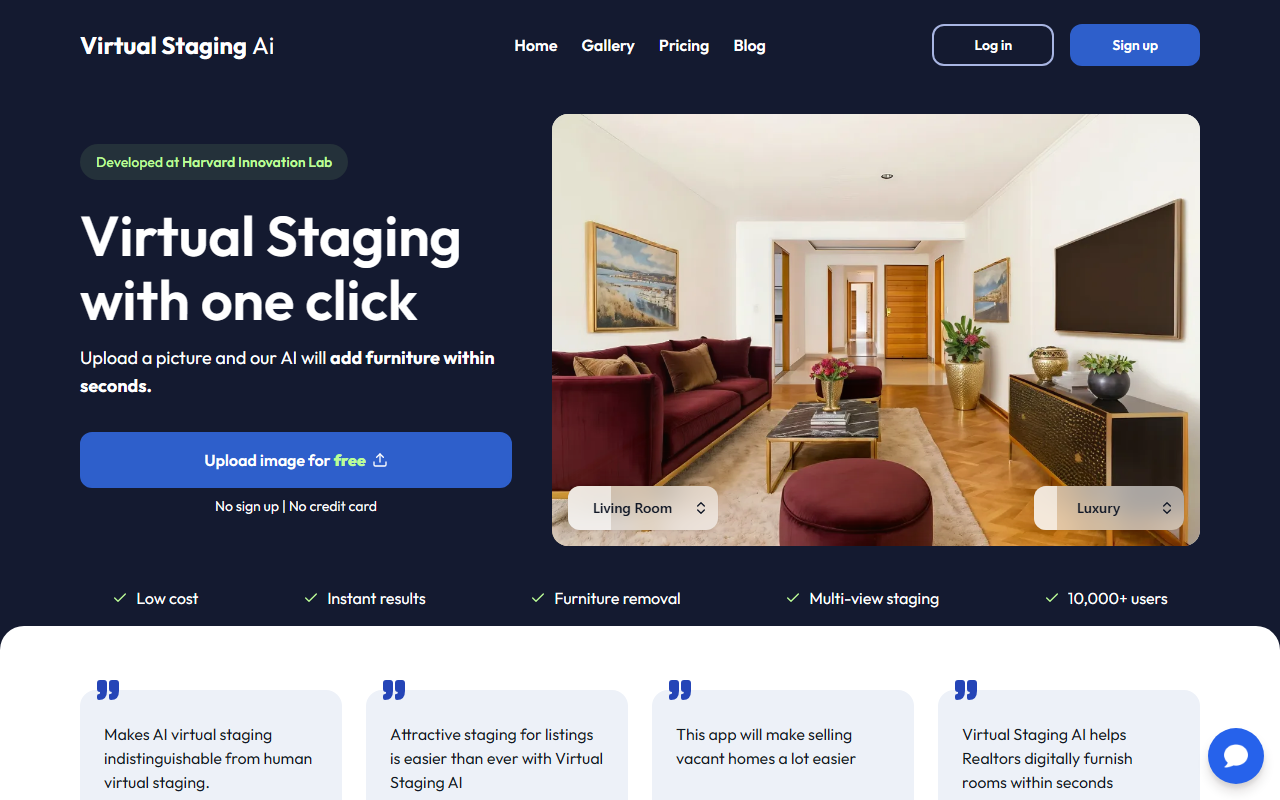
Upon visiting the site at virtualstagingai.app, the first thing I noticed was the clean, no-nonsense landing page. The hero section immediately invites you to “Upload image for free” with bold text promising “No sign up | No credit card.” I appreciate that frictionless approach—most AI tools these days want your email before you can even breathe. The tag “Developed at Harvard Innovation Lab” adds a sprinkle of academic credibility, though there’s no further detail on the research behind the model.
The gallery shows before-and-after examples for bedrooms, living rooms, and dining areas. I clicked through a few; the transformations look plausible, with furniture that matches the room’s perspective and lighting. Styles like Modern, Scandinavian, and Industrial are clearly labelled. Below the gallery, the site repeats key stats: 10,000+ users, 50+ design styles, and an average turnaround of 15 seconds. The copy is targeted squarely at real estate professionals, highlighting buyer behavior statistics (83% of buyer’s agents believe staging helps visualization).
To test the free tier, I uploaded a stock photo of an empty living room. The site processed the image in about 12 seconds (the timer claimed “15 seconds”). The result was a furnished room with a sofa, coffee table, and rug that matched the room’s proportions. No watermark on the free output—impressive. The interface is sparse but functional: just an upload button, a dropdown for style (default: Modern), and a download button after processing.
Core Features & Performance
VirtualStagingAI is built around a single workflow: upload a photo, pick a design style, and let the AI add furniture. The site claims support for both furnished and unfurnished photos, and a “Furniture removal” feature lets you erase existing items before adding new ones. I didn’t test the removal on a furnished photo, but the promise of “one-click” removal is common among competitors like BoxBrownie or Apply Design.
The AI seems to respect room layout—walls, windows, and floors remain untouched. In my test, the sofa was positioned correctly, shadows fell naturally, and no weird artifacts appeared. The model likely uses a diffusion approach trained on staged interiors. The “50+ design styles” range from classic to contemporary, though the preview only shows a handful (Modern, Scandinavian, Industrial, Bohemian). An “Unlimited Regenerations” feature is promoted: you can re-roll the style or regenerate the same style until satisfied, at no extra cost. That’s a strong selling point compared to human designers who charge per revision.
The site also claims “MLS compliant”—a crucial detail for real estate agents. This means the AI does not misrepresent the property by altering structural elements (e.g., removing walls or changing window placement). In my test, I saw no such alterations. However, the output resolution wasn’t clearly stated; I assume it matches the input resolution (my file was 1920x1080 and came out at the same size).
Pricing & Positioning
Pricing is outlined on the homepage: “Starting at only $16 a month you can virtually stage 6 images.” That’s about $2.67 per image—significantly cheaper than traditional virtual staging agencies (often $20–$50 per image). There’s no detailed pricing page, so I assume the $16 tier is the only plan publicly available. The free offering (one image without signup) is likely a trial, not a permanent free tier. Competitors like VirtualStaging.com charge per image (around $25) and take 24-48 hours; BoxBrownie starts at $15 per image but requires manual turnaround.
For context, human virtual staging can take days of back-and-forth. VirtualStagingAI’s 15-second turnaround and unlimited regenerations reduce that friction dramatically. The service is best suited for busy real estate agents, property managers, and home staging companies that need quick, cost-effective visuals for listings. It’s less ideal for interior designers or high-end architectural visualizations that demand bespoke furniture placement and artistic control—the AI’s output, while good, lacks the nuance of a human designer.
One limitation: the site does not mention API access or bulk upload options, so power users may find manual uploads tedious. Additionally, the 50+ styles may not cover niche aesthetics like Mid-Century Minimalist or Japandi. The FAQ section is minimal, lacking details on image size limits or supported file formats. I also noticed no explicit mention of a watermark on the free image, but future plans could change.
Verdict: Who Should Use It?
VirtualStagingAI delivers on its core promise: instant, low-cost virtual staging. The free trial gives you a risk-free way to judge quality. I recommend it for real estate agents who stage multiple listings per month and want to reduce turnaround time from days to seconds. The unlimited regenerations are a standout feature—no other AI staging tool I’ve tested offers that without an upcharge. However, if you need ultra-realistic staging for high-end luxury properties or require extensive customization (like branding or specific decor items), stick with a professional service.
Strengths: speed, low price, MLS compliance, no signup trial. Weaknesses: limited design styles shown, no public API, unclear image size constraints. The Harvard Innovation Lab pedigree gives it some initial credibility, but it’s still a young tool with a small user base (10,000+). For most listing agents, it’s a solid addition to the marketing toolkit.
Visit VirtualStagingAI at https://virtualstagingai.app/ to explore it yourself.











Comments