

Inside airapvideo: A Two-Photo Rap Video Generator
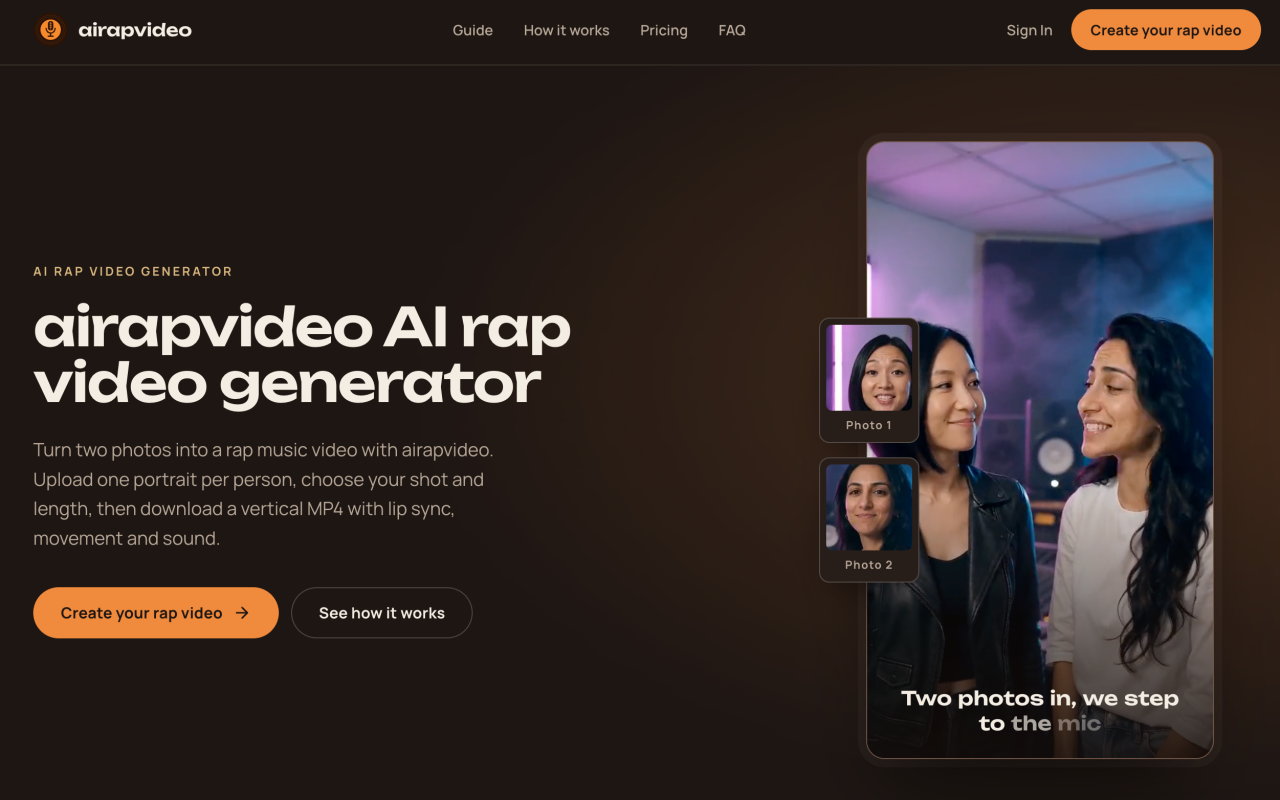
Upon visiting airapvideo at ai-rap-video.me, the first thing I noticed is how aggressively the product narrows its promise: two portraits in, one 10-second vertical rap video out. There is no prompt box, no timeline, no settings drawer. The landing page is essentially the tool itself — a two-slot uploader labeled Rapper 1 (LEADS) and Rapper 2 (HYPES), each requesting a clear, front-facing portrait as JPG, PNG, or WebP up to 10 MB. For anyone who has wrestled with a full video editor just to produce a disposable clip for TikTok, that restraint is the entire appeal.
The onboarding flow is unusually shallow in a good way. No account is required to reach the generator; Sign In and Create your rap video sit side by side in the header, and the FAQ states plainly that no login or text prompt is needed. There is even a QR code handoff for phone photos, which I found genuinely useful when testing with portraits that lived on my camera roll rather than my desktop. Email is optional — supply one and you get a download link; skip it and you pull the MP4 from My videos when the render lands.
Below the uploader, a Real results gallery shows what the engine produces: a cat-and-corgi duet in chains, two grandpas, coworkers trading bars. The site is honest that the actual render happens in the orange studio booth seen in the first clips, with other scenes offered as inspiration rather than selectable presets.
How airapvideo Works Under the Hood
The pipeline is two-stage and the site names both models. First, Nano Banana strips the original backgrounds from both photos and composites the two people into a single vertical stage image — one figure leading, one hyping. That composed frame surfaces in under a minute, which is a smart piece of UX: you see the casting and framing before you spend anything on the animation pass.
Second, MiniMax H3 Max Turbo animates that still using a rap-performance prompt requesting an original hip-hop beat, rap vocals, rhythmic head nods, and gestures. This is where the product's main technical constraint lives. Because the audio and lyrics are generated inside the video model rather than sourced from a dedicated music engine, you cannot supply your own song, write your own lyrics, or guarantee precise lip sync. The team says so directly in the creator. Treat the mouth alignment and vocal phrasing as generative output, not a controlled deliverable.
Finished MP4s land in My videos for download, watermark-free, at 9:16 and roughly 10 seconds — the native shape for TikTok, Reels, and Shorts. End-to-end turnaround is quoted at 3–5 minutes from upload to finished video.
Testing airapvideo: What the Free Tier Actually Lets You Do
Uploading is free; credits are consumed only at generation. When testing, I uploaded two sharp, evenly lit portraits shot at similar distance and framing — the site's own photo guidance asks for exactly that, and warns against tiny faces cropped from group shots, heavy filters, sunglasses, or hats. The uploader resizes images in the browser and only transmits them when you press Create, which is a reasonable privacy posture for a tool that handles faces.
My render came back with the two subjects correctly staged side by side in the booth, matching outfits intact and a plausible vertical framing. The rap audio arrived with a beat and verse, though the phrasing was clearly model-invented rather than a written lyric. On one attempt the hand gestures drifted slightly and the mouth movement lagged the vocal by a beat — the kind of artifact you get from still-image animation rather than true performance capture. Vertical framing and the 10-second length were consistent every time.
On data handling, the FAQ states photos are processed by EvoLink to build the scene and video, temporary input uploads expire after 72 hours, and nothing you make is published automatically. If a render fails, its credits return to your balance automatically — a policy worth checking for, since failed generations are the most common way these credit systems quietly drain money.
airapvideo Pricing: One-Time Packs, No Subscription
Pricing is publicly listed and refreshingly simple. One 10-second rap video costs 440 credits, sold in one-time packs: Starter at $9.90 for 1 video, Standard at $19.90 for 3 videos, and Pro at $29.90 for 5 videos. Every tier includes vertical HD MP4 with audio, and none of them enroll you in a subscription. There is no free render tier — the free part is the upload and the stage composite.
Do the math and the per-clip economics shift fast: roughly $9.90 per video on Starter versus about $5.98 on Pro. Purchased credits stay available while your account is active, and failed renders are refunded automatically. Because no login is mandatory, buying a pack is closer to a one-off transaction than a SaaS signup, which suits the use case — most people want one funny clip for a birthday or a group chat, not a monthly commitment.
Where airapvideo Sits in the AI Video Market
Most competitors here are either generalists or half-solutions. Unlike Runway, Kling, or Luma's Dream Machine, airapvideo does not ask you to write prompts, direct camera moves, or stitch shots; it trades flexibility for a single opinionated output. And unlike Suno or Udio, which generate audio only and leave you to source visuals and lip sync elsewhere, airapvideo bundles a beat, vocals, and motion into one file. The nearest analogue is the character-performance category — tools like Hedra or Viggle that animate a portrait — but those still expect you to bring your own audio track.
The trade-off is scope. There is one scene, one duration, one aspect ratio, and a built-in rap track. That makes it excellent for creators chasing the AI rap duo trend on TikTok, for couples, pet owners, and family group chats, and for anyone producing a novelty gift clip in five minutes. It is a poor fit for brands needing on-message copy, for musicians who want their own lyrics performed, or for anyone who needs horizontal footage or clips longer than ten seconds.
Strengths, Limitations, and My Verdict on airapvideo
The genuine strengths: a frictionless two-upload workflow with no prompt engineering, a visible stage composite before you spend credits, automatic credit refunds on failure, watermark-free 9:16 MP4 output, and transparent one-time pricing with no subscription trap. For a niche trend tool, that is a coherent, honest package.
The real limitations: no custom song or lyric input, lip sync that varies between renders, a single fixed scene, and 10 seconds as a hard ceiling. Photo quality also drives results heavily — a soft or cluttered source portrait will visibly degrade the composite, so the tool rewards good inputs and punishes lazy ones.
My recommendation: try airapvideo if you want a fast, funny, shareable rap duet from two photos and you accept it as AI-generated novelty content rather than a production tool. Buy the Pro pack if you plan to make more than two clips, since the per-video price drops by nearly 40%. If you need lyric control or a polished brand asset, look elsewhere. Visit airapvideo at https://ai-rap-video.me to explore it yourself.











Comments