

Inside Burning Bridges AI: A Studio Built Around Motion Transfer
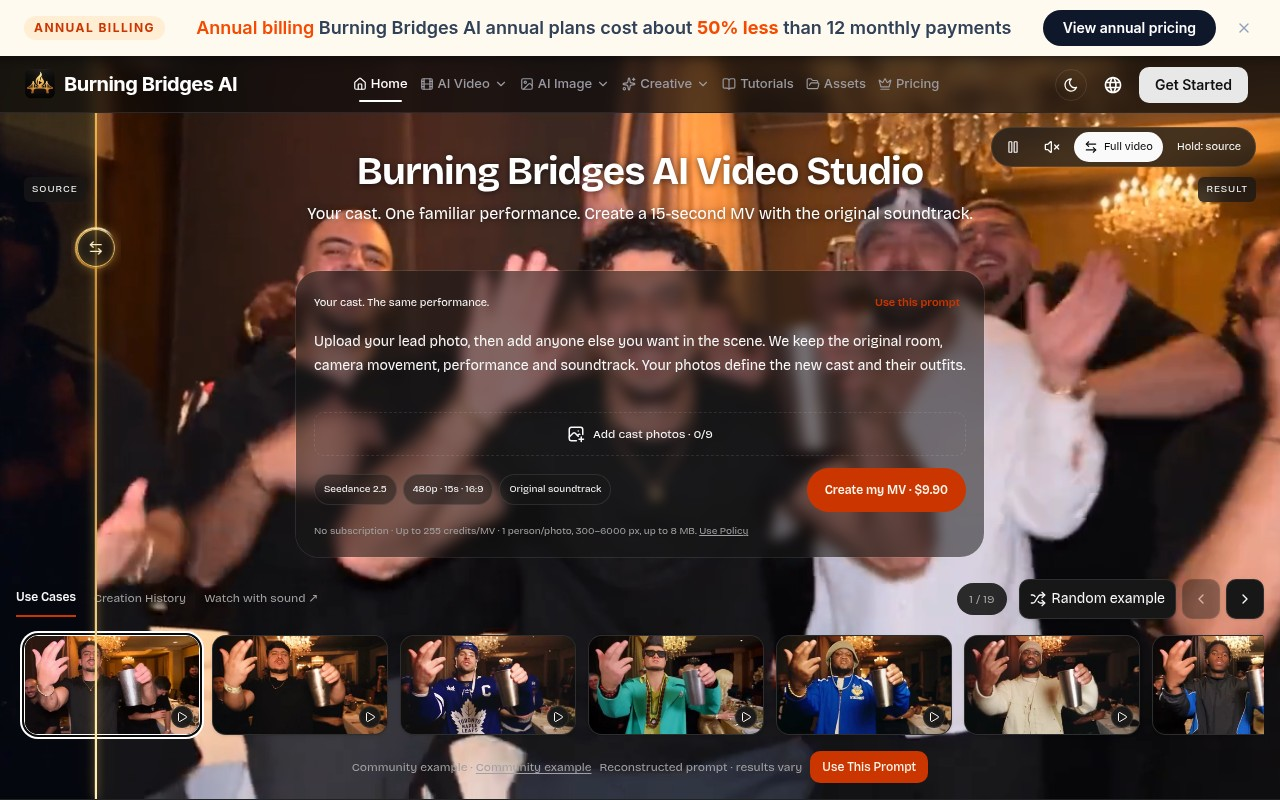
Upon visiting Burning Bridges AI, the first thing that struck me was how narrowly and deliberately the product is scoped. This is not another general-purpose text-to-video generator; it is a remix studio. The homepage leads with a single promise — keep the motion, change the cast — and every element of the interface reinforces that. A prompt box sits above an "Add cast photos · 0/9" uploader, with the active model labeled Seedance 2.5, 480p, 15 seconds, 16:9, and an original soundtrack toggle. The cost of pressing the button is printed on the button itself: Create my MV · 300 Credits. That kind of upfront pricing visibility is rarer than it should be in this category.
The workflow is a four-step ladder the site lays out explicitly: choose a source video (a 4–30 second segment), upload 1–8 ordered reference images, pick a mode and optionally write instructions, then review a credit quote before generating and compare the result against the source with a drag slider. Loading a community example populated the studio with its source video, ordered images, prompt, model and style without charging anything. There is no free tier, but this example-loading path is the closest thing to one, and it makes the preset library genuinely useful for learning rather than just for show. The drag-to-compare slider is the detail I would point to first — isolating a single change is how you actually judge whether a recast held together.
How the Three Modes Work in Practice
Burning Bridges AI splits its capability into three models, each with a distinct job. Motion Transfer keeps the timing, camera movement and rhythm of the source clip while your photographs define a new identity and world. Object Swap targets a single subject — a character, an outfit, a product — while guiding the surrounding scene to stay consistent; it requires at least 409,600 pixels per source frame, a meaningful floor if you are working from compressed social video. Restyle applies a selected visual style to the entire clip and accepts zero to five optional character images, so it is the only mode that can run with no references at all.
Prompts are optional across all three modes, capped at 10,000 characters. My advice after reading the workflow guides: use them. The strongest results come from mapping each ordered image to a role — image 1 is the actor, image 2 is the location, image 3 is a second look — and describing that mapping in plain language. The studio's preset library is organized exactly this way, with six directions (Character, Fashion, World, Product, Multi-character, Performance) each publishing its complete input set. Community examples also surface a reconstructed prompt, a nice touch for reverse-engineering what actually works. Skip the prompt entirely and expect the model to lean hard on your references, producing a literal swap with little directorial nuance.
Pricing and Credit Economics
Pricing on Burning Bridges AI is credit-based, with no mandatory subscription, and listed prices include tax. A complete 15-second MV on the template costs 300 Credits, and photo uploads accept one person per image at 300–6,000 px and up to 8 MB. One-time packs run from Starter at 800 Credits for $39.90, Value at 2,000 Credits for $79.90, Pro at 7,500 Credits for $199.90, Bulk at 50,000 Credits for $999.90, up to Mega at 160,000 Credits for $2,599.00. Annual billing is advertised at roughly 50% less than twelve monthly payments.
Run the math and the tiering matters: at the Starter rate you are paying about $15 per 15-second video, while at the Mega rate the same output drops to under $5. Credits are valid for 365 days with no automatic renewal, failed jobs return reserved credits to the original funding source, and the quote appears before you submit — three policies that materially reduce the burn-credits-blind anxiety common in this space. One caution: each mode carries its own quote, and Restyle budgets conservatively at twice the base rate plus 100 credits per character image, so a long source with five references is not a 300-credit job.
Where Burning Bridges AI Fits in the Video AI Market
The site is candid about its lineage, which is worth stating plainly. Burning Bridges AI is an independent studio connected to the official Genjutsu API, and its featured demonstrations are sourced from Higgsfield — reference examples, not generations made on burningbridges.ai. That places it in direct conversation with Higgsfield itself, and with Runway's Act-Two for performance transfer and Kling's motion-control tooling. Against those, the differentiator is packaging: ordered multi-reference input of up to eight images, explicit role assignment, and pay-per-video pricing with no subscription gate.
It supports English and Simplified Chinese interfaces. The help documentation references public API limits, suggesting programmatic access exists for partners, though no API docs are publicly linked from the landing page — developers should email [email protected] before planning an integration.
Strengths, Limitations, and the Transparency Question
The genuine strengths are workflow transparency and reference discipline. Being able to inspect the exact inputs behind an example, load them for free, see the quote, then compare output against source in a slider is a better creative loop than most competitors offer. Preserving the original soundtrack is also a practical win for music-driven content.
The limitations are equally real. Output from the flagship template is 480p at 15 seconds — fine for social, thin for anything broadcast-adjacent — and source selection caps at 30 seconds. The most significant caveat, though, is evidential: every demonstration on the site originates from Higgsfield, so prospective buyers cannot see a single frame generated by this platform before paying. That is a trust gap the team should close with a native gallery. There is also no free tier, so evaluation costs money, with the cheapest entry at $39.90. Queued requests can at least be cancelled with credits returned, which softens the cost of experimentation.
Who Should Try Burning Bridges AI
Burning Bridges AI is best suited to short-form creators, dance and music content producers, fashion and product marketers, and anyone who already has a strong source clip and wants to recast it without reshooting. The eight-image reference stack and role-mapping workflow are genuinely useful for multi-character scenes, where most motion-transfer tools fall apart. If your reference photographs are clean, single-subject, well-lit images, the studio hands you an unusual amount of directorial control for this price bracket. Budget-conscious hobbyists and anyone needing 1080p-plus deliverables should look elsewhere for now, and teams wanting a fully self-serve API should confirm access first.
Visit Burning Bridges AI at https://burningbridges.ai to explore it yourself.











Comments