

First Impressions and Onboarding
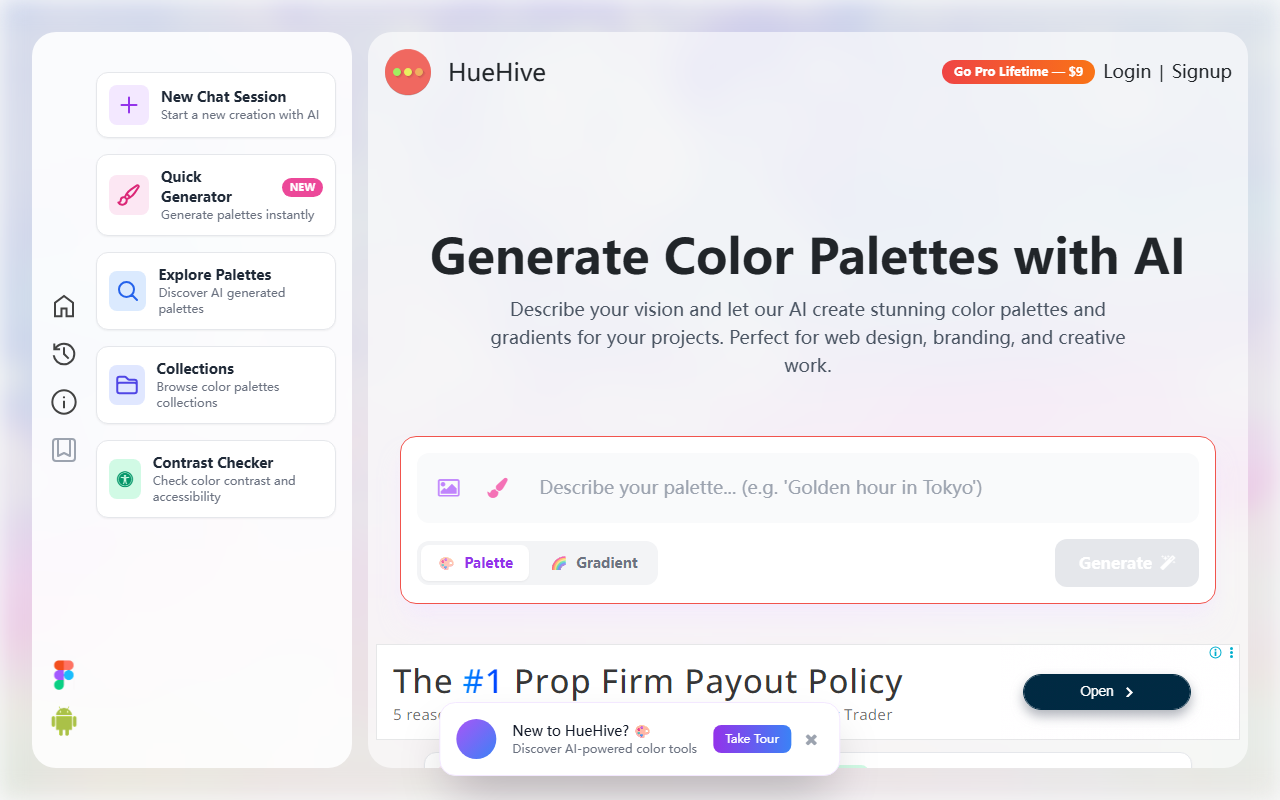
Upon visiting HueHive, I was greeted by a clean, minimal interface that immediately invites experimentation. The landing page features a prominent input bar for text prompts and two large buttons to switch between "Palette" and "Gradient" modes. Below that, a row of example prompts like “🌿 Wellness brand” and “⚡ Cyberpunk neon” lets you test the AI with a single click. I started a new chat session, typed “cozy coffee shop,” and within seconds the AI returned a five-color palette with hex values, shades, and a small preview. The response felt fast—around 2–3 seconds—and the colors were warm, brown-heavy, and indeed “cozy.” The free tier gives full access to the palette generator, contrast checker, color converter, and gradient tool, so there’s no paywall for basic use. The mobile-menu button and top navigation are straightforward, though the "Go Pro Lifetime — $1" banner is persistent and slightly distracting.
Core Features and AI Performance
The AI palette generator is the star. It appears to use a natural language model trained on color theory—though HueHive does not publicly name the underlying technology. The app also includes a photo extraction tool where you can upload or paste an image to pull dominant colors; I tested it with a screenshot of a sunset and got a six‑color palette that matched the warm tones accurately. The live UI previews are a standout: you can apply your generated palette to seven real mockups (dashboard, landing page, mobile app, social media, etc.) and see how the colors work in context. The contrast checker evaluates WCAG AA/AAA compliance and offers a color blindness simulation. The color converter handles HEX, RGB, HSL, and CMYK with instant conversion and harmony suggestions. The gradient generator produces linear, radial, and conic CSS gradients that you can copy as ready‑to‑use code. Export is generous: CSS, Tailwind, JSON, PNG, and even ASE (Adobe Swatch Exchange) files. This makes HueHive a practical tool for both quick inspiration and real project handoff.
Pricing and Market Position
HueHive offers a genuinely free forever plan that includes all the tools mentioned above—no credit card required. The "Pro Lifetime" upgrade costs a flat $1, which unlocks additional features like saving unlimited collections and removing the watermark on exported palettes. This is remarkably cheap compared to competitors like Coolors (which charges $29/year for its pro tier) or Adobe Color (part of a $55/month Creative Cloud subscription). The tool has already generated over 25,000 palettes, according to the website, and its user base appears to be a mix of hobbyists, freelance designers, and front‑end developers. Unlike Coolors’ more algorithm‑driven generator, HueHive focuses on natural language input, which feels more intuitive for non‑designers. However, it lacks a collaborative workspace or API, and the AI does not allow fine‑grained control over hue or saturation sliders—something advanced users might miss.
Verdict – Strengths and Limitations
HueHive’s greatest strength is its simplicity and speed. The AI produces usable palettes almost instantly, and the free tier covers most needs. The one‑dollar lifetime pro is an exceptional deal. The live UI previews and accessibility checks genuinely help designers avoid mistakes early in the workflow. On the downside, the AI sometimes returns palettes that feel generic—prompts like “futuristic tech” gave me a predictable blue‑gray scheme without much surprise. There is no way to refine a generated palette by adjusting individual colors or regenerating only certain swatches. Additionally, the tool has no plugin for Figma or Sketch, so you must export and import manually. Despite these limitations, HueHive is an excellent choice for anyone who needs quick, beautiful color schemes without learning complex software. It is best for UI designers, front‑end developers, and brand designers seeking rapid inspiration. For color theorists or data visualizers, a more advanced tool like Adobe Color may be preferable. Visit HueHive at https://huehive.co/ to explore it yourself.













Comments