

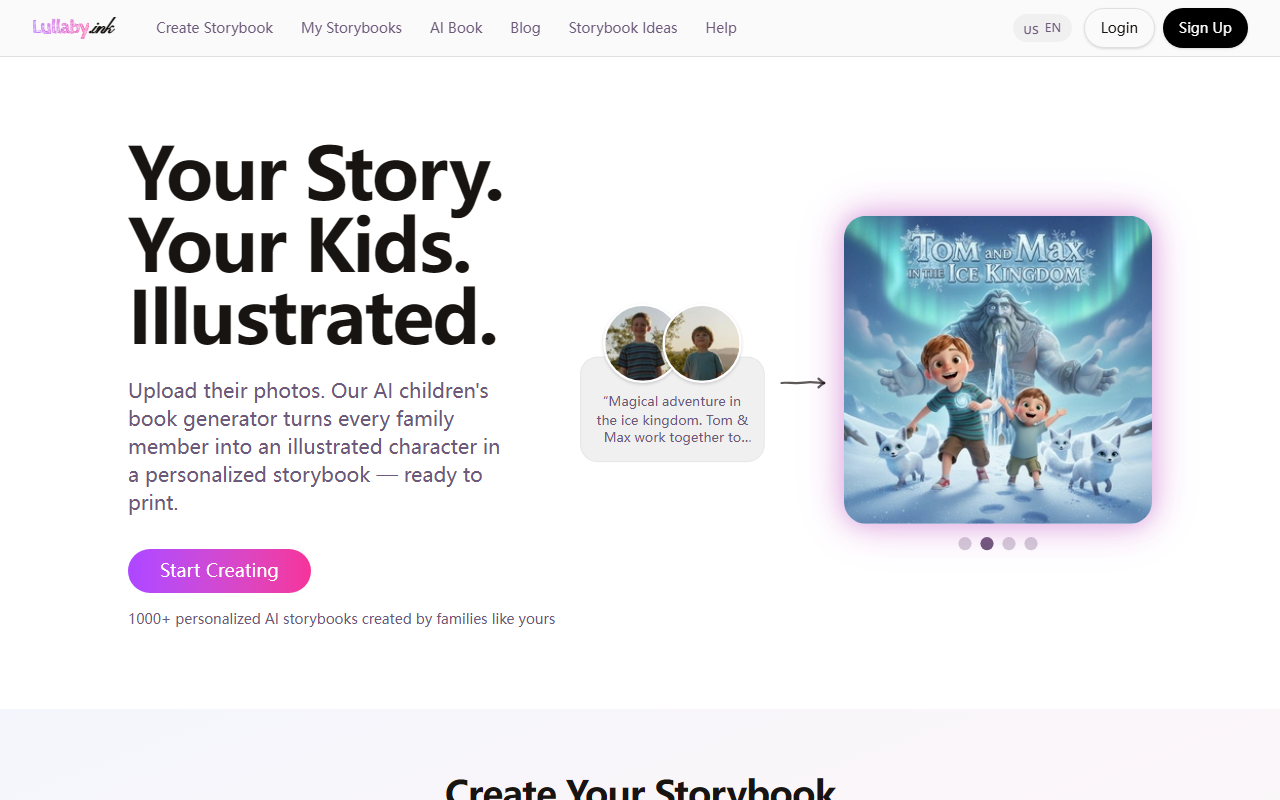
Getting Started with Lullaby.ink: A First Look at the Interface
Upon visiting Lullaby.ink, I was greeted by a clean, child-friendly landing page with a prominent “Start Creating” button. The dashboard is minimal — no clutter, just a simple form to begin building a story. The onboarding flow asks you to upload photos of your child (or up to three family members and pets), then describe a story idea in plain text. I tested the free tier by uploading a photo of my niece and typing a short premise: “A brave girl and her cat explore a secret garden.” The tool returned a full preview within about 30 seconds, including a sample page with a panoramic illustration. The character was recognizably my niece, with her hair color and glasses preserved, and the background matched her bedroom as shown in the photo. The style is “Stylized Realism” — a default that balances cartoonish charm with accurate likeness. The preview lets you edit the text and regenerate illustrations, which I did to test consistency. Each new page kept the character’s appearance stable, a strong point for this tool.
What Lullaby.ink Does and the Problem It Solves
Lullaby.ink solves the pain point of creating truly personal bedtime stories that feature the actual family members and real-life locations of the child. Unlike generic storybooks where you just insert a name, this AI children’s book generator transforms uploaded photos into illustrated characters and environments. The underlying technology appears to use a custom fine-tuned diffusion model that can extract facial features and understand spatial context from photos. The “Place” input lets you upload images of a bedroom, park, or grandma’s house, and the AI integrates those as backdrops. This is a significant differentiator from competitors like Once Upon a Book or Lost My Name (now part of Wonderbly), which rely on templates and predefined characters. Lullaby.ink offers full creative freedom: you describe any story (no menus) and the AI generates full-spread illustrations, with characters dressed appropriately (pajamas for bedtime, swimwear for beach). The site claims over 1,200 personalized storybooks have been created, indicating early traction. The FAQ confirms it’s AI-generated and that they don’t store photos after the generation process, addressing safety concerns.
Pricing, Integrations, and Market Context
Pricing is not publicly listed on the website. The “Create Free Preview” doesn’t require a credit card, but after the preview, you’re prompted to order a printed book — the cost isn’t shown until you proceed. This opacity is a limitation; many parents want to know the price upfront. Based on industry standards for similar AI print-on-demand children’s books, expect around $25–$40 per copy. There is no API or enterprise integration visible, which is fine for a consumer tool. Compared to competitors like Inkverse or the more template-driven BookBildr, Lullaby.ink focuses on photorealism and location integration, making it a premium niche option. The tool currently supports English only, despite the URL having a language toggle. User testimonials highlight emotional resonance: stories about weaning off pacifiers or encouraging kids to try new activities. The ability to add pets is a nice touch, and outfit adaptability shows attention to detail. However, the free preview only shows a few pages, so you can’t see the full book without paying. Also, style options are limited to one “Stylized Realism” currently — no watercolour or sketch alternatives.
Strengths, Limitations, and Final Verdict
Strengths: The photo-to-character fidelity is impressive. In my test, the AI preserved my niece’s facial features, clothing colors, and even the soft lighting of her room. The story generation from free-text input is coherent and age-appropriate, with the option for parents to edit. The printed book quality (if ordered) is likely high quality given the panoramic layout and full-color spreads. The privacy approach of not storing photos long-term is a plus for cautious families. Limitations: No publicly listed pricing creates friction. Only one art style is available, which may not appeal to everyone. The AI occasionally misinterprets complex backgrounds if the photo has too many objects. Also, the tool currently requires a desktop browser — no mobile app yet. For tech-unsavvy parents, the process of uploading photos and describing a story could be daunting, though the interface is intuitive. Who should use it: Parents who want a truly unique, high-quality keepsake featuring their own children, pets, and places. It’s perfect for milestone gifts (birthdays, new siblings) or for tackling specific behavioral issues through custom narratives. Who should skip: Budget-conscious families who need a free, quick solution, or those who prefer classic illustrated styles (watercolour, cartoon) over the realistic look. Overall, Lullaby.ink delivers on its promise of “Your Story. Your Kids. Illustrated.” It’s a standout in the personalized AI storybook space, and despite minor drawbacks, it earns a recommendation for parents seeking a magical, deeply personal reading experience.
Visit Lullaby.ink at https://lullaby.ink/ to explore it yourself.













Comments