

First Impressions: A Developer's Toolkit for Knowledge Management
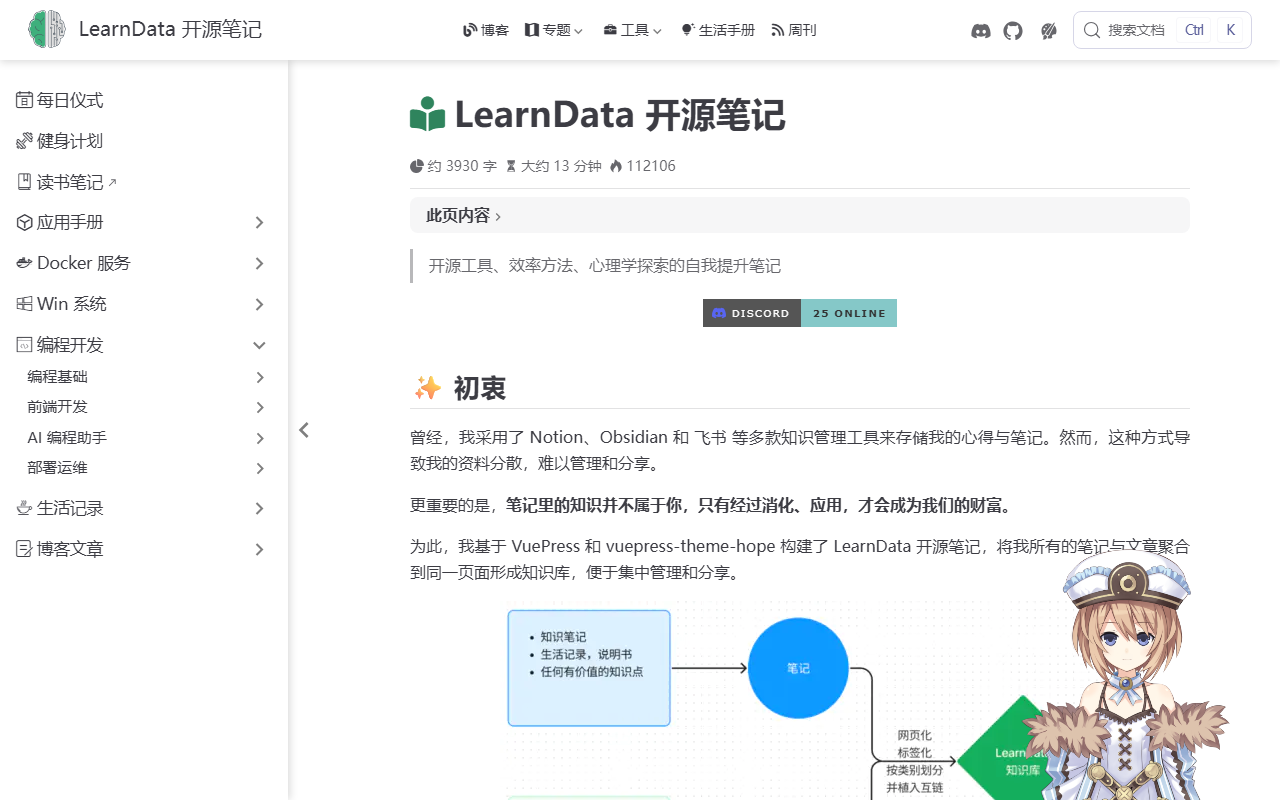
Upon visiting the LearnData website, I was immediately struck by its transparency. The entire project is open-source, and the documentation is thorough. The landing page is essentially the creator's own knowledge base, demonstrating the tool in action. It's a single-page site with a clean sidebar, categorized notes, and a blog section. The setup process is detailed step-by-step on GitHub, targeting users comfortable with Git, GitHub Actions, and static site generation. This is not a drag-and-drop tool—it's a framework for building a personal digital garden.
The dashboard, if you can call it that, is the static site itself. After deployment, you navigate through categories like “Software Applications,” “Docker Services,” and “Code Programming.” The search functionality uses Algolia (or a local fallback), making it easy to find specific notes. During my testing of the free tier (the entire project is free and open-source), I cloned the template repository and followed the instructions. The workflow required me to modify GitHub repository settings, adjust sidebar config files, and manually trigger Actions. Within about 20 minutes, I had a bare-bones site running on GitHub Pages. The experience confirmed that LearnData is built for people who are already familiar with version control and static site deployment.
Under the Hood: Models, Integrations, and Technical Details
LearnData is built on VuePress 2 (a Vue-powered static site generator) and the vuepress-theme-hope theme. It does not use any third-party AI models or APIs by default—it's purely a note-taking and blogging framework. The core technology is Markdown files stored in a GitHub repository, which are automatically compiled and deployed via GitHub Actions. The project also supports deployment to Vercel or a custom server. For search, it integrates Algolia DocSearch (cloud-based) or a local searchPro plugin. There's also a Live2D widget for a decorative mascot, and it supports reading notes via docsify as a separate sub-site.
From a technical standpoint, the project leverages GitHub's infrastructure for CI/CD. You can customize the sidebar order, add encrypted directories, and even deploy to your own server using FTP or OSS. The documentation mentions using Node.js 20.x for Vercel builds. There is no API endpoint for external tools—this is a static site generator, not a SaaS platform. However, the open-source nature means you can fork it and add any integrations you like. The project is actively maintained with frequent commits, and the creator provides a CDN for the Live2D assets, indicating a community-oriented approach.
Positioning in the Market: Strengths and Limitations
Compared to mainstream knowledge management tools like Notion (proprietary, cloud-only) or Obsidian (local-first but not web-native), LearnData occupies a niche: self-hosted, open-source, and blog-integrated. It's ideal for developers who want a free, customizable knowledge base that doubles as a personal blog. The automated publishing workflow via GitHub Actions is a standout feature—you write in Markdown, push to GitHub, and the site updates automatically. The use of VuePress means you can extend the site with Vue components if needed.
However, the tool has real limitations. Setting up LearnData requires significant technical skill. You need to understand Git branching, GitHub Actions permissions, configuration files (TypeScript), and the concept of base paths for subdirectory deployments. The initial setup is not beginner-friendly; there are multiple steps and potential pitfalls (e.g., permissions errors, missing branches). Non-technical users would struggle without a developer's help. Additionally, the static site approach means no real-time collaboration—it's a read-only published output after edits. For team projects, tools like Outline or BookStack might be better. Finally, the default search uses Algolia, which requires an API key and setup; the local search option is less powerful.
Final Verdict: Who Should Use LearnData?
If you are a developer, technical writer, or hobbyist who wants complete ownership of your notes and blog, LearnData is a compelling choice. It's free, open-source, and lets you leverage GitHub's reliability for hosting. The workflow encourages writing consistently (order system for notes) and publishing without manual steps. The inclusion of a reading notes section via docsify is a nice touch for book summaries.
But if you want a ready-to-use platform with a visual editor, drag-and-drop pages, or mobile apps, look elsewhere. LearnData is not for the non-technical user or anyone who dislikes tinkering with config files. It shines in the hands of someone who already uses Git and wants to consolidate their digital presence. For this audience, it's an excellent tool that delivers on its promise. Visit LearnData at https://newzone.top/ to explore it yourself.













Comments