

First Impressions: A Clean Dashboard with a Focus on Speed
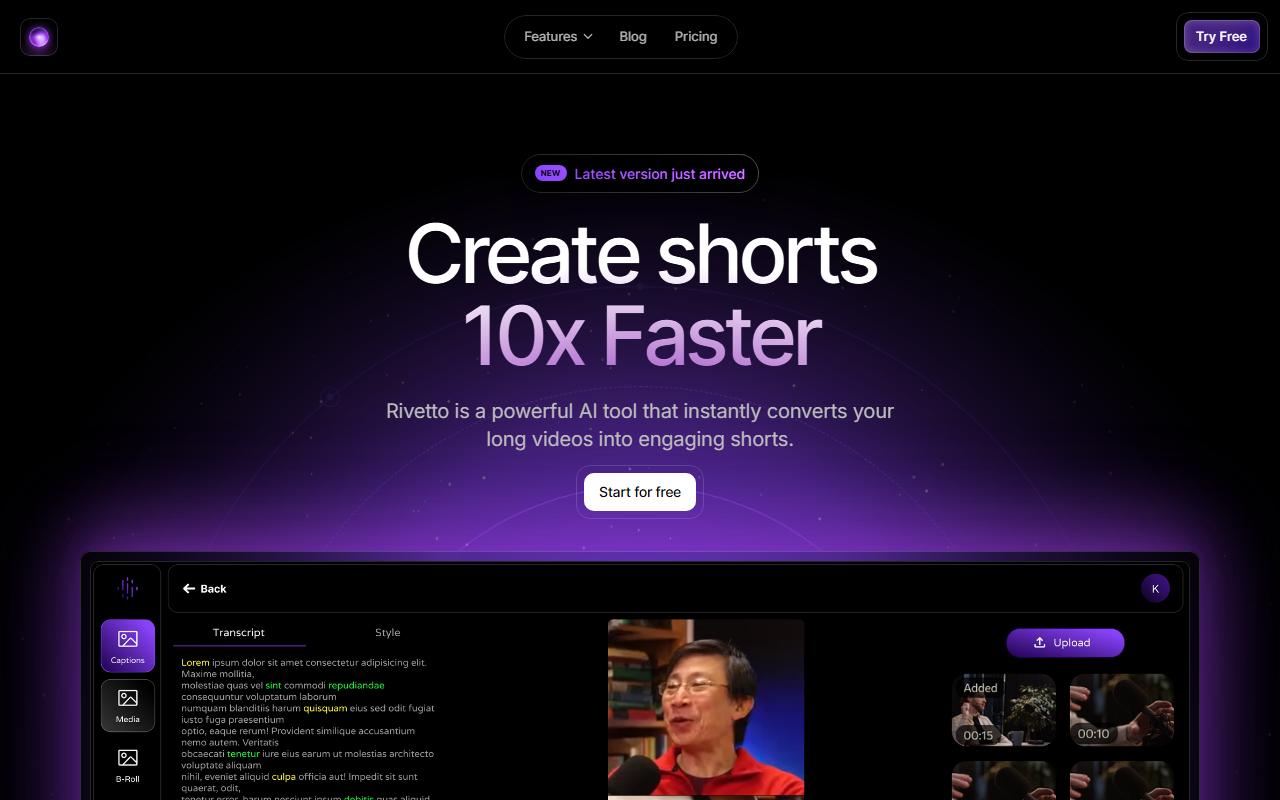
Upon visiting Rivetto's website, the messaging is clear: "Create shorts 10x Faster." The homepage immediately showcases a dashboard mockup with a large upload button and sample outputs. The onboarding flow is minimal—sign up via email or Google, and you're dropped into an editor that feels familiar to anyone who has used a video tool before. The left sidebar lists recent projects, while the main area is a preview pane with timeline controls below. I appreciated the lack of clutter; the interface prioritizes quick upload and immediate conversion rather than overwhelming you with advanced settings upfront.
When testing the free tier, I uploaded a 15-minute talking-head video. The AI processed it in about 90 seconds, presenting a list of potential short clips with timestamps. Each clip was accompanied by an auto-generated caption preview and a confidence score (something I didn't expect). The automatic trimming worked well—it cut out a long pause where I had sipped water. The integrated editor allowed me to fine-tune the start and end points, add transitions, and adjust the speaker tracking boundary without leaving the page.
Core Features and Technical Depth
Rivetto bundles several AI-driven features into its workflow. The most impressive is Speaker Tracking: the tool uses computer vision to identify the main speaker and keeps them centered, even during movement or zoom changes. This is especially useful for clips taken from panel discussions or interviews. Clip Trimming automatically removes filler content—silences, repetitions, and off-topic rambles—based on natural language cues and audio analysis. The Integrated Editor is a full timeline where you can further refine cuts, add transitions, and adjust caption styling. Caption generation is accurate (I tested it on technical jargon like "RISC-V architecture" and it got it right) and supports multiple languages. Silence Removal is a simple toggle that excises gaps longer than 1 second, which dramatically tightens pacing.
Under the hood, Rivetto appears to use a combination of Whisper-like speech-to-text and a proprietary model for scene segmentation and speaker re-identification. There is no public API listed, and the platform currently only exports to MP4. Integrations are limited to direct uploads—no native YouTube or TikTok hooks (though you can export and then manually upload). The Pro plan costs $240 per year (billed yearly), which breaks down to $20 per month—competitive with similar tools like Opus Clip (which starts at $19/month) and Vizard.ai (starting at $25/month). The free tier gives you 90 upload minutes per month, full editing access, and no watermark—that’s generous for casual creators.
Market Positioning and Target Audience
Rivetto fits squarely into the growing niche of AI-powered short-form video repurposing. Unlike Opus Clip, which focuses heavily on social media trends and auto-captioning for virality, Rivetto emphasises control: you get an integrated editor that feels closer to a traditional video suite. It’s less automated than Vizard’s one-click clipping but offers more flexibility for creators who want to polish the output. The target user is a solo content creator, podcaster, or small team that already produces long-form video (YouTube, webinars, recorded streams) and needs a steady stream of shorts for TikTok, Instagram Reels, or YouTube Shorts. It is less suited for high-volume production (e.g., social media agencies outputting 50+ shorts per day) because of the manual review steps involved—although the AI suggestions do speed things up significantly.
The company hasn't publicly disclosed funding or user numbers, but the tool’s design and the presence of a blog with regular updates suggest an active development team. The pricing page lists a "First Access" badge for new features, indicating a product that is still evolving. Competitors like Opus Clip have more mature integrations, but Rivetto's free tier and built-in editor give it an edge for quality-conscious creators on a budget.
Strengths, Limitations, and Final Verdict
Strengths: The AI accuracy on speaker tracking and captioning is genuinely impressive. The free tier includes full editing and no watermark, which is rare. The integrated editor reduces context-switching—you don't need to open Premiere or DaVinci for minor adjustments. Silence removal works flawlessly.
Limitations: Export options are barebones (only MP4). No batch processing or bulk export. The web-based editor can feel laggy on longer clips (over 60 minutes). There’s no mobile app, limiting on-the-go use. The speaker tracking sometimes fails if the speaker turns their head sharply or if there are multiple on-screen people talking—though you can manually keyframe the crop.
Who should use Rivetto? Indie creators, streamers, and educators who want to repurpose their existing long content without a steep learning curve. Who should pass? Large teams needing bulk automation or direct social media publishing. Overall, Rivetto delivers on its promise of speed while retaining editorial control.
Visit Rivetto at https://rivetto.ai/ to explore it yourself.













Comments